🔬5 Hands-On Electronics Experiments for Kids in Pune and Maharashtra (Monsoon, Ganeshotsav & Diwali Ideas)
Five safe, low-cost electronics experiments for children in Pune and across Maharashtra — a lemon battery, a monsoon rain alarm, a festive paper-circuit card, a Ganeshotsav LED blinker and a solar fan.
In this article (11)
- 1. The lemon battery
- 2. Monsoon rain alarm
- 3. Diwali paper-circuit greeting card
- 4. Ganeshotsav LED blinker with a 555 timer
- 5. Solar-powered fan
- Where to get the parts
- Learn with others
- Frequently asked questions
- Are these experiments safe for children?
- My LED does not light up. What should I check?
- What should my child learn next?
Children in Pune and across Maharashtra grow up surrounded by perfect science moments — the first heavy monsoon rain in June, the lights and decorations of Ganeshotsav, Diwali lamps, and bright sunny days for most of the year. Each one is a chance to show how electricity really works.
Here are five safe, low-cost experiments you can do at home with your child this year. All of them use batteries, sunlight or fruit — never mains electricity.
1. The lemon battery
Can a fruit light an LED? Yes — if you use a few of them together.
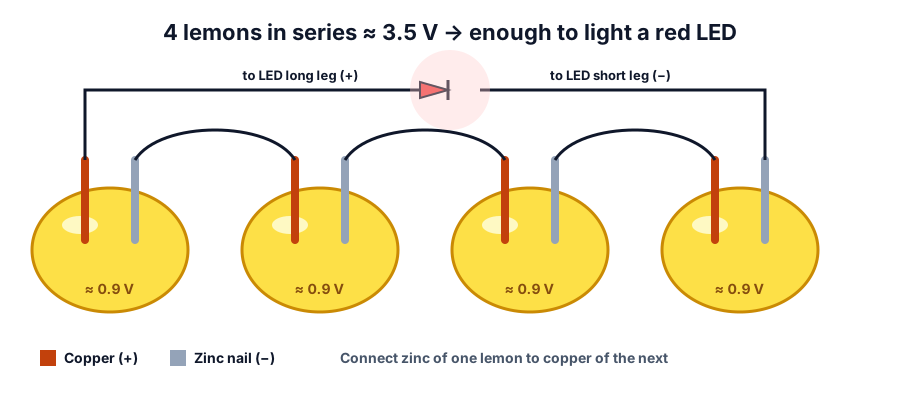 Four lemon cells in series: copper of one lemon connects to zinc of the next
You need: 4 lemons, 4 copper pieces (copper wire or strips), 4 galvanised (zinc-coated) nails, 5 crocodile-clip wires, 1 red LED, and a multimeter if you have one.
- Roll each lemon on the table to make it juicy inside.
- Push one nail and one copper piece into each lemon, about 2 cm apart. They must not touch.
- Connect the copper of lemon 1 to the nail of lemon 2, and so on — this is called connecting in series.
- Connect the free copper end to the LED's long leg, and the free nail to the short leg.
- Switch off the room lights. The LED glows softly.
Try next: measure each lemon with a multimeter. Try potatoes, oranges or tomatoes. Which fruit gives the highest voltage?
2. Monsoon rain alarm
When the monsoon reaches Pune, this little alarm beeps as soon as the first drops fall on its sensor. It is a perfect introduction to the transistor, the tiny switch inside every computer.
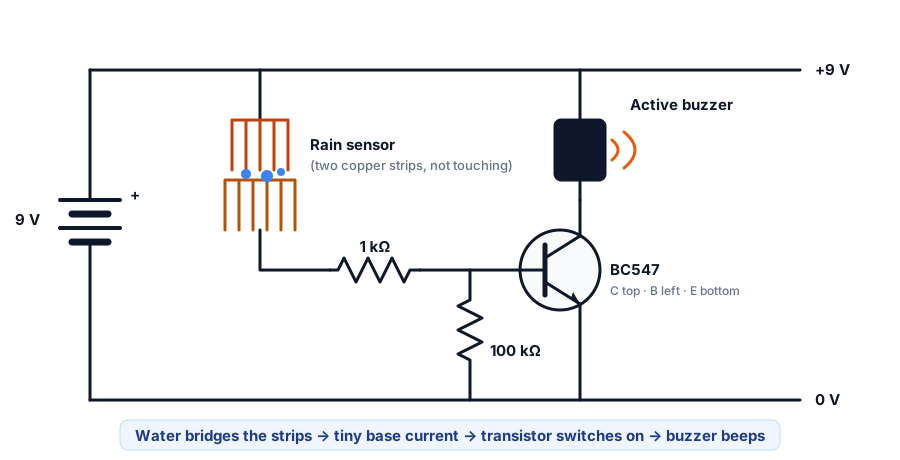 When water bridges the two probes, a small current switches on the transistor and the buzzer
You need: a BC547 NPN transistor, a 1 kΩ resistor, a 100 kΩ resistor, a 5 V–12 V active buzzer (one that beeps on its own), a 9 V battery with clip, a small breadboard, jumper wires, and two bare copper wires or a strip of copper tape for the sensor.
- Make the sensor: stick two strips of copper tape side by side on a piece of plastic, about 3 mm apart, without touching.
- Place the BC547 on the breadboard with the flat side facing you: the legs are collector, base, emitter from left to right.
- Connect the emitter to the battery negative.
- Connect the buzzer's negative to the collector and its positive to the battery positive.
- Connect one sensor strip to the battery positive, and the other sensor strip through the 1 kΩ resistor to the base.
- Add the 100 kΩ resistor from the base to the battery negative, so the alarm stays quiet when the sensor is dry.
- Sprinkle a few drops of water on the sensor — beep!
Try next: add an LED with a 1 kΩ resistor in parallel with the buzzer, or use the sensor to alert you when a plant pot needs water (in reverse!).
3. Diwali paper-circuit greeting card
Make a Diwali card where a diya actually lights up when you press it.
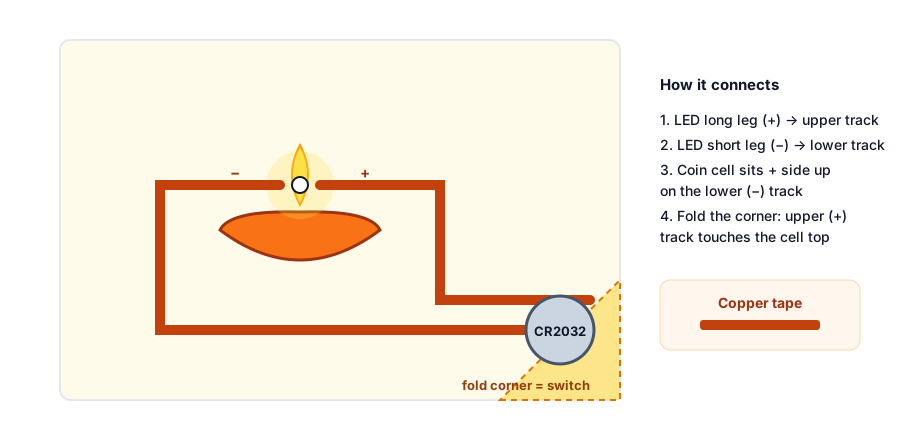 Copper tape tracks run from the coin cell to the LED; folding the corner closes the circuit
You need: a sheet of thick card paper, copper tape (conductive adhesive), one 3 V CR2032 coin cell, one yellow or red LED, clear tape, and colour pens.
- Draw your design — a diya, a rangoli or a lantern — on the front. Mark where the flame is.
- Poke the LED legs through the paper at the flame. Bend the long leg (+) to one side and the short leg (−) to the other side.
- On the inside, run one copper-tape track from the long leg to the corner where the battery will sit, and another track from the short leg to the battery spot.
- Place the coin cell + side up on the negative track's end. Fold the paper corner with the positive track over it — this is your switch.
- Press the corner and the diya glows.
Try next: add a second LED in parallel (side by side) for a two-flame diya.
4. Ganeshotsav LED blinker with a 555 timer
Pune's public Ganeshotsav, made popular by Lokmanya Tilak in the 1890s, is famous for its lights. Build a pair of LEDs that blink alternately — perfect for a small home decoration. This uses the 555 timer, one of the most popular chips ever made.
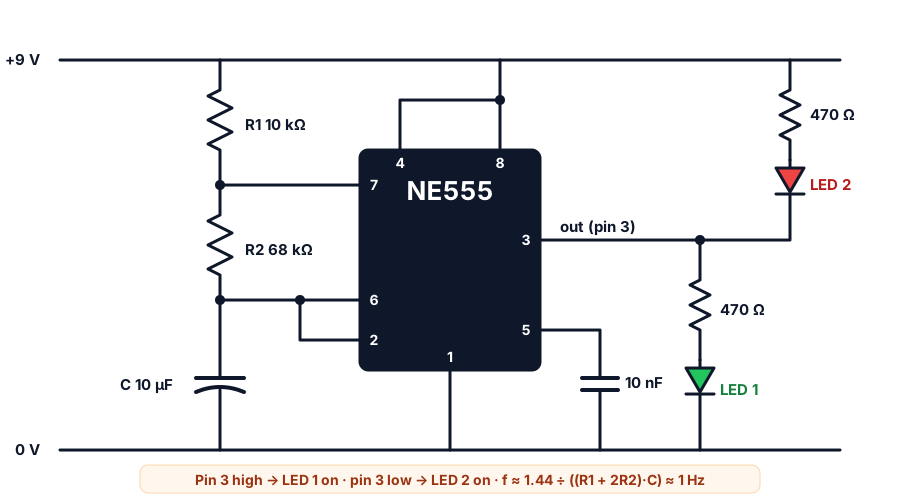 With R1 = 10 kΩ, R2 = 68 kΩ and C = 10 µF the LEDs swap about once a second
You need: an NE555 chip, resistors of 10 kΩ, 68 kΩ and 2 × 470 Ω, a 10 µF electrolytic capacitor, a 10 nF capacitor, 2 LEDs (two colours), a 9 V battery with clip, a breadboard and jumper wires.
- Place the 555 across the breadboard's centre gap. Pin 1 is at the notch, on the left.
- Connect pins 4 and 8 to battery positive and pin 1 to negative.
- Connect R1 (10 kΩ) from positive to pin 7, and R2 (68 kΩ) from pin 7 to pin 6.
- Join pins 2 and 6. Connect the 10 µF capacitor from pin 6 to negative (its stripe side goes to negative).
- Connect the 10 nF capacitor from pin 5 to negative.
- LED 1: from pin 3 through a 470 Ω resistor and the LED to negative.
- LED 2: from positive through a 470 Ω resistor and the LED into pin 3.
Try next: swap the 10 µF capacitor for 4.7 µF — the blinking roughly doubles in speed.
5. Solar-powered fan
From October to May, Maharashtra gets plenty of sunshine. Put it to work with a tiny fan that runs only when the sun is out.
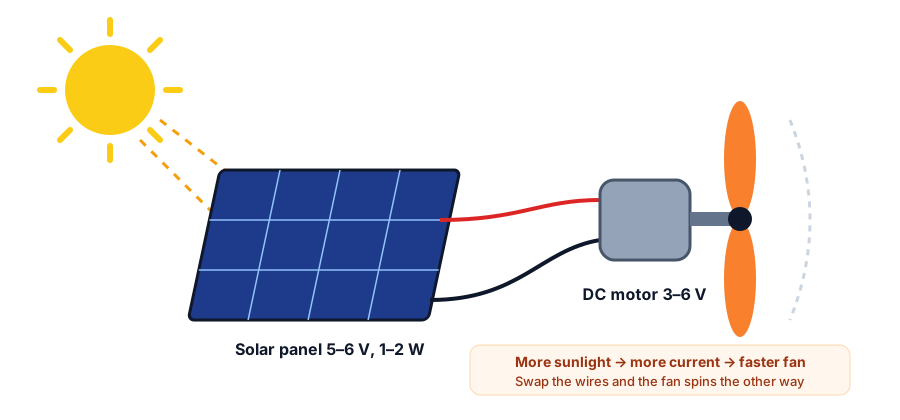 The solar panel turns sunlight into electricity that spins the motor
You need: a small solar panel (around 5 V – 6 V, 1 W – 2 W), a small 3 V – 6 V DC motor, a plastic propeller, two wires, and some cardboard or an ice-cream stick frame.
- Fix the propeller firmly on the motor shaft.
- Connect the panel's red wire to one motor terminal and the black wire to the other.
- Take it into direct sunlight. The fan spins!
- Swap the two wires. What happens to the direction?
Try next: cover half the panel with paper and see how the speed changes, or measure the panel voltage in the morning, at noon and in the evening.
Where to get the parts
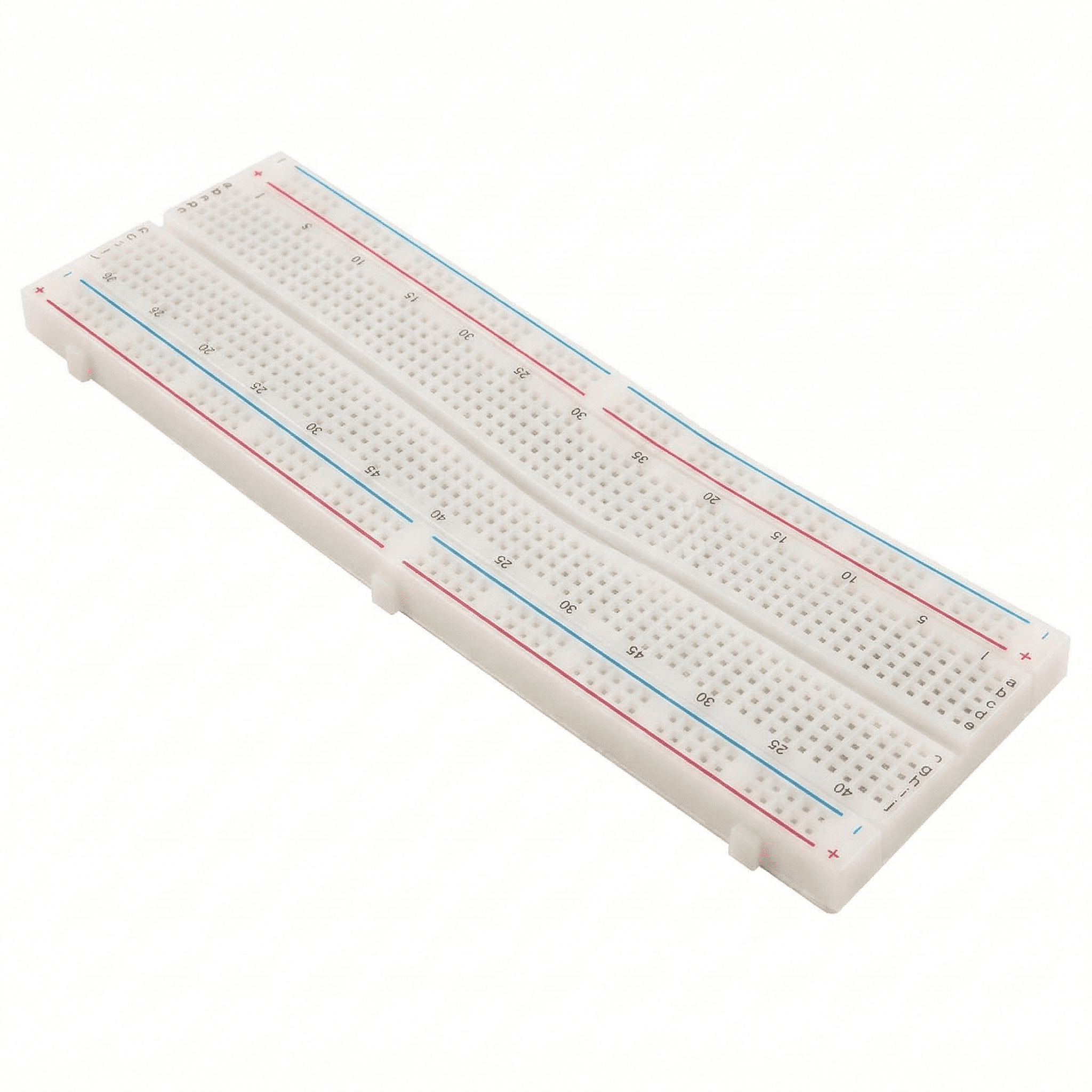
Most parts are available at local electronics shops in Pune, Mumbai and other cities, or online. To skip the shopping list, a beginner electronics kit usually includes LEDs, resistors, a breadboard, jumper wires and a battery clip. Browse Thinking Robot kits.
Learn with others
Children learn fastest when they build alongside friends. The Thinking Robot team is based in Pune — ask about our hands-on workshops for schools, societies and groups.
Frequently asked questions
Are these experiments safe for children?
Yes, with adult supervision. They use batteries, sunlight or fruit — all low voltage. The main risks are small parts and coin cells for young children, and sharp nail or wire ends.
My LED does not light up. What should I check?
Check the LED direction first (long leg to positive), then every connection, then the battery. In the lemon battery, make sure copper and zinc are connected alternately and do not touch inside the lemon.
What should my child learn next?
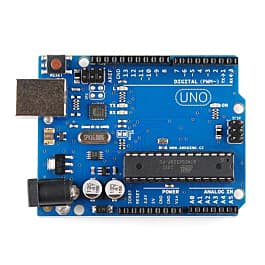
After these projects, try a breadboard kit with an Arduino-compatible board. Children can then make the rain alarm send a message, or the LEDs blink in patterns using code. Older children can learn the maths behind every circuit with Ohm's law explained and build their first robot with our robot car motor guide.
Try the calculators
LED Resistor Calculator
Find the right series resistor for any LED or LED string, with the nearest standard value, colour code and power rating.
555 Timer Calculator
Calculate frequency, period, high/low time and duty cycle of a 555 astable, or the pulse width of a monostable, with a live waveform.
Capacitor Code Calculator
Decode ceramic and film capacitor codes like 104, 473J or 2A104K into pF, nF and µF with tolerance and voltage — or turn a value into its code.
RC Time Constant Calculator
Find the RC time constant τ, the time to reach 63%, 90% and 99%, and the capacitor voltage at any moment while charging or discharging.
Thinking Robot Team
Thinking Robot is a team of engineers and educators in Pune who design electronics and robotics kits and run hands-on workshops for students and schools. Spotted a mistake or have a question? Get in touch.