🤖How to Control DC Motors for a Robot Car: L298N Motor Driver with Arduino (4 Experiments)
Why an Arduino can't drive a motor directly, how an H-bridge reverses direction, how to wire the L298N driver, and four hands-on experiments that end with a robot car driving a square.
In this article (17)
- Why not connect the motor straight to the Arduino?
- How an H-bridge reverses a motor
- Meet the L298N module
- Wiring the robot car
- The code
- Experiment 1: one motor, both directions
- Experiment 2: find the "dead zone"
- Experiment 3: drive in a straight line
- Experiment 4: differential steering and the square
- Choosing the battery
- Troubleshooting
- Where to go next
- Frequently asked questions
- Can I use the L298N with an ESP32?
- Why does my robot slow down as the battery gets older?
- What is the difference between brake and coast?
- Should I use the L298N or a newer driver?
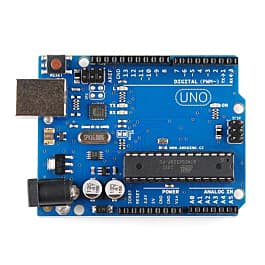
Almost every first robot is a car: two wheels, two DC motors, a battery and a microcontroller. The moment you try to plug a motor into an Arduino pin, though, you hit the first real lesson of robotics — a microcontroller can think, but it can't push much current.
This guide shows how to control DC motors properly with an H-bridge and the popular L298N motor driver, then walks through four experiments that turn two motors into a robot that drives a square. It is written for students and makers building their first robot, and for parents helping them.
Why not connect the motor straight to the Arduino?
| Arduino Uno pin | Small yellow "BO" gear motor | |
|---|---|---|
| Voltage | 5 V | 3 V – 6 V (often run at 6 V – 7 V) |
| Current | 20 mA recommended, 40 mA absolute maximum | 100 – 200 mA running, much more when starting or stalled |
| What happens | — | The pin is overloaded; the board can reset or be damaged |
A motor also creates voltage spikes when it switches off, because its coil resists sudden changes in current. A motor driver handles the high current and absorbs those spikes, while the Arduino only sends small control signals.
How an H-bridge reverses a motor
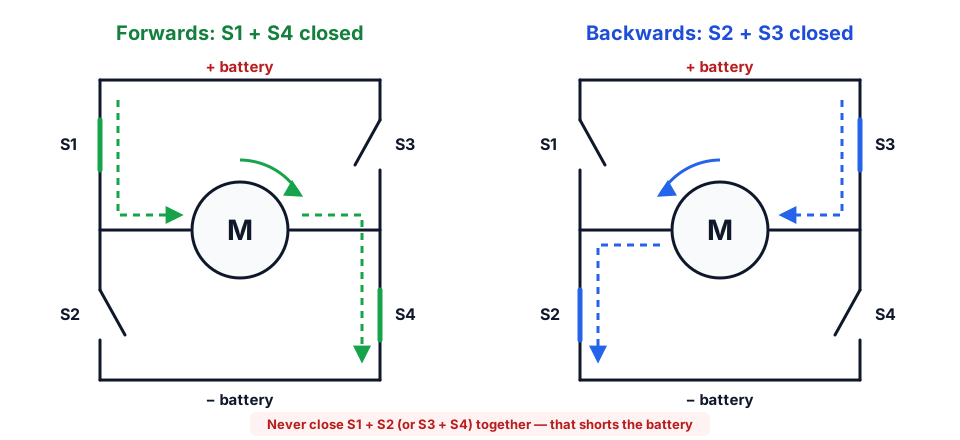 Close S1 + S4 for forwards, S2 + S3 for backwards. Never close S1 + S2 together — that shorts the battery.
A DC motor spins one way when current flows through it from left to right, and the other way when current flows right to left. An H-bridge is four switches arranged in the shape of the letter H with the motor in the middle:
| Switches closed | Current through motor | Result |
|---|---|---|
| S1 + S4 | Left → right | Forwards |
| S2 + S3 | Right → left | Backwards |
| S1 + S3 or S2 + S4 | Both ends at the same voltage | Brake (motor stops quickly) |
| None | No current | Coast (motor spins down) |
| S1 + S2 or S3 + S4 | Straight from + to − | Short circuit — never do this |
Inside the L298N, these switches are transistors controlled by logic pins, and the chip prevents the dangerous combinations for you.
Meet the L298N module
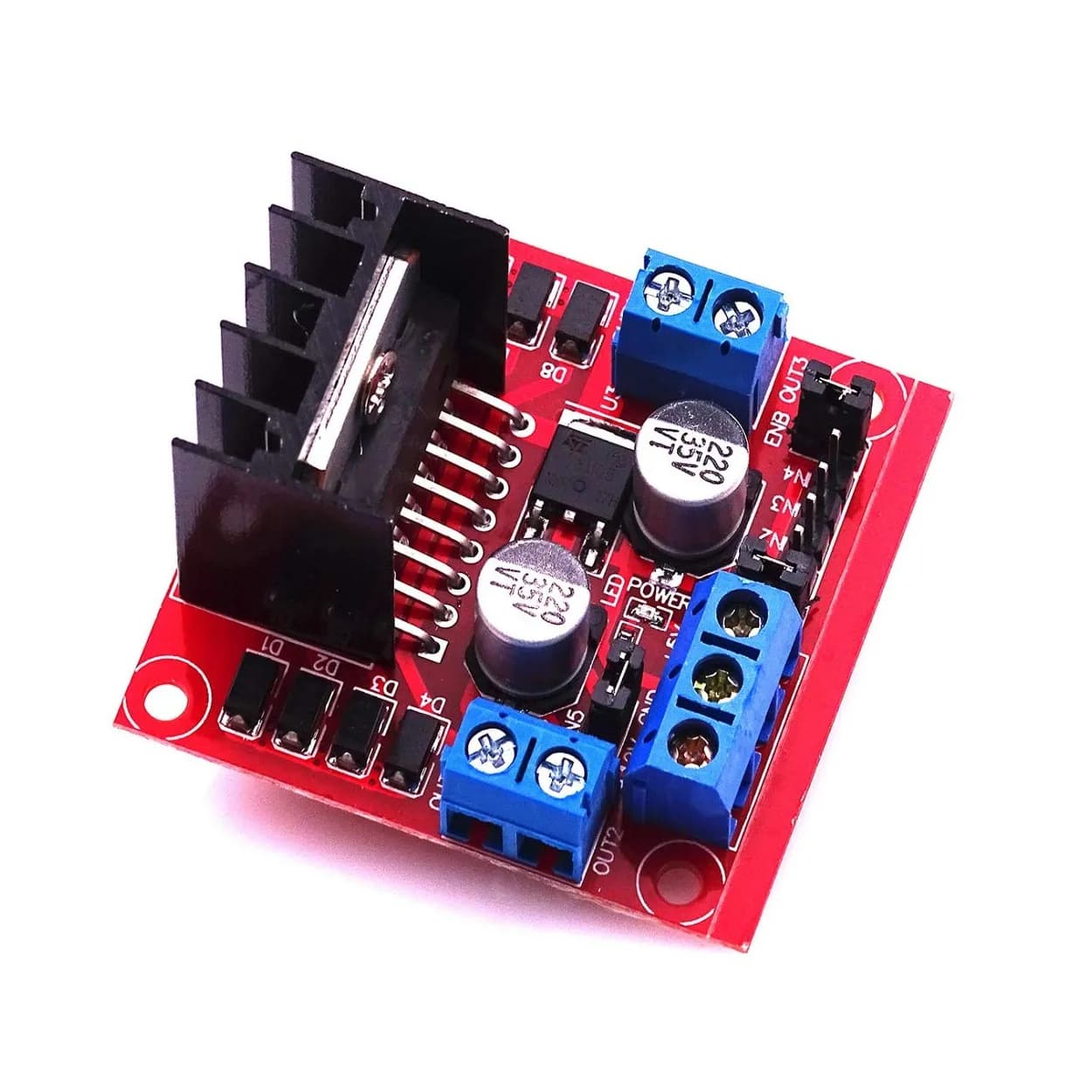
The common red L298N module contains two H-bridges, so one board drives both wheels of a robot car.
| Pin | Connects to | Purpose |
|---|---|---|
| +12V (VS) | Battery + (7 V – 12 V) | Motor power |
| GND | Battery − and Arduino GND | Common ground |
| +5V | Arduino 5V (optional) | 5 V output from the on-board regulator when the jumper is fitted |
| ENA / ENB | Arduino PWM pins | Speed of motor A / B |
| IN1, IN2 | Arduino digital pins | Direction of motor A |
| IN3, IN4 | Arduino digital pins | Direction of motor B |
| OUT1, OUT2 | Left motor | Motor A |
| OUT3, OUT4 | Right motor | Motor B |
Wiring the robot car
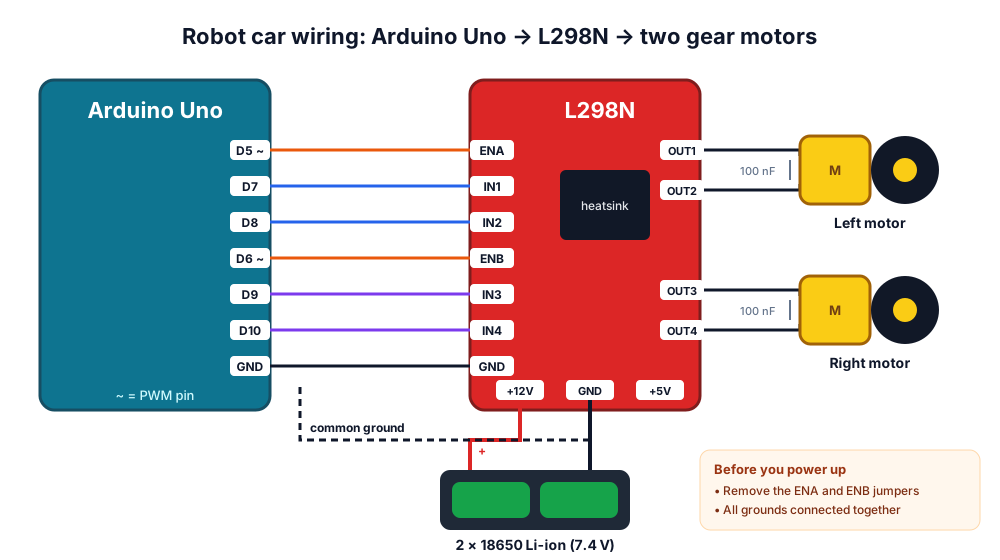 Arduino Uno → L298N → two gear motors. The battery negative, L298N GND and Arduino GND must all be connected.
| Arduino Uno | L298N | Notes |
|---|---|---|
| D5 (PWM) | ENA | Remove the ENA jumper first |
| D7 | IN1 | Left motor direction |
| D8 | IN2 | Left motor direction |
| D6 (PWM) | ENB | Remove the ENB jumper first |
| D9 | IN3 | Right motor direction |
| D10 | IN4 | Right motor direction |
| GND | GND | Common ground — essential |
Power the Arduino from USB while testing, or from the L298N's +5V pin once the robot runs on its own battery (keep the 5 V regulator jumper on, and the battery at 12 V or below).
The code
// Left motor
const int ENA = 5, IN1 = 7, IN2 = 8;
// Right motor
const int ENB = 6, IN3 = 9, IN4 = 10;

// speed: -255 (full reverse) ... 0 (stop) ... 255 (full forwards)
void setMotor(int en, int inA, int inB, int speed) {
  digitalWrite(inA, speed > 0 ? HIGH : LOW);
  digitalWrite(inB, speed < 0 ? HIGH : LOW);
  analogWrite(en, abs(speed));
}

void drive(int left, int right) {
  setMotor(ENA, IN1, IN2, left);
  setMotor(ENB, IN3, IN4, right);
}

void setup() {
  const int pins[] = {ENA, IN1, IN2, ENB, IN3, IN4};
  for (int i = 0; i < 6; i++) pinMode(pins[i], OUTPUT);
}

void loop() {
  drive(180, 180);   delay(2000);  // forwards
  drive(0, 0);       delay(1000);  // stop
  drive(-150, 150);  delay(600);   // spin left on the spot
  drive(0, 0);       delay(1000);
  drive(-180, -180); delay(1500);  // backwards
  drive(0, 0);       delay(2000);
}
analogWrite() produces PWM — the pin switches on and off about 490 or 980 times a second (depending on the pin), and the fraction of time it is on sets the average power. 255 is fully on, 128 is about half.
Experiment 1: one motor, both directions
Lift the car so the wheels spin freely. Upload the code and watch the left wheel. Now swap the two wires on OUT1 and OUT2. The wheel turns the other way for the same code — this is how you fix a motor that runs backwards.
What you learn: direction depends only on which way the current flows.
Experiment 2: find the "dead zone"
Change the forward speed in steps: 255, 200, 150, 100, 80, 60. Note the value where the wheels stop turning on the floor.
| PWM value | Approx. duty cycle | Typical result with BO motors on 7.4 V |
|---|---|---|
| 255 | 100% | Full speed |
| 180 | 71% | Comfortable driving speed |
| 120 | 47% | Slow, smooth |
| 80 | 31% | May stall on carpet |
| 60 | 24% | Usually just hums |
What you learn: motors need a minimum power to overcome friction. Your robot's slowest usable speed is just above this point.
Experiment 3: drive in a straight line
Run drive(180, 180) for 3 seconds on a smooth floor. Most cars drift to one side, because no two motors are identical. Reduce the faster side a little — for example drive(180, 170) — until it goes straight.
What you learn: real robots need calibration. Better robots use wheel encoders and feedback to correct this automatically, just like the PID control in our line-following robot guide.
Experiment 4: differential steering and the square
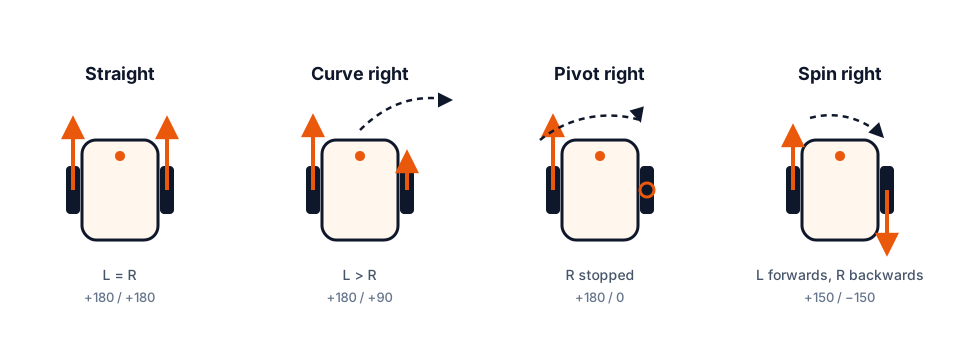 Two-wheel robots steer by running the wheels at different speeds
| Left wheel | Right wheel | Movement |
|---|---|---|
| + 180 | + 180 | Straight forwards |
| + 180 | + 90 | Gentle curve right |
| + 180 | 0 | Pivot turn right (around the right wheel) |
| + 150 | − 150 | Spin right on the spot |
Now combine them: drive forwards for 1.5 seconds, spin right for the time that gives a 90° turn, and repeat four times. Adjust the spin time until the car comes back to where it started.
Choosing the battery
| Battery | Voltage | Good for | Watch out for |
|---|---|---|---|
| 4 × AA alkaline | 6 V | First tests | Weak under motor load; ~4 V reaches the motors through an L298N |
| 6 × AA alkaline | 9 V | Light cars | Heavy, drains quickly |
| 2 × 18650 Li-ion (2S) | 7.4 V (8.4 V full) | Most robot cars | Needs a proper charger and protection |
| 9 V PP3 battery | 9 V | Not recommended | Too little current for motors |
Troubleshooting
| Problem | Most likely cause | Fix |
|---|---|---|
| Motors don't move at all | ENA/ENB left unconnected after removing the jumpers, or no common ground | Connect ENA to D5 and ENB to D6; connect all grounds |
| Speed never changes | ENA/ENB jumpers still fitted, so the enable pins are always on | Remove both jumpers and connect ENA/ENB to PWM pins |
| Arduino resets when motors start | Battery too weak, or motor noise | Fresh batteries, 100 nF capacitors across motors, separate supply |
| One wheel spins backwards | Motor wires reversed | Swap that motor's two wires |
| Motors only hum | PWM value too low or battery flat | Increase speed value, charge battery |
| L298N gets very hot | Motors drawing too much current | Check for stalled wheels; add the heatsink; consider a MOSFET driver |
Where to go next
- Learn how stepper motors differ in our stepper motor guide.
- Control the car from your phone with our Bluetooth car build.
- Check current and resistor values with the Ohm's law calculator.
- Get the parts — motors, wheels, drivers and chassis — from our robotics kits.
Frequently asked questions
Can I use the L298N with an ESP32?
Yes. The ESP32's 3.3 V logic is high enough for the L298N's inputs. Use any GPIO for IN1–IN4 and PWM-capable pins for ENA and ENB, and connect the grounds together.
Why does my robot slow down as the battery gets older?
Battery voltage falls as it discharges, and the L298N's 2 V loss makes this more noticeable. Lithium-ion packs hold their voltage better than AA cells.
What is the difference between brake and coast?
Brake connects both motor terminals to the same voltage, so the motor stops quickly. Coast disconnects it, so it spins down slowly. In the code above, drive(0, 0) with ENA at 0 lets the motors coast.
Should I use the L298N or a newer driver?
The L298N is great for learning because it is tough and widely available. For battery-powered robots, a MOSFET driver like the TB6612FNG runs cooler and gives the motors more of the battery's voltage.
Try the calculators
Ohm's Law Calculator
Enter any two of voltage, current, resistance or power and get the other two instantly, with units and the right resistor wattage.
PWM Duty Cycle Calculator
Convert duty cycle % to Arduino analogWrite and ESP32 LEDC values, and get period, on-time, off-time and average voltage with a live waveform.
Battery Life Calculator
Estimate how long a battery will last from its mAh or Wh, the load current or power, usable capacity and sleep/active duty cycle.
Wire Gauge & Voltage Drop Calculator
Find the voltage drop, power loss and minimum wire size (AWG or mm²) for a copper wire run, with an AWG to mm² resistance table.
Thinking Robot Team
Thinking Robot is a team of engineers and educators in Pune who design electronics and robotics kits and run hands-on workshops for students and schools. Spotted a mistake or have a question? Get in touch.