🔋Capacitors Explained for Beginners: Types, Codes (104 = 100 nF), Polarity and τ = RC (with 2 Experiments)
What a capacitor does, the four types in every beginner kit, how to read codes like 104, polarity and voltage safety, the RC charging curve, and two hands-on experiments.

In this article (17)
- What does a capacitor actually do?
- Capacitor units
- Types of capacitors
- How to read capacitor codes
- Polarity and voltage rating: the safety rules
- Charging, discharging and the time constant τ = RC
- Where capacitors are used
- Experiment 1: an LED that fades out slowly
- Experiment 2: measure a time constant with an Arduino
- Common beginner mistakes
- Where to get the parts
- Frequently asked questions
- What does 104 mean on a capacitor?
- Can I use a capacitor with a higher voltage rating?
- Which leg of a capacitor is positive?
- Why does a capacitor charge to only 63 % in one time constant?
- Is it safe for children to experiment with capacitors?
Open any circuit board — a phone charger, an Arduino, a TV remote — and you will find small brown discs and little blue or black cylinders next to almost every chip. These are capacitors, and after resistors they are the most common part in electronics.
A capacitor stores a small amount of electrical charge and releases it when the circuit needs it. That simple job lets it smooth power supplies, block noise, set the speed of a blinking LED and keep a microcontroller from resetting. This guide explains how capacitors work, how to read their codes, how to use them safely, and ends with two experiments you can do on a breadboard today.
What does a capacitor actually do?
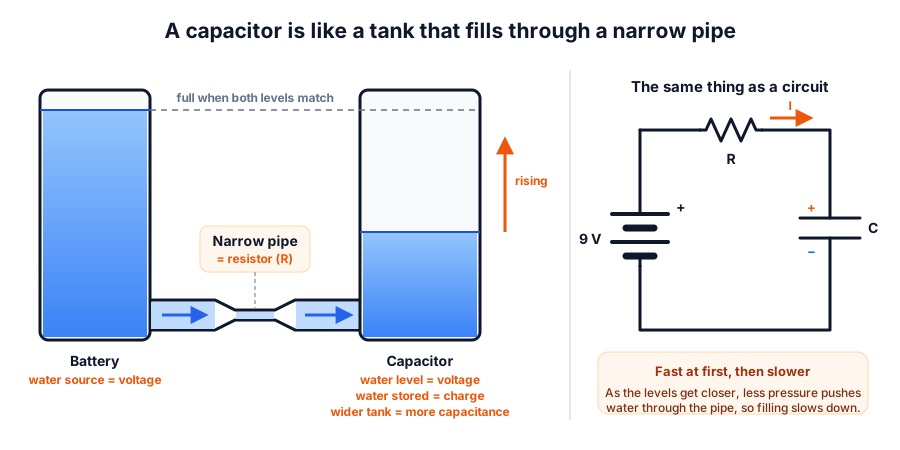 A capacitor fills like a tank through a narrow pipe: quickly at first, then more slowly as the levels get closer
Inside, a capacitor is just two metal plates separated by an insulator (called the dielectric). No current can flow straight through the insulator. When you connect a battery, electrons pile up on one plate and leave the other, so a voltage builds up between them. Disconnect the battery and the charge stays there — the capacitor now behaves like a tiny, very fast rechargeable battery.
The water analogy makes this easy to picture:
| Electricity | Water tank analogy |
|---|---|
| Voltage across the capacitor | Height of water in the tank |
| Charge stored (Q, in coulombs) | Amount of water in the tank |
| Capacitance (C, in farads) | How wide the tank is — a wider tank holds more water for the same height |
| Resistor in series | A narrow pipe that slows the filling |
The three are linked by a simple formula:
For example, a 1000 µF capacitor charged to 9 V holds Q = 0.001 × 9 = 0.009 C (9 mC) and E = ½ × 0.001 × 9² = 0.04 J. That is tiny compared with a battery, but a capacitor can give it back in a fraction of a second — which is exactly what makes it useful.
Capacitor units
One farad is huge, so you will almost always see smaller units:
| Unit | Symbol | In farads | Typical use |
|---|---|---|---|
| picofarad | pF | 0.000 000 000 001 F | Crystal and radio circuits (e.g. 22 pF) |
| nanofarad | nF | 0.000 000 001 F | Filters, 555 timer pin 5 (10 nF) |
| microfarad | µF | 0.000 001 F | Power smoothing, timing (10 µF – 1000 µF) |
Remember: 1 µF = 1,000 nF = 1,000,000 pF.
Types of capacitors
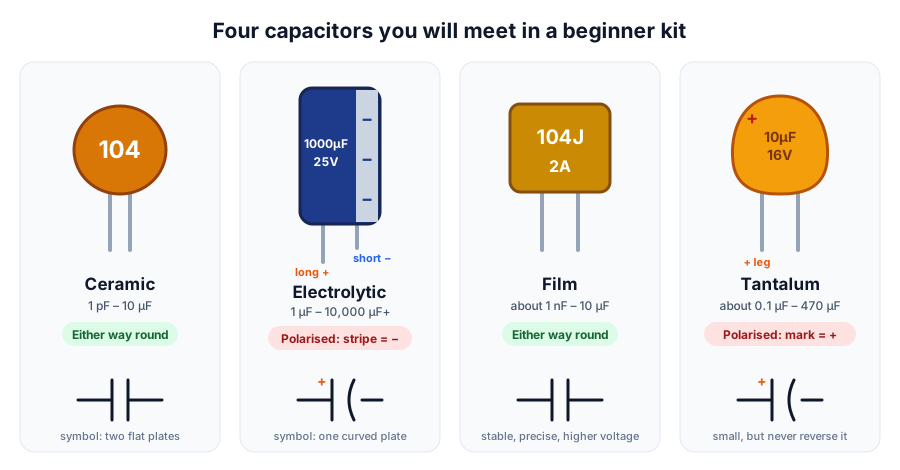 The four types in most beginner kits. Electrolytic and tantalum capacitors are polarised; ceramic and film are not.
| Type | Typical range | Polarised? | Good for | Watch out for |
|---|---|---|---|---|
| Ceramic (disc or MLCC) | 1 pF – 10 µF | No | Decoupling next to chips, high-frequency filters | Value can drop at higher voltage and temperature |
| Aluminium electrolytic | 1 µF – 10,000 µF+ | Yes — stripe marks − | Power supply smoothing, bulk storage, slow timers | Wide tolerance (often ±20 %), dries out with age and heat |
| Film (polyester, polypropylene) | about 1 nF – 10 µF | No | Accurate timing, audio, higher voltages | Larger and costlier for the same value |
| Tantalum | about 0.1 µF – 470 µF | Yes — mark or stripe = + | Compact boards needing steady, small capacitors | Can fail as a short circuit if reversed or over-voltaged |
How to read capacitor codes
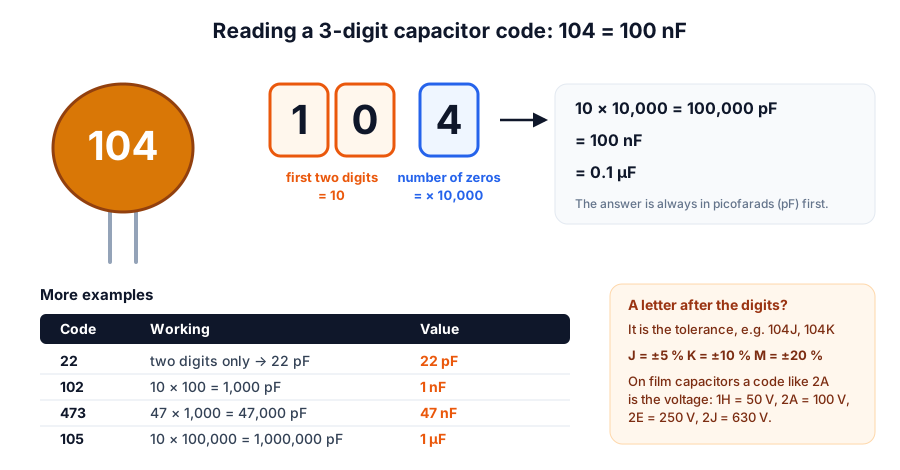 First two digits are the value, the third is the number of zeros. The result is in picofarads.
Electrolytic capacitors usually have the value printed in full ("1000µF 25V"). Small ceramic and film capacitors use a three-digit code:
- Take the first two digits as a number.
- The third digit says how many zeros to add.
- The answer is in picofarads (pF).
| Code | Working | Value |
|---|---|---|
| 22 | Two digits only — already in pF | 22 pF |
| 101 | 10 × 10 | 100 pF |
| 102 | 10 × 100 | 1 nF |
| 103 | 10 × 1,000 | 10 nF |
| 104 | 10 × 10,000 | 100 nF = 0.1 µF |
| 224 | 22 × 10,000 | 220 nF |
| 473 | 47 × 1,000 | 47 nF |
| 105 | 10 × 100,000 | 1 µF |
A letter after the code is the tolerance: J = ±5 %, K = ±10 %, M = ±20 %. So 104K is 100 nF ±10 %. Film capacitors may also carry a voltage code such as 2A (100 V). Save yourself the counting with our capacitor code calculator.
Polarity and voltage rating: the safety rules
Every capacitor has a maximum voltage printed on it (or in its datasheet). Exceed it and the insulator breaks down.
- Choose a rating comfortably above your supply. For a 5 V Arduino circuit use 10 V or 16 V parts; for a 9 V battery circuit use 16 V or 25 V. A higher rating is always fine — only the size and price go up.
- Fit polarised capacitors the right way round. The negative leg goes to the lower voltage (usually ground). A reversed electrolytic can get hot, swell and burst its top vent.
- Large capacitors can stay charged after power is removed. Before touching a big capacitor in a power circuit, discharge it through a resistor (for example 1 kΩ for a few seconds) — never short it with a screwdriver.
Charging, discharging and the time constant τ = RC
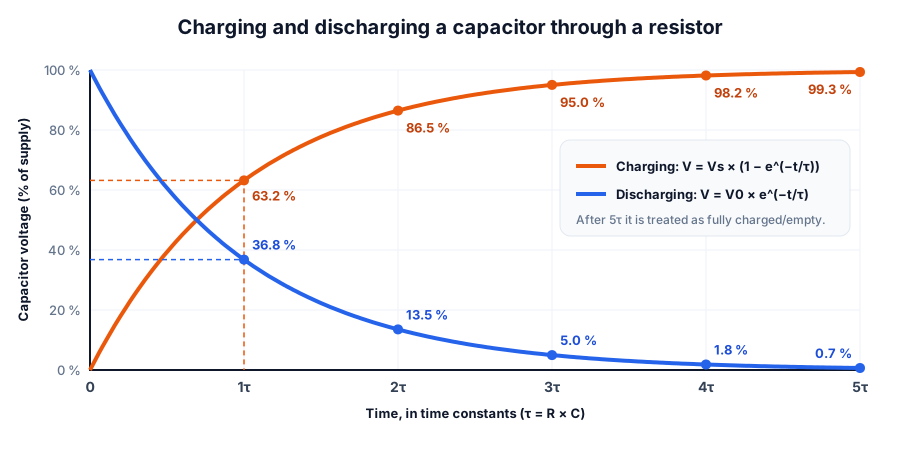 Every RC circuit follows the same curves; only the time scale changes with R × C
When a capacitor charges through a resistor, the current is largest at the start (the capacitor is empty, so the full supply voltage pushes current through the resistor). As the capacitor voltage rises, less voltage is left across the resistor, so the current — and the rate of charging — falls. That gives the famous curved shape.
The speed is set by the time constant:
| Time | Charging (% of supply) | Discharging (% of start voltage) |
|---|---|---|
| 1τ | 63.2 % | 36.8 % |
| 2τ | 86.5 % | 13.5 % |
| 3τ | 95.0 % | 5.0 % |
| 4τ | 98.2 % | 1.8 % |
| 5τ | 99.3 % | 0.7 % |
Where capacitors are used
- Decoupling: a 100 nF ceramic capacitor right next to the power pins of every chip supplies the quick bursts of current the chip needs, and stops noise from travelling along the power wires. This is why Arduino and ESP32 boards are covered in tiny capacitors.
- Smoothing and bulk storage: a 100 µF – 1000 µF electrolytic across a supply fills in dips when a motor or servo starts. If your Arduino resets when a servo moves, this is often the fix.
- Filtering: a resistor and capacitor make an RC low-pass filter that removes fast noise. Its cut-off frequency is f = 1 ÷ (2π × R × C) — with 10 kΩ and 100 nF that is about 159 Hz. Try it in the RC filter cut-off calculator.
- Timing: the capacitor in a 555 timer sets how fast an LED blinks. Bigger capacitor, slower blink — see the 555 timer calculator.
- Coupling: a capacitor in series passes changing (AC) signals but blocks steady DC, which is how audio stages are joined together.
Experiment 1: an LED that fades out slowly
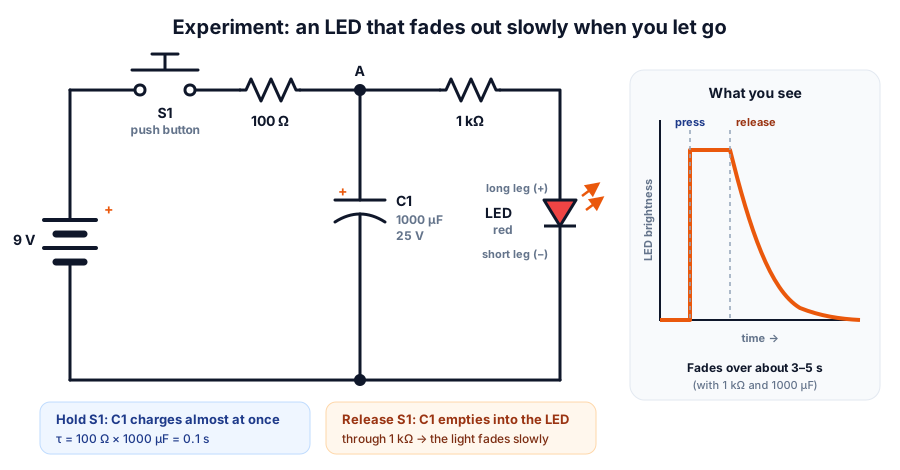 Press S1 to charge C1. Release it and C1 keeps the LED lit while it discharges.
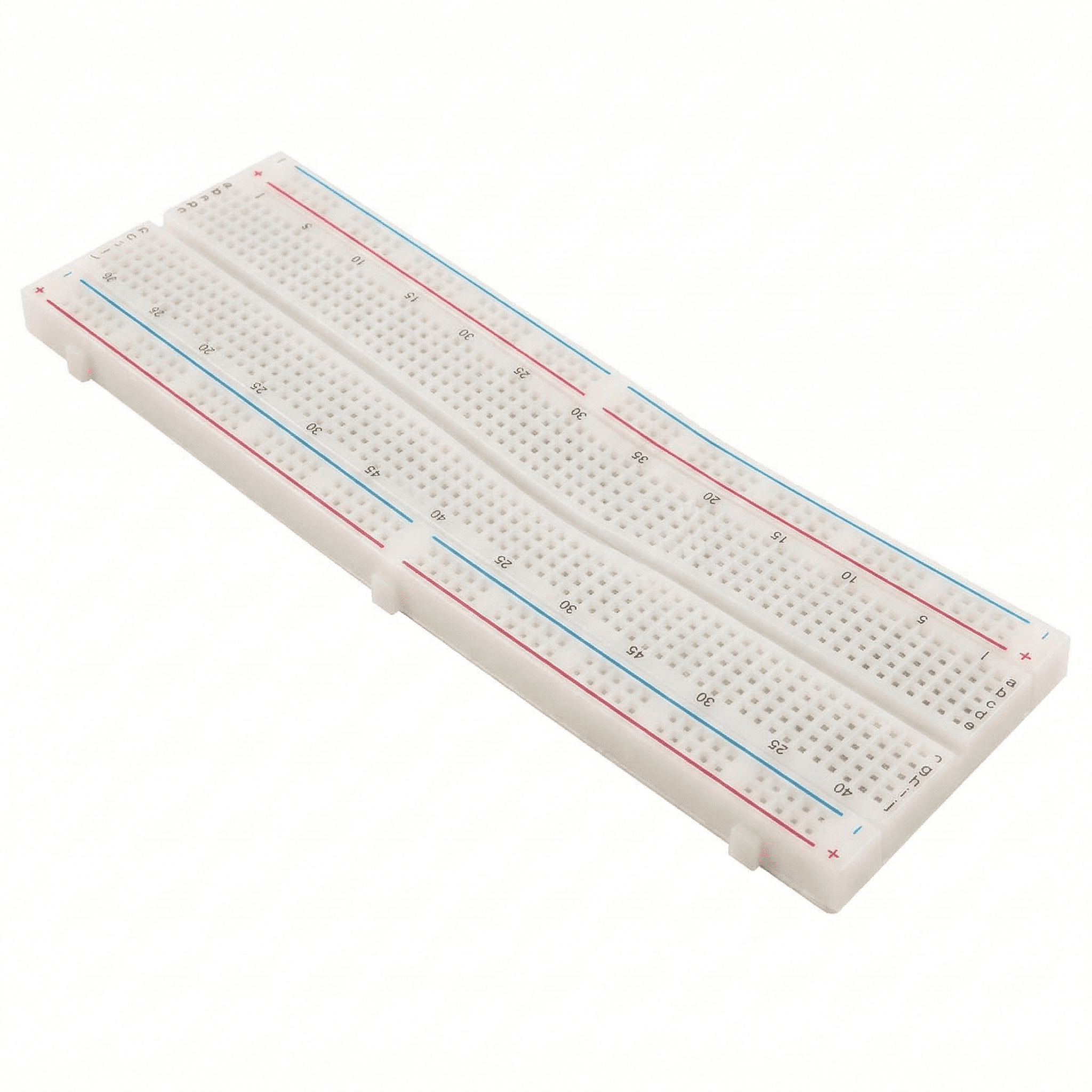
You need: a breadboard, a 9 V battery with clip, a push button, a 1000 µF electrolytic capacitor rated 16 V or more (25 V is ideal), a 100 Ω resistor, a 1 kΩ resistor, a red LED and jumper wires.
- Connect the battery + through the push button and the 100 Ω resistor to a free breadboard row. Call this row A.
- Put the capacitor's long (+) leg in row A and its striped (−) leg on the negative rail.
- From row A, connect the 1 kΩ resistor to the LED's long leg. Connect the LED's short leg to the negative rail.
- Connect the battery − to the negative rail. Check the capacitor polarity once more.
- Press and hold the button for a second. The LED lights up.
- Let go. Instead of switching off, the LED fades out over about 3–5 seconds as the capacitor empties through the 1 kΩ resistor and the LED.
Try next: swap the 1000 µF capacitor for 470 µF — the fade takes about half as long. Use a 2.2 kΩ resistor instead of 1 kΩ — the LED starts dimmer but glows for longer. Can you explain both using τ = R × C?
Experiment 2: measure a time constant with an Arduino
Your eyes cannot time a capacitor accurately, but an Arduino can. Connect D7 → 10 kΩ resistor → row B, a 100 µF electrolytic from row B (+ leg) to GND (− leg), and a wire from row B to A0. The expected time constant is 10 kΩ × 100 µF = 1 second.
const int chargePin = 7;
const int sensePin = A0;
const float R = 10000.0;   // 10 kΩ charging resistor

void setup() {
  Serial.begin(9600);
  pinMode(chargePin, OUTPUT);
}

void loop() {
  // 1. Empty the capacitor and wait until it reads (almost) 0 V
  digitalWrite(chargePin, LOW);
  while (analogRead(sensePin) > 2) { }
  delay(500);

  // 2. Start charging and time how long it takes to reach 63.2 %
  unsigned long start = millis();
  digitalWrite(chargePin, HIGH);
  while (analogRead(sensePin) < 647) { }   // 0.632 × 10²³ ≈ 647
  unsigned long tauMs = millis() - start;

  // 3. Report the time constant and the capacitance it implies
  float tau = tauMs / 1000.0;
  Serial.print("tau = ");
  Serial.print(tau, 3);
  Serial.print(" s,  C = ");
  Serial.print(tau / R * 1000000.0, 1);
  Serial.println(" uF");
  delay(2000);
}
Open the Serial Monitor at 9600 baud. You should see a value near 1 s and about 100 µF. Do not be surprised by 0.85 s or 1.15 s — electrolytic capacitors often have a ±20 % tolerance, and this experiment measures the real value of yours.
Common beginner mistakes
| Mistake | What happens | Fix |
|---|---|---|
| Electrolytic fitted backwards | Gets warm, bulges or vents | Stripe (−) to ground, long leg to + |
| Voltage rating too low (e.g. 6.3 V on 9 V) | Leakage, failure, possible bursting | Use a rating well above the supply |
| Reading 104 as 104 µF | Wrong value by a factor of 1,000 | Codes are in pF: 104 = 100 nF |
| No decoupling capacitor near a chip | Random resets, glitches | 100 nF ceramic across each chip's power pins |
| Expecting exact timing from electrolytics | Timer runs 20 % fast or slow | Use film capacitors for accurate timing |
Where to get the parts
Most beginner kits include an assortment of ceramic and electrolytic capacitors, resistors, LEDs and a breadboard. If you are just starting, our breadboard basics guide shows how to place each part, and you can browse Thinking Robot kits or individual components for everything used above. To see how capacitors and PWM work together in motor projects, read PWM explained.
Frequently asked questions
What does 104 mean on a capacitor?
It means 10 followed by 4 zeros, in picofarads: 100,000 pF, which is 100 nF or 0.1 µF. It is the most common decoupling capacitor in electronics.
Can I use a capacitor with a higher voltage rating?
Yes. A 1000 µF 35 V capacitor works perfectly in place of a 1000 µF 16 V one — it is just larger. Never use a lower voltage rating than the circuit needs.
Which leg of a capacitor is positive?
For an electrolytic capacitor, the longer leg is positive and the stripe marks the negative leg. For a tantalum capacitor, the + mark or bar shows the positive leg. Ceramic and film capacitors have no polarity.
Why does a capacitor charge to only 63 % in one time constant?
The charging current falls as the capacitor fills, so it never charges at a steady rate. The maths of that curve (1 − e⁻¹ ≈ 0.632) gives 63.2 % after one time constant τ = R × C. After five time constants it is over 99 % full.
Is it safe for children to experiment with capacitors?
Yes, with small capacitors and battery or USB power, under adult supervision. Check polarity and voltage rating before powering up, and never take apart mains-powered equipment. Our workshops cover these basics hands-on.
Try the calculators
Capacitor Code Calculator
Decode ceramic and film capacitor codes like 104, 473J or 2A104K into pF, nF and µF with tolerance and voltage — or turn a value into its code.
RC Time Constant Calculator
Find the RC time constant τ, the time to reach 63%, 90% and 99%, and the capacitor voltage at any moment while charging or discharging.
RC Filter Cutoff Frequency Calculator
Find the cutoff frequency of an RC low-pass or high-pass filter, solve for R or C, and see the gain in dB at any frequency on a Bode plot.
SMD Resistor Code Calculator
Decode SMD resistor markings — 3-digit, 4-digit, R-notation and EIA-96 codes — or find the code for any resistor value.
Thinking Robot Team
Thinking Robot is a team of engineers and educators in Pune who design electronics and robotics kits and run hands-on workshops for students and schools. Spotted a mistake or have a question? Get in touch.