🛠️Fix avrdude "not in sync: resp=0x00" and "programmer is not responding" Arduino Upload Errors
Getting "avrdude: stk500_getsync() not in sync: resp=0x00" on an Arduino Uno or Nano? A ranked checklist, flowchart and loopback test: board and port settings, Old Bootloader, pins 0/1, CH340 drivers, cables and re-burning the bootloader.
In this article (17)
- Quick fix: avrdude not in sync checklist
- What does "programmer is not responding" mean?
- Cause 1: wrong board, Processor or port
- Cause 2: something connected to pins 0 and 1
- Cause 3: the port is busy
- Cause 4: CH340 driver or a bad cable
- Hands-on: the loopback test (two minutes, no code)
- Cause 5: auto-reset is not working
- Cause 6 (last resort): burn the bootloader
- macOS and Linux notes
- Where to go next
- Frequently asked questions
- What does "avrdude: stk500getsync() not in sync: resp=0x00" mean?
- How do I know if my Nano needs "ATmega328P (Old Bootloader)"?
- Can a Serial Monitor being open cause upload errors?
- Is my Arduino dead if I get "programmer is not responding"?
- Do I need a USBasp to fix a missing bootloader?
The avrdude "not in sync" upload error (avrdude: stk500_getsync() attempt 10 of 10: not in sync: resp=0x00, usually after avrdude: stk500_recv(): programmer is not responding) is the most common error beginners see on an Arduino Uno or Nano. The good news: the board is almost always fine.
Direct answer: "programmer is not responding" and "not in sync: resp=0x00" mean the PC sent data but the bootloader on the Arduino never replied. The usual causes are the wrong board, port or Processor setting (especially "ATmega328P (Old Bootloader)" on Nano clones), something connected to pins 0 and 1, a missing CH340 driver or a charge-only cable. Re-burning the bootloader is the last resort, not the first.
Quick fix: avrdude not in sync checklist
Work from the top; the causes are ordered from most to least likely.
| # | Likely cause | How to confirm | Fix |
|---|---|---|---|
| 1 | Wrong port selected | The ticked port does not vanish when you unplug the Arduino | Pick the port that appears when you plug the Arduino in |
| 2 | Wrong board or Processor | Nano, or a board that is not an Uno | Match Tools → Board; on a Nano switch to ATmega328P (Old Bootloader) |
| 3 | Wires on D0/D1 | Bluetooth, GPS or a shield using pins 0 and 1 | Unplug them during upload |
| 4 | Port busy | Access is denied in the output | Close other Serial Monitors and serial apps |
| 5 | Missing CH340 driver | No COM port, or yellow ! in Device Manager | Install WCH's CH341SER driver |
| 6 | Charge-only or bad cable | Board LED lights but no COM port | Use a known data cable |
| 7 | Auto-reset not working | Loopback passes; manual RESET timing makes it work | Press RESET as "Uploading..." appears |
| 8 | Missing or damaged bootloader | Loopback passes, everything else fails | Burn the bootloader with Arduino as ISP |
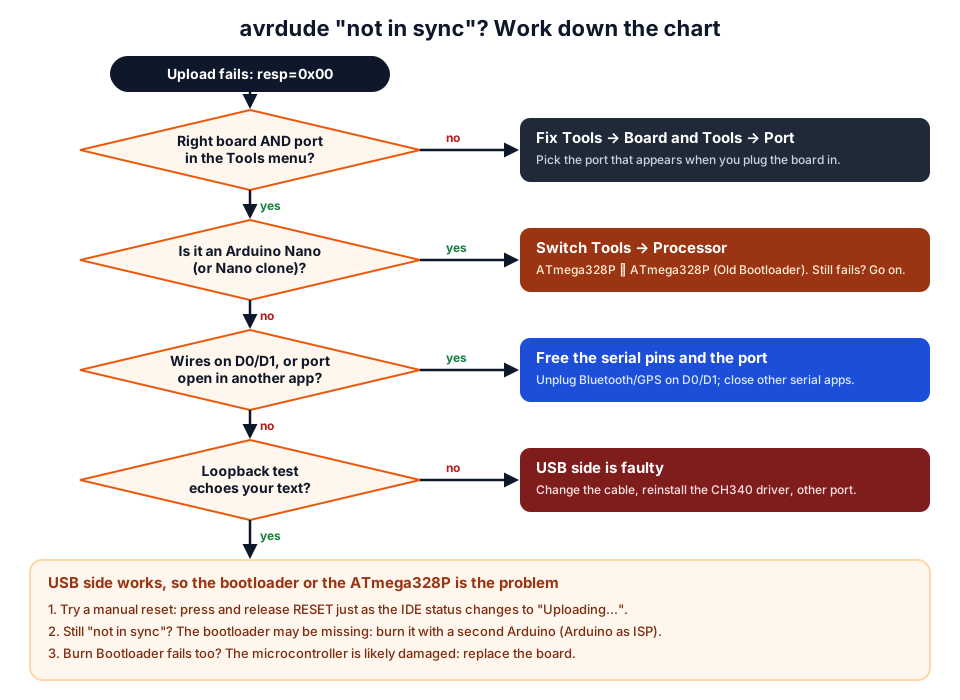 Work down the chart. Most uploads are fixed in the first three boxes.
What does "programmer is not responding" mean?
It means avrdude could not get a valid reply from the bootloader on your board. When you click Upload, the board resets, a small program called the bootloader starts and listens on the serial pins for a moment, and avrdude sends a "get sync" command. A healthy bootloader answers with the byte 0x14 ("in sync"). If nothing useful comes back, avrdude retries ten times and gives up:
avrdude: stk500_recv(): programmer is not responding
avrdude: stk500_getsync() attempt 1 of 10: not in sync: resp=0x00
...
avrdude: stk500_getsync() attempt 10 of 10: not in sync: resp=0x00
Arduino IDE 2 then shows Failed uploading: uploading error: exit status 1. Newer avrdude versions word these lines a little differently, but the causes are the same. Any resp= value other than 0x14 also means "no proper reply".
| Message | Board | Meaning |
|---|---|---|
stk500_getsync() ... not in sync: resp=0x00 | Uno, Nano, Pro Mini | No reply from the bootloader |
stk500v2_ReceiveMessage(): timeout | Mega 2560 | The Mega's version of the same problem |
ser_open(): can't open device "\\.\COM4": The system cannot find the file specified. | Any | Wrong COM port, or the board was unplugged |
ser_open(): can't open device "\\.\COM4": Access is denied. | Any | Another program has the port open |
ser_open(): can't open device "/dev/ttyUSB0": Permission denied | Linux | Your user is not in the dialout group |
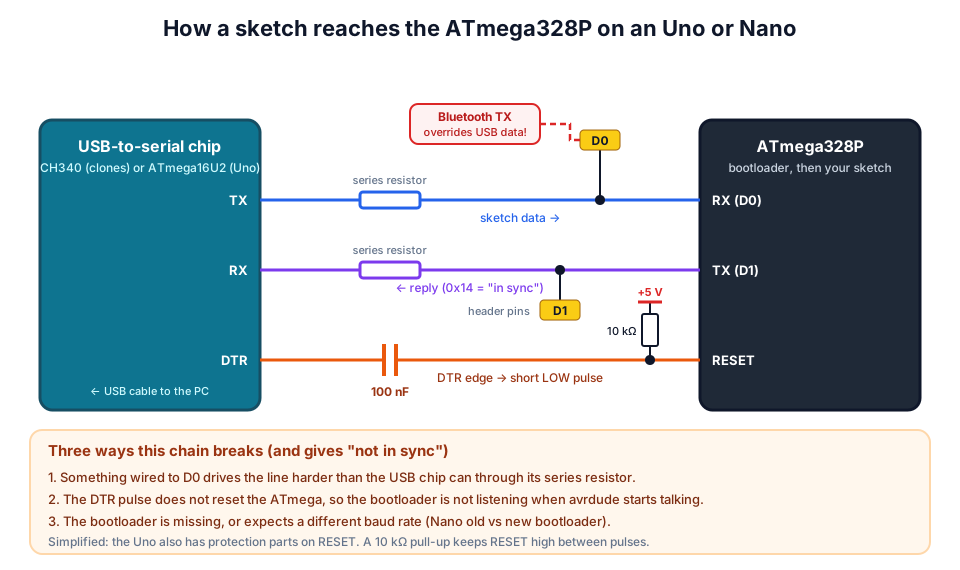 The upload travels on D0 and D1, and a DTR pulse through a 100 nF capacitor resets the chip so the bootloader is listening.
Cause 1: wrong board, Processor or port
The bootloader only answers if avrdude uses the right protocol and baud rate, and those come from your Tools menu.
| Your board | Tools → Board | Tools → Processor | Upload speed used |
|---|---|---|---|
| Uno and Uno clones (CH340) | Arduino Uno | (none) | 115200 |
| Nano with new bootloader | Arduino Nano | ATmega328P | 115200 |
| Nano with old bootloader (many clones) | Arduino Nano | ATmega328P (Old Bootloader) | 57600 |
| Mega 2560 and clones | Arduino Mega or Mega 2560 | ATmega2560 (Mega 2560) | 115200 |
| Pro Mini 5 V with USB-serial adapter | Arduino Pro or Pro Mini | ATmega328P (5V, 16 MHz) | 57600 |
If the bootloader expects 57600 baud and avrdude talks at 115200 (or the other way round), you get exactly not in sync: resp=0x00. On a Nano, simply try the other Processor option before anything else. Official Nanos made since 2018 use the new bootloader, but many clones still ship with the old one.
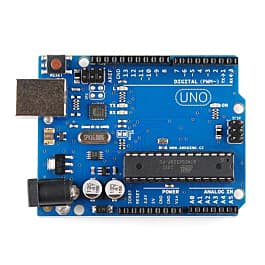
For the port, unplug the board and open Tools → Port, then plug it in and open the menu again. The new entry is your Arduino. An official Uno appears as "Arduino Uno (COMx)" in Device Manager; clones with a CH340 chip appear as "USB-SERIAL CH340 (COMx)". COM1 is almost never the Arduino.
Cause 2: something connected to pins 0 and 1
Pins D0 (RX) and D1 (TX) are the same wires the upload travels on. The USB-to-serial chip drives D0 through a series resistor, so any module that also drives D0, such as an HC-05 Bluetooth module, a GPS or another Arduino, overpowers it and the bootloader receives garbage.
Unplug anything on D0 and D1 (and remove shields) before uploading, then reconnect. For projects that need a second serial device, use SoftwareSerial on other pins so you never have to unplug.
Cause 3: the port is busy
Only one program can open a COM port at a time. A Serial Monitor in a second IDE window, a Processing or Python sketch, PuTTY or a 3D-printer program holding the port gives Access is denied or sometimes just "not in sync". Close them and upload again; restart the PC if you cannot find the culprit.
Cause 4: CH340 driver or a bad cable
Most Uno and Nano clones use a CH340 USB-to-serial chip, which needs a driver on some Windows PCs. If Device Manager (press Windows + X, then choose Device Manager) shows a yellow ! under Other devices, or no port appears, install WCH's CH341SER driver, then unplug and replug. Official Unos use an ATmega16U2 as the USB chip, as listed on the Uno Rev3 hardware page, and their driver installs with the Arduino IDE.
If the board lights up but Device Manager never changes when you plug it in, the cable is probably charge-only. Use a cable you know transfers data (the old USB-A to USB-B "printer cable" for an Uno, mini-USB or micro-USB for most Nanos). A good Arduino USB cable costs far less than the time spent on a bad one. Plug directly into the PC, not a front-panel port or unpowered hub.
Hands-on: the loopback test (two minutes, no code)
This test separates a USB problem from a microcontroller problem. Holding the ATmega328P in reset makes it let go of D0 and D1, so whatever you type goes into the USB chip, out on D0, through your jumper, back in on D1 and back to the PC.
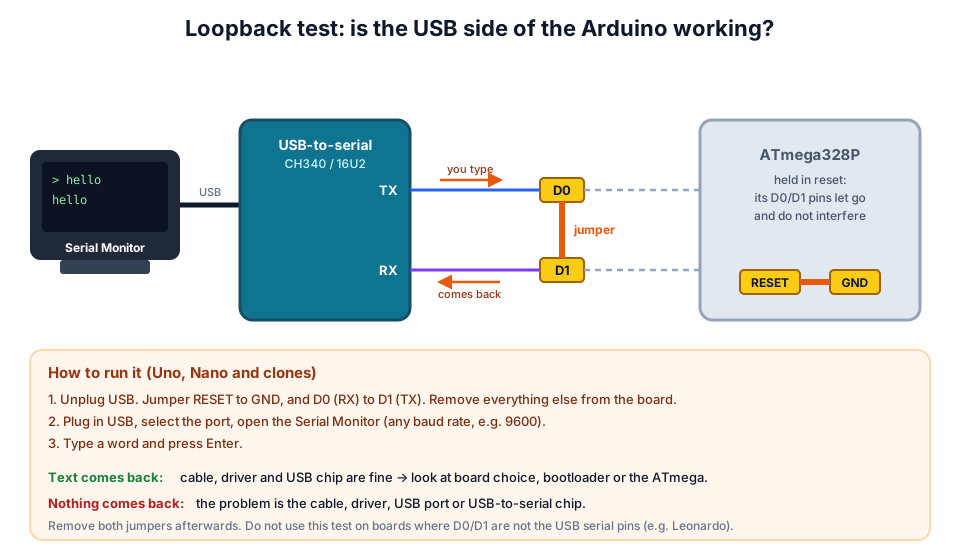 If the text comes back, the cable, driver and USB chip all work.
- Unplug USB. Remove everything else from the board.
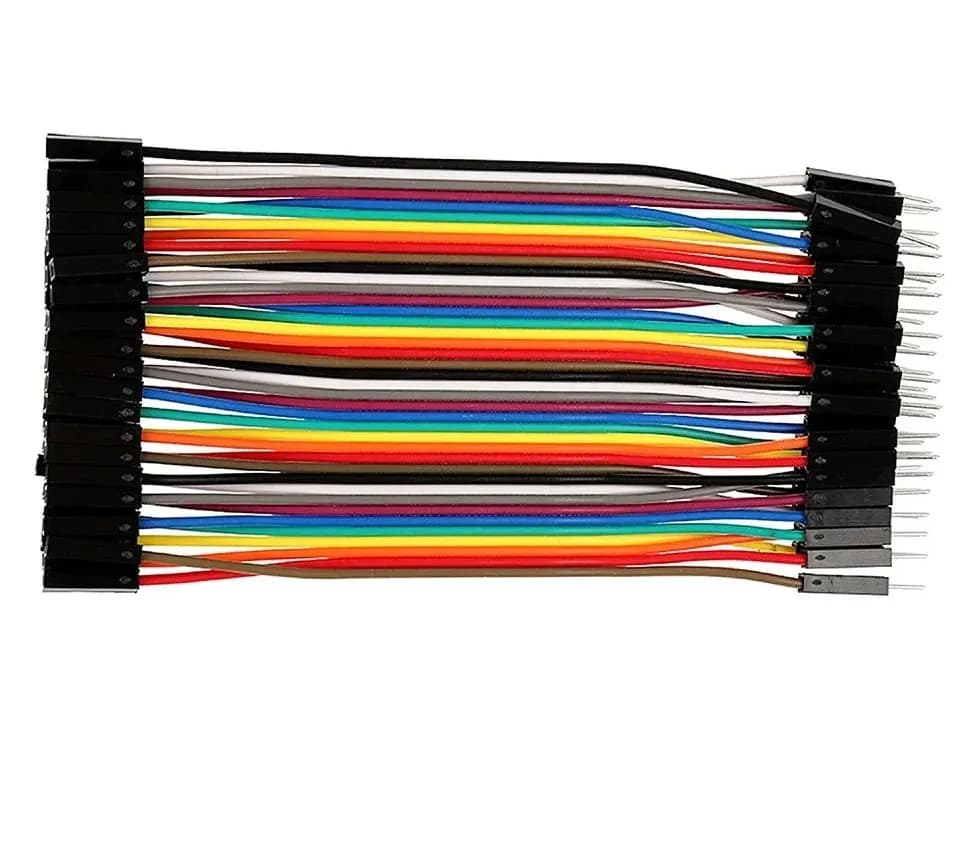
- Fit a jumper from RESET to GND, and another from D0 to D1.
- Plug in USB, choose the port and open the Serial Monitor.
- Type
helloand press Enter.
| Result | What it proves | Next step |
|---|---|---|
hello comes back | Cable, driver and USB chip are fine | Board settings, auto-reset or bootloader |
| Nothing comes back | Fault on the USB side | New cable, driver, other port; possibly a damaged USB chip |
| Port missing entirely | PC cannot see the board | Cable and driver (Cause 4) |
Remove both jumpers when you finish.
Cause 5: auto-reset is not working
If the loopback test passes but uploads still fail, the board may not be resetting at the right moment. The USB chip's DTR line pulses RESET through a 100 nF capacitor so the bootloader starts just before avrdude talks. A cracked capacitor, a damaged track or a USB-serial adapter without DTR (common on Pro Minis) breaks this.
Try a manual reset: click Upload, watch the status bar, and press and release RESET the moment it changes from "Compiling sketch..." to "Uploading...". It can take a few tries to get the timing right. If this works every time, the auto-reset circuit is the problem; you can keep uploading this way or repair the board.
Turn on File → Preferences → Show verbose output during upload to see exactly when avrdude starts talking.
Cause 6 (last resort): burn the bootloader
If the loopback test passes and nothing else works, the bootloader may be missing or corrupted. This happens after uploading with a USBasp or Sketch → Upload Using Programmer (both erase it), or after an electrical accident. You can rewrite it with a second working Arduino.
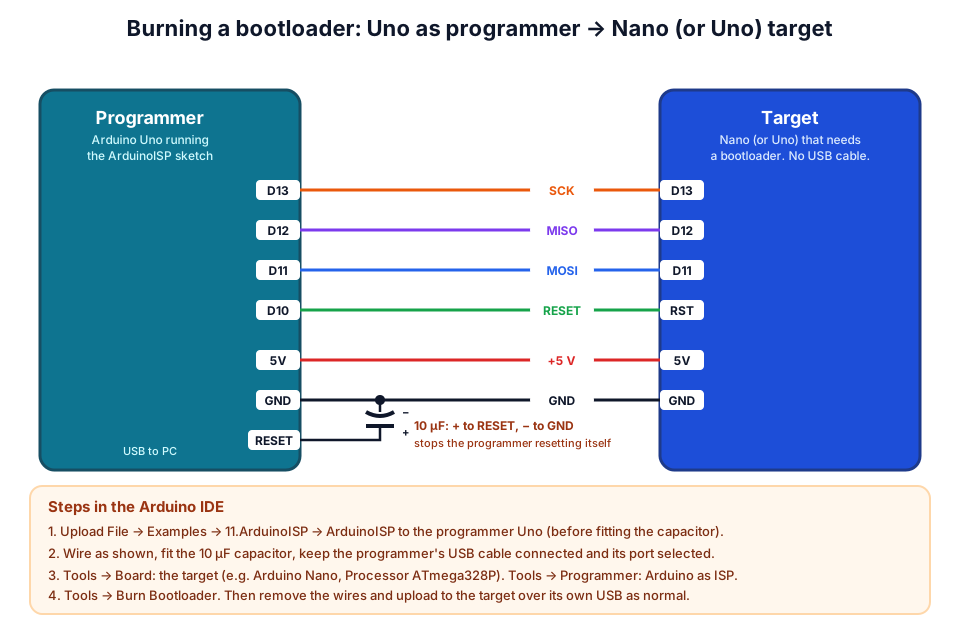 D13 to D13, D12 to D12, D11 to D11, D10 to the target's RESET, plus 5V and GND.
| Programmer Uno | Target Nano or Uno | Signal |
|---|---|---|
| D13 | D13 | SCK |
| D12 | D12 | MISO |
| D11 | D11 | MOSI |
| D10 | RESET (RST) | Reset |
| 5V | 5V | Power |
| GND | GND | Ground |
The steps follow Arduino's official ArduinoISP guide:
- Upload File → Examples → 11.ArduinoISP → ArduinoISP to the working Uno.
- Wire it to the target as above and fit a 10 µF capacitor between the programmer's RESET and GND (stripe to GND).
- Select the target board in Tools → Board (for a Nano, Processor ATmega328P gives the new bootloader), set Tools → Programmer → Arduino as ISP, and keep the programmer's port selected.
- Click Tools → Burn Bootloader and wait for "Done burning bootloader".
Then remove the wires and upload to the target over its own USB as usual. If Burn Bootloader fails with a signature or "Device signature = 0x000000" error, check the wiring; if the wiring is right, the ATmega328P is probably damaged and a replacement Arduino board is the sensible fix.
macOS and Linux notes
The same causes apply; only the port names and permissions differ.
| macOS | Linux | |
|---|---|---|
| Official Uno (16U2) | /dev/cu.usbmodem... | /dev/ttyACM0 |
| CH340 clones | /dev/cu.usbserial-... or /dev/cu.wchusbserial... | /dev/ttyUSB0 |
| Permission fix | Usually not needed | sudo usermod -a -G dialout $USER, then log out and back in |
On Ubuntu 22.04 and later, a CH340 port that appears and then disappears is often grabbed by the brltty service; removing that package fixes it if you do not use a braille display.
Where to go next
- Using an ESP32 instead? See ESP32 not detected / COM port fixes.
- Board resets when your motors start? Read why an Arduino resets when a motor starts.
- Buying your first board? Our Arduino starter kit buying guide and Arduino projects for beginners will help, and our workshops give hands-on help in Pune.
Frequently asked questions
What does "avrdude: stk500_getsync() not in sync: resp=0x00" mean?
The PC sent a sync command to the Arduino's bootloader and got no valid answer (a working bootloader replies 0x14). The usual causes are the wrong port, the wrong board or Processor setting, wires on pins 0 and 1, or a missing driver.
How do I know if my Nano needs "ATmega328P (Old Bootloader)"?
Try it. Select Tools → Processor → ATmega328P (Old Bootloader) and upload. If it works, your Nano has the old bootloader, which runs at 57600 baud. Many clones ship with it, while official Nanos made since 2018 use the newer one.
Can a Serial Monitor being open cause upload errors?
The Arduino IDE closes its own Serial Monitor during uploads, but another program or a second IDE window holding the port will block it. You will usually see "Access is denied". Close the other program and try again.
Is my Arduino dead if I get "programmer is not responding"?
Probably not. Run the loopback test. If your text echoes back, the USB side works and the problem is settings, wiring on D0/D1, auto-reset or the bootloader, all of which are fixable. A board is only likely dead if Burn Bootloader also fails with correct wiring.
Do I need a USBasp to fix a missing bootloader?
No. A second Arduino Uno running the ArduinoISP example works as a programmer. A USBasp also works with Tools → Burn Bootloader, but uploading sketches with it (Upload Using Programmer) erases the bootloader again.
Thinking Robot Team
Thinking Robot is a team of engineers and educators in Pune who design electronics and robotics kits and run hands-on workshops for students and schools. Spotted a mistake or have a question? Get in touch.