🔌ESP32 Not Detected or No COM Port? Fix "Failed to connect to ESP32" (Windows, Mac, Linux)
ESP32 not detected, no COM port, or "Failed to connect to ESP32: No serial data received"? A quick checklist and flowchart: data cables, CP210x/CH340 drivers, the BOOT button trick, busy ports, power and damage tests.
In this article (18)
- Quick fix: ESP32 not detected checklist
- What do the ESP32 upload error messages mean?
- Cause 1: a charge-only USB cable
- Cause 2: missing CP210x or CH340 driver (Windows)
- Cause 3: wrong board or port selected in Arduino IDE
- Cause 4: "Wrong boot mode detected" or "No serial data received"
- Cause 5: "Access is denied" means the port is busy
- Cause 6: not enough power
- Cause 7: is the ESP32 board damaged? Two quick tests
- Hands-on: a two-minute "is it alive?" test
- macOS and Linux notes
- Where to go next
- Frequently asked questions
- Why is my ESP32 not showing up in Device Manager?
- How do I fix "Failed to connect to ESP32: Wrong boot mode detected"?
- Which driver does my ESP32 need, CP210x or CH340?
- Why does the COM port number keep changing?
- Can a bad USB port or hub stop an ESP32 from being detected?
If your ESP32 is not detected, no COM port shows up in the Arduino IDE, or the upload stops with A fatal error occurred: Failed to connect to ESP32: No serial data received., don't worry. It is the most common problem students hit with a new ESP32 board, and it is rarely a dead board.
Direct answer: an ESP32 that is not detected on a COM port is nearly always caused by a charge-only USB cable, a missing USB-to-serial driver (CP210x or CH340), or the wrong port selected in the IDE. If the port appears but the upload fails with "Wrong boot mode detected" or "No serial data received", hold the BOOT button while the IDE shows "Connecting...". Work through the checklist below in order and most boards are fixed in five minutes.
Quick fix: ESP32 not detected checklist
Causes are ordered from most to least likely.
| # | Likely cause | How to confirm | Fix |
|---|---|---|---|
| 1 | Charge-only or broken USB cable | Board LED lights, but Device Manager does not change when you plug in | Use a known data cable |
| 2 | Missing driver | Device under Other devices with a yellow ! | Install the CP210x or CH340 driver |
| 3 | Wrong port or board in the IDE | Tools → Port shows COM1, or nothing ticked | Select the port that appears when you plug in |
| 4 | Not entering download mode | Wrong boot mode detected or No serial data received | Hold BOOT while "Connecting..." shows |
| 5 | Port in use | Access is denied | Close Serial Monitor and other serial apps |
| 6 | Wires on boot pins | Upload works only with your circuit unplugged | Free GPIO 0, 2 and 12 during upload |
| 7 | Weak power | Brownout detector was triggered, or a USB hub | PC port directly, short cable |
| 8 | Damaged board | All of the above fail, or a chip gets hot | 3V3 and loopback tests below, then replace |
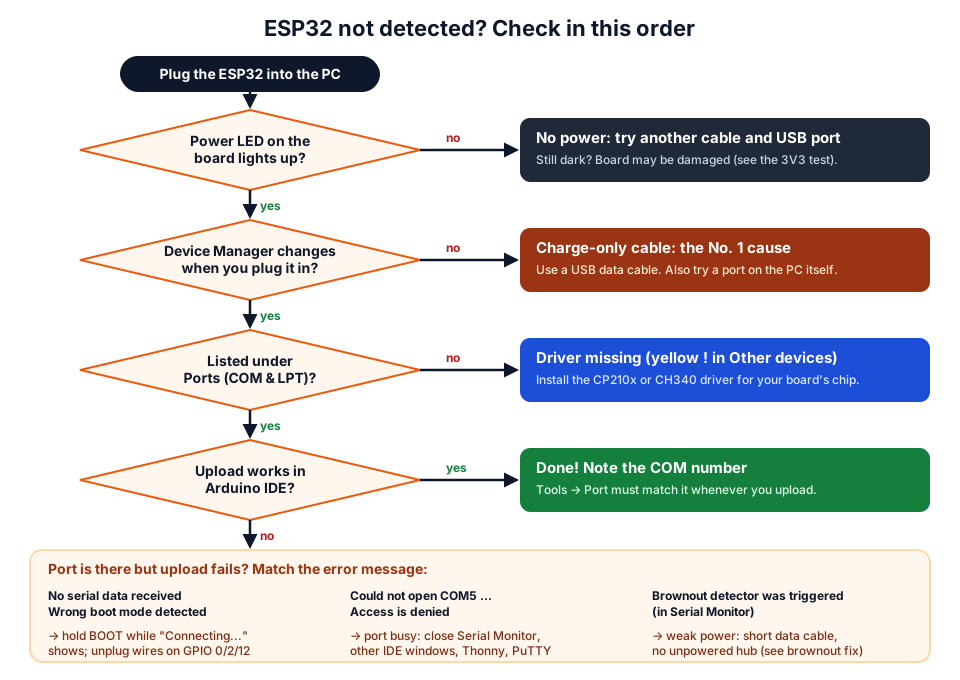 Follow the questions from the top. Most boards are fixed at the second or third box.
What do the ESP32 upload error messages mean?
Each message points to a different cause, so read the red lines near the end of the output. They come from esptool, the flashing tool the Arduino IDE runs for ESP32 boards (wording varies slightly between versions):
A fatal error occurred: Failed to connect to ESP32: No serial data received.
A fatal error occurred: Failed to connect to ESP32: Wrong boot mode detected (0x13)! The chip needs to be in download mode.
A fatal error occurred: Failed to connect to ESP32: Timed out waiting for packet header
A fatal error occurred: Could not open COM5, the port is busy or doesn't exist.
(could not open port 'COM5': PermissionError(13, 'Access is denied.', None, 5))
Arduino IDE 2 then adds Failed uploading: uploading error: exit status 2, which only says the upload failed.
| Message | What it means | Go to |
|---|---|---|
No serial data received (older: Timed out waiting for packet header) | The ESP32 never answered | Cause 4, then cable and driver |
Wrong boot mode detected (0x13) | The chip started your old program instead of the bootloader | Cause 4 (BOOT button) |
PermissionError(13, 'Access is denied.'...) | Another program has the port open | Cause 5 |
FileNotFoundError(2, ...) in the brackets | That COM port no longer exists | Cause 3 (select the right port) |
| No COM port at all, Port menu greyed out | Windows cannot talk to the board | Causes 1 and 2 |
Espressif's esptool troubleshooting guide lists these too.
Cause 1: a charge-only USB cable
A charge-only cable has only the two power wires, so the ESP32 lights up but the PC never sees it. This is the most common reason for "ESP32 COM port not showing"; many cables bundled with power banks and cheap chargers are built this way.
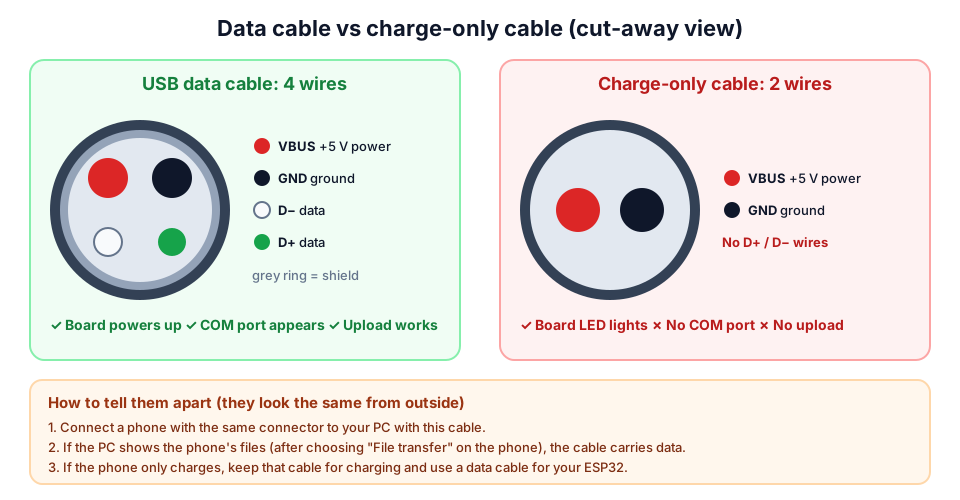 Both cables power the board. Only the one with D+ and D− wires creates a COM port.
Confirm it: open Device Manager (Windows + X → Device Manager) and watch the list while you plug the ESP32 in. If nothing appears or refreshes, the PC sees no USB device at all.
Fix it: use a cable you know transfers files, plugged straight into the laptop or the back of the desktop (not a front-panel port or unpowered hub). Need a reliable one? Get a USB data cable that matches your board's connector (micro-USB or USB-C).
Cause 2: missing CP210x or CH340 driver (Windows)
On most DevKit boards a small USB-to-serial chip handles USB, not the ESP32, and Windows needs the right driver for that chip. Read its marking with your phone camera's zoom.
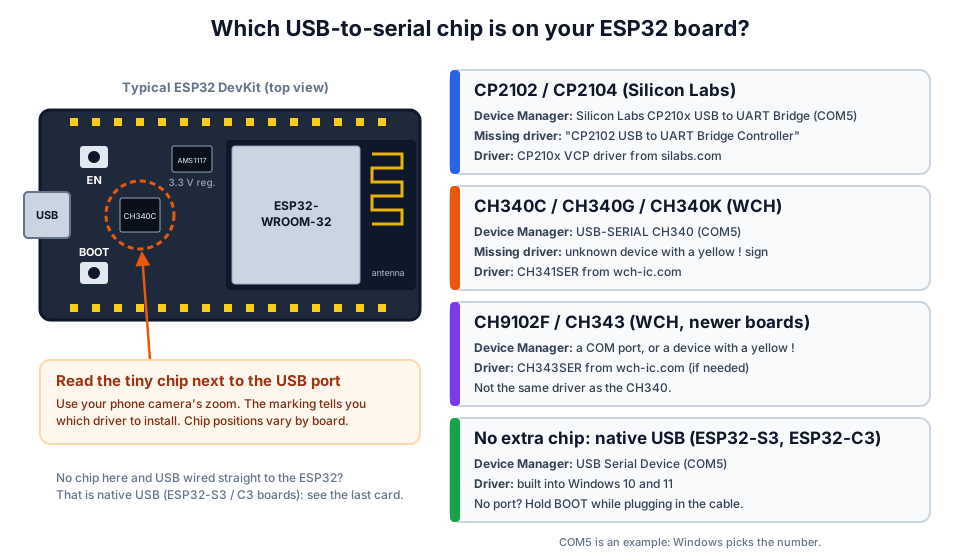 The marking on the small chip near the USB port tells you which driver you need.
| Chip on the board | Device Manager name when working | Windows driver |
|---|---|---|
| CP2102, CP2104 | Silicon Labs CP210x USB to UART Bridge (COMx) | Silicon Labs CP210x VCP driver |
| CH340C, CH340G, CH340K | USB-SERIAL CH340 (COMx) | WCH CH341SER driver |
| CH9102F, CH343 | A COM port (install WCH's CH343SER driver if it shows a yellow !) | WCH CH343SER |
| None (ESP32-S3 / C3 native USB) | USB Serial Device (COMx) | Built into Windows 10 and 11 |
Steps on Windows 10 or 11:
- In Device Manager, expand Ports (COM & LPT) and Other devices. A device with a yellow warning sign under Other devices means the driver is missing.
- Download the driver from the chip maker's page above, run its installer, then unplug and replug the board.
- The board should now appear under Ports (COM & LPT) with a COM number. Write it down.
Cause 3: wrong board or port selected in Arduino IDE
If the COM port is in Device Manager, the Arduino IDE must be set to that exact port and an ESP32 board.
- Install the board package once: Tools → Board → Boards Manager, search esp32 and install esp32 by Espressif Systems. If it is not listed, add
https://espressif.github.io/arduino-esp32/package_esp32_index.jsonunder File → Preferences → Additional boards manager URLs (official instructions). - Choose Tools → Board → esp32 → ESP32 Dev Module for the common 30-pin and 38-pin ESP32-WROOM-32 boards.
- Choose Tools → Port and pick the COM number you noted. Not sure? Unplug the board, plug it back in and see which port is new. COM1 is usually the PC's own port, not your ESP32.
- If uploads start but fail halfway, set Tools → Upload Speed to 115200 instead of 921600.
Cause 4: "Wrong boot mode detected" or "No serial data received"
These errors mean the ESP32 did not enter its download (flashing) mode when the IDE tried to connect. The ESP32 reads GPIO0 as it comes out of reset: LOW means "wait for a new program", HIGH means "run the program in flash". Most boards switch modes automatically with two transistors driven by the USB chip, but on some boards and PCs the timing fails.
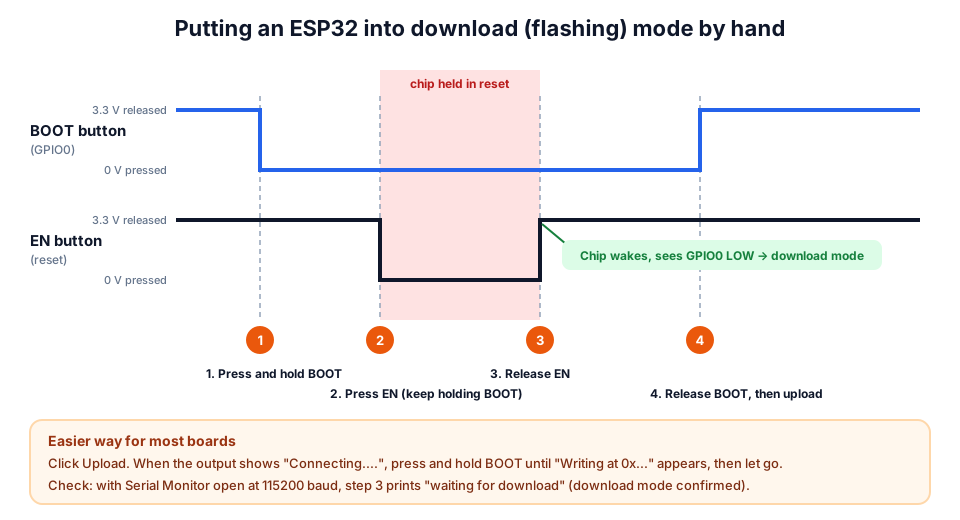 Releasing EN while BOOT is held starts the ESP32 in download mode. Espressif calls this boot mode selection.
The fix that works on almost every board:
- Click Upload.
- When the output shows
Connecting...., press and hold the BOOT button (sometimes labelled IO0). - Keep holding until you see
Writing at 0x...and a percentage, then release. - When it says
Hard resetting via RTS pin..., press EN once if your program does not start by itself.
Needing this every time means your board's auto-reset circuit is marginal; many makers fix it with a 1 µF to 10 µF capacitor between EN and GND. Espressif explains the logic in its boot mode selection guide.
Also check the ESP32's strapping pins. A module wired to them can block download mode or normal boot:
| Pin | Needs at reset | What goes wrong |
|---|---|---|
| GPIO0 | LOW for download, HIGH (default) to run | A module pulling it high blocks download mode |
| GPIO2 | LOW or floating for download | Something pulling it high blocks download mode |
| GPIO12 (MTDI) | LOW (default) on most boards | Pulled high, it selects the wrong flash voltage and the board may not boot |
If the bare board uploads fine with everything unplugged, move your wiring to other pins.
Cause 5: "Access is denied" means the port is busy
Only one program can open a COM port at a time. If a Serial Monitor in another IDE window, Thonny, PuTTY or a Python script holds the port, esptool cannot open it. Close them (or restart the PC) and upload again. On Linux, Permission denied is a different problem (see the Linux notes).
Cause 6: not enough power
When the ESP32 starts its radio it draws short bursts of current that a weak port, hub or thin cable cannot supply. You may see Brownout detector was triggered repeating in the Serial Monitor, or the port may vanish and return. Plug directly into the PC, use a short cable, and disconnect motors or servos while uploading. Our ESP32 brownout fix guide covers this in detail.
Cause 7: is the ESP32 board damaged? Two quick tests
Run these before you buy a new board; they separate a dead USB chip from a dead ESP32.
Test 1: 3V3 rail. With the board on USB, measure DC volts between the 3V3 and GND pins. You should read close to 3.3 V; near 0 V means the regulator or USB power path is damaged. If any chip is too hot to touch, unplug at once.
Test 2: loopback. This checks the cable, driver and USB-to-serial chip without the ESP32.
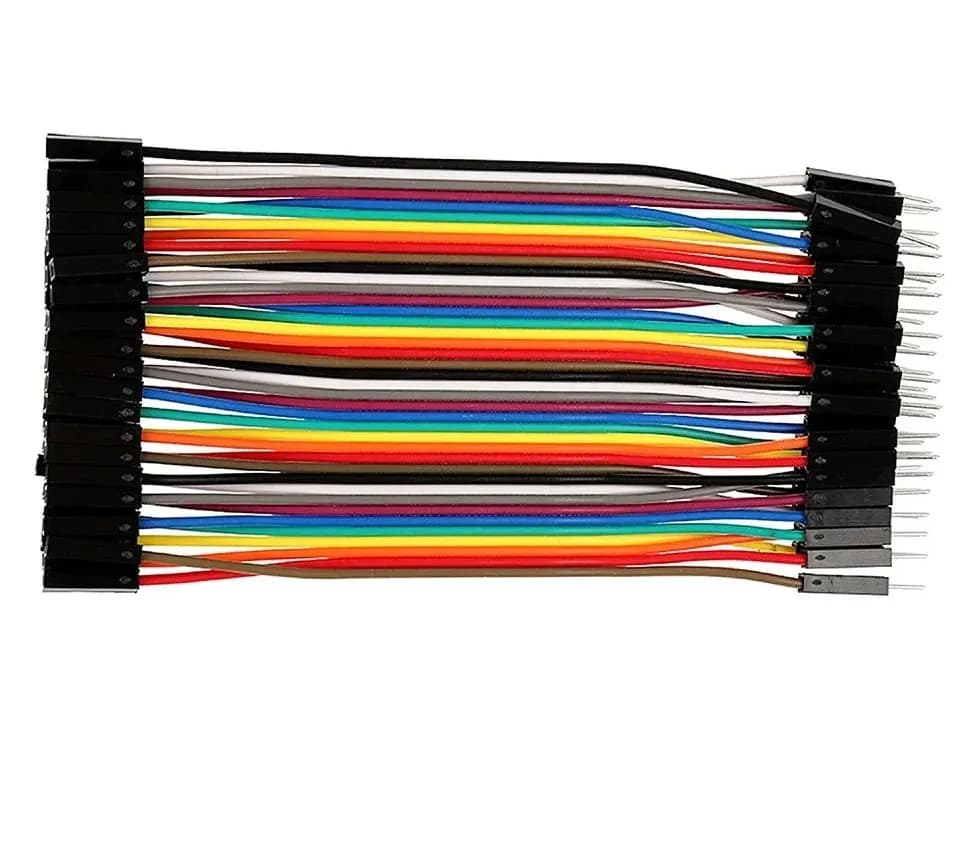
- Connect a jumper wire between the TX0 (GPIO1) and RX0 (GPIO3) pins.
- Open the Serial Monitor at 115200 baud.
- Press and hold EN so the ESP32 stays in reset and lets go of those pins.
- Type a word and press Enter. If it comes straight back, the USB side works and the problem is boot mode, strapping pins or the ESP32 chip.
| COM port? | 3V3 | Loopback | Most likely problem |
|---|---|---|---|
| Yes | About 3.3 V | Echo | ESP32 side: boot mode, strapping pins or the chip |
| Yes | About 3.3 V | No echo | USB-to-serial chip or its driver |
| No | About 3.3 V | — | Cable data wires or USB-to-serial chip |
| No | About 0 V | — | No power arriving: cable, connector or regulator |
If the board fails, a replacement ESP32 development board costs less than hours spent on a damaged one; our best ESP32 board for beginners in India guide helps you choose.
Hands-on: a two-minute "is it alive?" test
Once the port appears, upload this sketch. It proves the whole chain works and reports which chip you have.
void setup() {
  Serial.begin(115200);
  delay(1000);
  Serial.println("ESP32 is alive!");
  Serial.printf("Chip: %s, revision %d, %d cores\n",
                ESP.getChipModel(), ESP.getChipRevision(), ESP.getChipCores());
  Serial.printf("Flash size: %lu bytes\n", (unsigned long)ESP.getFlashChipSize());
  pinMode(2, OUTPUT);  // many DevKit V1 boards have a blue LED on GPIO2
}

void loop() {
  digitalWrite(2, !digitalRead(2));  // blink
  delay(500);
}
Open the Serial Monitor at 115200 baud and press EN. You should see the chip model, revision, cores and flash size (4194304 bytes, i.e. 4 MB, on most ESP32-WROOM-32 boards).
macOS and Linux notes
The causes are the same on every operating system; only the port names and permission fixes differ.
| macOS | Linux (Ubuntu, Mint, Raspberry Pi OS) | |
|---|---|---|
| Port name | /dev/cu.usbserial-..., /dev/cu.SLAB_USBtoUART or /dev/cu.wchusbserial... | /dev/ttyUSB0 (CP210x, CH340), /dev/ttyACM0 (native USB) |
| List ports | ls /dev/cu.* | ls /dev/ttyUSB* /dev/ttyACM* |
| Drivers | Recent macOS recognises most CP210x and CH340 boards; if not, install the vendor driver and allow it in System Settings → Privacy & Security | Built into the kernel |
| Permission error | Rare | sudo usermod -a -G dialout $USER, then log out and back in |
On macOS, choose the cu. device, not the tty. one. On Ubuntu 22.04 and later, if a CH340 port appears and then vanishes, the brltty braille-display service may be grabbing it (sudo dmesg | tail mentions brltty); removing that package fixes it if you do not use a braille display. lsusb should list 10c4:ea60 for CP210x or 1a86:7523 for CH340.
Where to go next
- Arduino Uno or Nano refusing uploads? See how to fix avrdude "not in sync" errors. Choosing a board? Compare ESP32 vs ESP8266.
- Working now? Pick a build from our ESP32 project ideas for students, or learn with a mentor at our workshops.
Frequently asked questions
Why is my ESP32 not showing up in Device Manager?
Usually because the USB cable is charge-only. If Device Manager does not change when you plug the board in, try a cable that you know transfers files. If a device appears with a yellow warning sign, install the CP210x or CH340 driver.
How do I fix "Failed to connect to ESP32: Wrong boot mode detected"?
Click Upload, and when the output shows "Connecting....", hold the BOOT button until "Writing at 0x..." appears. The chip ran the program in flash instead of entering download mode. If you need this every time, add a 1 µF to 10 µF capacitor between EN and GND and free GPIO0, GPIO2 and GPIO12.
Which driver does my ESP32 need, CP210x or CH340?
It depends on the USB-to-serial chip next to the USB port, not on the ESP32. CP2102 and CP2104 need the Silicon Labs CP210x driver, CH340 needs WCH's CH341SER driver, and CH9102 uses WCH's CH343SER. Native-USB ESP32-S3 and C3 boards need no driver on Windows 10 and 11.
Why does the COM port number keep changing?
Windows assigns COM numbers per device and USB port, so a different port or board can get a new number. Re-check Tools → Port after plugging in, or set a fixed number in Device Manager → port Properties → Port Settings → Advanced.
Can a bad USB port or hub stop an ESP32 from being detected?
Yes. Front-panel ports and unpowered hubs may not supply the current an ESP32 draws when its radio starts, so the board resets or drops off the bus. Use a port directly on the PC and a short, good-quality data cable.
Thinking Robot Team
Thinking Robot is a team of engineers and educators in Pune who design electronics and robotics kits and run hands-on workshops for students and schools. Spotted a mistake or have a question? Get in touch.