📡ESP32 vs ESP8266: Which One Should You Choose?
A precise ESP32 vs ESP8266 comparison: CPU, RAM, GPIO, ADC, Bluetooth, deep sleep and libraries, with a decision table, pin map, migration tips and a sketch that runs on both.
In this article (13)
- ESP32 vs ESP8266: full specification comparison
- Which should you choose: ESP32 or ESP8266?
- Analog inputs: the biggest practical difference
- Deep sleep and battery projects
- Libraries and code: what changes
- Migrating a project from ESP8266 to ESP32
- Experiment: run the same sketch on both boards
- Frequently asked questions
- Is the ESP32 better than the ESP8266?
- Can ESP8266 code run on an ESP32?
- Does the ESP8266 have Bluetooth?
- Which is better for battery-powered projects?
- Are ESP8266 and ESP32 pins 5 V tolerant?
ESP32 vs ESP8266: which one should you choose for your next Wi-Fi project? Both are Espressif chips, both run Arduino code and MicroPython, and both sit on cheap development boards that Indian students and makers use for smart switches, weather stations and phone-controlled robots. But the ESP32 is a much bigger chip, and the differences show up the moment you add a second sensor, need Bluetooth or try to run on batteries.
This guide compares them precisely: CPU, RAM, pins, analog inputs, Bluetooth, deep sleep and libraries, with a decision table, migration tips for moving code from ESP8266 to ESP32, and a sketch that runs on both.
Short answer: for new projects, choose the ESP32. It has two cores at up to 240 MHz, 520 KB of SRAM, Bluetooth Classic and BLE, up to 18 analog channels and far more usable pins, usually for only a small price difference. The ESP8266 is still fine for simple Wi-Fi-only jobs, such as one relay or one sensor, especially if you already own the boards and code.
ESP32 vs ESP8266: full specification comparison
| ESP8266 (ESP8266EX) | ESP32 (classic, as on ESP32-WROOM-32) | |
|---|---|---|
| CPU | 1 × Tensilica L106, 32-bit | 2 × Xtensa LX6, 32-bit |
| Clock | 80 MHz (160 MHz max) | Up to 240 MHz |
| RAM | About 50 KB free for your code with Wi-Fi connected | 520 KB SRAM + 16 KB RTC memory |
| Flash | External; 4 MB on most NodeMCU boards | External; 4 MB on most DevKit boards |
| GPIO | 17 on the chip (GPIO0–16); about 11 usable on a NodeMCU | 34 on the chip; 25 broken out on a 30-pin DevKit V1 |
| ADC | 1 channel, 10-bit, 0–1.0 V at the chip pin | Up to 18 channels, 12-bit, on two ADCs |
| DAC | None | 2 × 8-bit |
| PWM | Software PWM | LED PWM controller with 16 channels, plus motor PWM |
| Touch sensing | None | 10 capacitive touch pins |
| UART | 2 (UART1 is transmit-only) | 3 |
| I²C | Software (bit-banged) | 2 hardware controllers |
| Wi-Fi | 802.11 b/g/n, 2.4 GHz | 802.11 b/g/n, 2.4 GHz |
| Bluetooth | None | v4.2 BR/EDR (Classic) and BLE |
| Deep sleep (chip only) | About 20 µA | About 10 µA (RTC timer + RTC memory) |
| Ultra-low-power coprocessor | No | Yes (ULP) |
| Logic level | 3.3 V | 3.3 V |
| Arduino support | ESP8266 community core | Arduino-ESP32 core by Espressif |
| MicroPython | Yes | Yes |
| Price tier (typical board) | Budget | Budget to mid |
Sources: Espressif's ESP8266EX datasheet and ESP32 datasheet. Board-level figures (flash size, usable pins) vary between sellers.
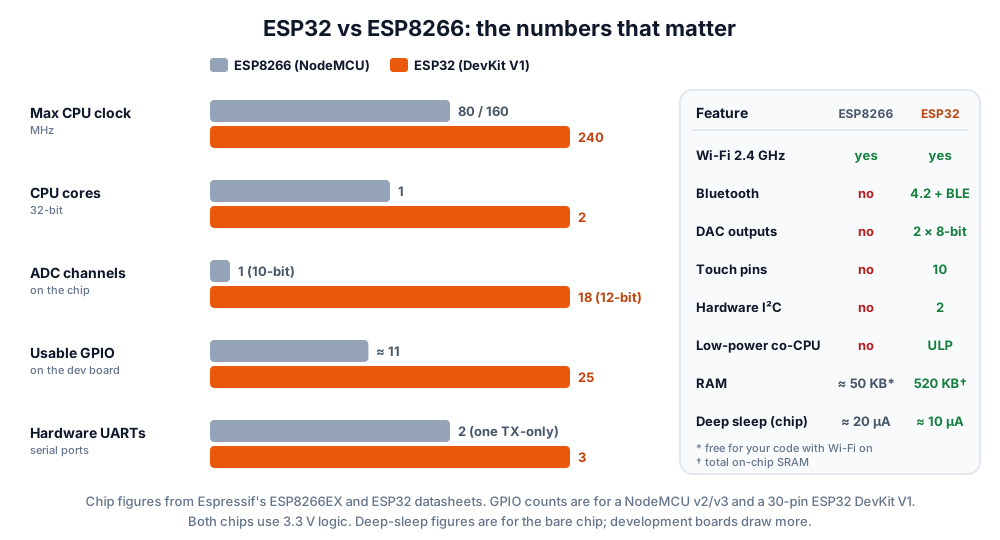 The ESP32 wins on every number. The question is whether your project needs any of it.
Which should you choose: ESP32 or ESP8266?
Choose the ESP32 unless your project is a simple Wi-Fi job and you already have ESP8266 boards. The table below covers the common cases.
| Project | Choose | Why |
|---|---|---|
| Smart switch: one relay on Wi-Fi | Either (ESP8266 is enough) | Needs one output pin and Wi-Fi |
| Wi-Fi temperature logger with one sensor | Either | Digital sensors such as DHT11 or DS18B20 use one pin |
| Soil moisture + light + gas sensors (analog) | ESP32 | ESP8266 has only one analog input |
| Phone-controlled car over Bluetooth | ESP32 | ESP8266 has no Bluetooth |
| OLED or TFT dashboard plus web server | ESP32 | More RAM and pins |
| Battery sensor that wakes on a timer or touch | ESP32 | Built-in wake sources, ULP coprocessor |
| ESP32-CAM camera project | ESP32 | The camera needs PSRAM and the ESP32's camera support |
| Class of 30 students, same simple Wi-Fi exercise | Either | Use what the lab already has |
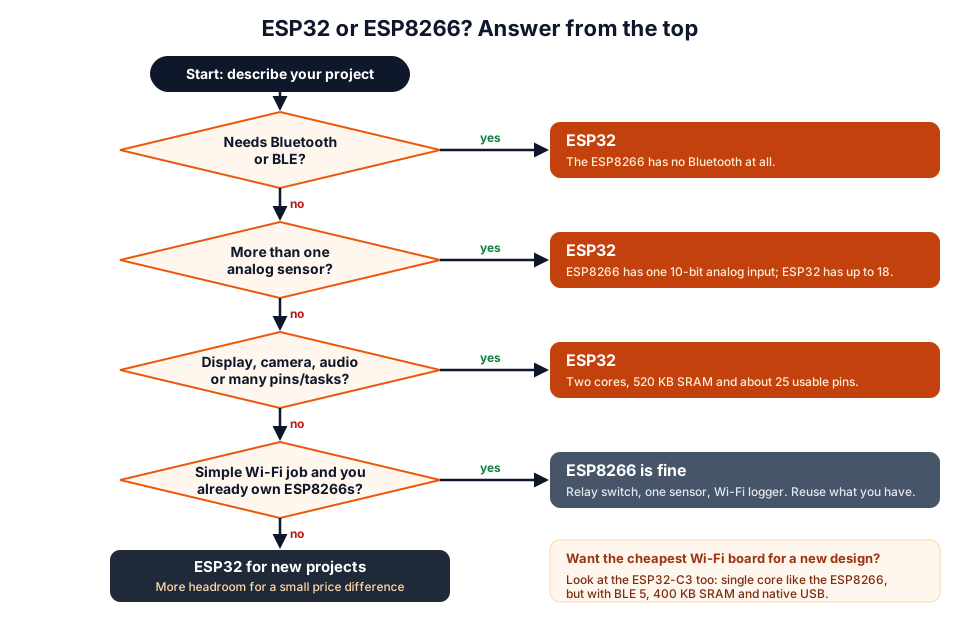 Answer from the top. Most new projects end at the ESP32.
If you are choosing between several ESP32 boards (DevKit V1, ESP32-CAM, S3, C3), our best ESP32 board for beginners guide compares them.
Analog inputs: the biggest practical difference
The ESP8266 has one 10-bit analog input that reads 0–1.0 V at the chip pin. NodeMCU-style boards add a resistor divider in front of A0, typically 220 kΩ and 100 kΩ, so the A0 pin accepts roughly 0–3.2 V.
| ESP8266 (NodeMCU A0) | ESP32 | |
|---|---|---|
| Inputs | 1 | Up to 18 (6 ADC1 pins on a DevKit V1 work with Wi-Fi on) |
| Resolution | 10-bit (0–1023) | 12-bit (0–4095) |
| Range at the board pin | About 0–3.2 V (via on-board divider) | Roughly 0.15–3.1 V usable at the default 11 dB attenuation |
| Watch out for | Only one sensor | ADC2 pins stop working while Wi-Fi is on; readings bend near 0 V and the top |
On the ESP32, use ADC1 pins (GPIO 32–36 and 39) with Wi-Fi, and read calibrated millivolts with analogReadMilliVolts(). Convert raw readings with our ADC voltage calculator and design dividers with the voltage divider calculator.
Deep sleep and battery projects
Both chips can sleep at microamp levels, but the ESP32 is far easier to wake up. The ESP8266 wakes from a timed sleep only by resetting itself through a wire from GPIO16 (D0) to RST.
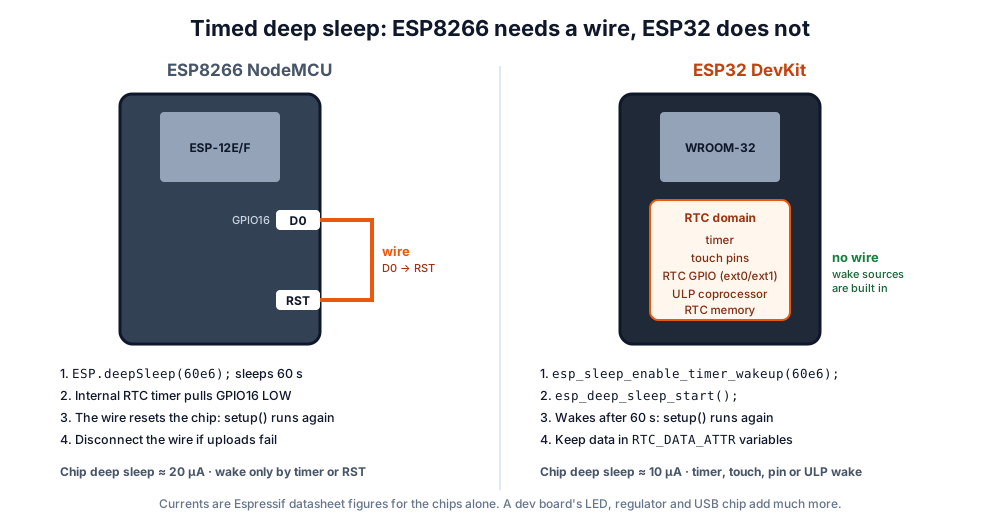 ESP8266 timed sleep needs the D0-to-RST wire. The ESP32's wake sources are inside the chip.
| ESP8266 | ESP32 | |
|---|---|---|
| Timed sleep call | ESP.deepSleep(microseconds) | esp_sleep_enable_timer_wakeup(us) + esp_deep_sleep_start() |
| Extra wiring | D0 (GPIO16) to RST | None |
| Other wake sources | RST pin | Touch pins, RTC GPIO (ext0/ext1), ULP coprocessor |
| Keep data across sleep | RTC user memory (ESP.rtcUserMemoryWrite()) | Variables marked RTC_DATA_ATTR |
| Chip deep-sleep current | About 20 µA | About 10 µA |
// ESP32: wake every 60 s and count how many times it has woken
RTC_DATA_ATTR int bootCount = 0;   // kept in RTC memory during deep sleep

void setup() {
  Serial.begin(115200);
  delay(200);
  bootCount++;
  Serial.print("Wake-up number ");
  Serial.println(bootCount);
  // ... read your sensor and send data here ...
  esp_sleep_enable_timer_wakeup(60ULL * 1000000ULL);  // 60 s in microseconds
  esp_deep_sleep_start();
}

void loop() {
  // never reached: the chip restarts from setup() after each sleep
}
Libraries and code: what changes
Most sketches move between the two with a handful of changes, because both Arduino cores follow the same style.
| Task | ESP8266 | ESP32 |
|---|---|---|
| Wi-Fi | #include <ESP8266WiFi.h> | #include <WiFi.h> |
| Web server | ESP8266WebServer.h, ESP8266WebServer | WebServer.h, WebServer |
| HTTP client | ESP8266HTTPClient.h; http.begin(client, url) | HTTPClient.h; http.begin(url) also works |
mDNS (name.local) | ESP8266mDNS.h | ESPmDNS.h |
| Over-the-air updates | ArduinoOTA.h | ArduinoOTA.h |
| File system | LittleFS.h | LittleFS.h |
| Save settings | EEPROM.h (emulated in flash) | Preferences.h (or EEPROM.h) |
| Bluetooth | Not available | BluetoothSerial.h (Classic) or the BLE library |
| Pin names | D1, D2 … on NodeMCU | GPIO numbers: 21, 22 … |
This sketch compiles for both boards and serves a small web page showing which chip you are on and its free memory:
// One sketch for both: select a NodeMCU or an ESP32 board and upload
#if defined(ESP8266)
  #include <ESP8266WiFi.h>
  #include <ESP8266WebServer.h>
  ESP8266WebServer server(80);
  const char* BOARD = "ESP8266";
#elif defined(ESP32)
  #include <WiFi.h>
  #include <WebServer.h>
  WebServer server(80);
  const char* BOARD = "ESP32";
#endif

const char* WIFI_SSID = "YourWiFi";       // must be a 2.4 GHz network
const char* WIFI_PASS = "YourPassword";

void handleRoot() {
  String page = "<h1>Hello from ";
  page += BOARD;
  page += "</h1><p>Free heap: ";
  page += String(ESP.getFreeHeap());
  page += " bytes</p>";
  server.send(200, "text/html", page);
}

void setup() {
  Serial.begin(115200);
  WiFi.mode(WIFI_STA);
  WiFi.begin(WIFI_SSID, WIFI_PASS);
  while (WiFi.status() != WL_CONNECTED) {
    delay(250);
    Serial.print('.');
  }
  Serial.println();
  Serial.printf("%s connected, open http://%s\n", BOARD, WiFi.localIP().toString().c_str());
  Serial.printf("CPU %u MHz, free heap %u bytes\n",
                (unsigned)ESP.getCpuFreqMHz(), (unsigned)ESP.getFreeHeap());
  server.on("/", handleRoot);
  server.begin();
}

void loop() {
  server.handleClient();
}
Migrating a project from ESP8266 to ESP32
- Install the ESP32 core in the Arduino IDE by following Espressif's Arduino-ESP32 installation guide.
- Swap the includes and class names using the table above.
- Replace D-labels with GPIO numbers. Use the pin map below; for I²C, the ESP32 defaults are SDA = GPIO21 and SCL = GPIO22.
- Move analog sensors to ADC1 pins and rescale: 0–1023 becomes 0–4095.
- Check PWM ranges. Older ESP8266 code may assume 0–1023; set the range you want explicitly (
analogWriteRange()on the ESP8266,analogWriteResolution()on the ESP32). - Rewrite deep sleep with the ESP32 calls shown earlier, and remove the D0–RST wire.
- Check the power supply. Wi-Fi transmit bursts can reset an ESP32 on a weak USB port or thin cable; see our ESP32 brownout fix.
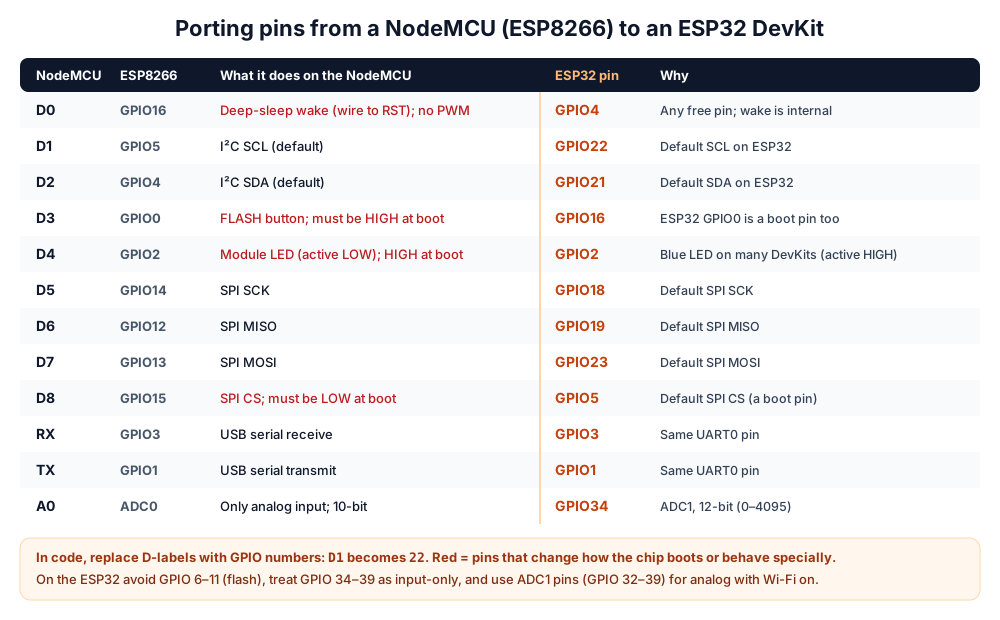 A practical pin map for moving a NodeMCU project to an ESP32 DevKit V1. Red rows are pins with boot or special behaviour.
Experiment: run the same sketch on both boards
- Upload the two-board sketch above to a NodeMCU, then to an ESP32 DevKit, with your 2.4 GHz Wi-Fi name and password.
- Open the Serial Monitor at 115200 baud and note the CPU speed and free heap each board prints.
- Open the printed IP address in a phone browser on the same Wi-Fi and refresh a few times.
- Fill in the table.
| NodeMCU (ESP8266) | ESP32 DevKit | |
|---|---|---|
| CPU MHz printed | ||
| Free heap after Wi-Fi connects | ||
| Page loads on the phone? |
What you learn: both boards do the job for a small page, but the ESP32 reports several times more free heap. That headroom is what lets it run a display, a bigger web page and Bluetooth at the same time.
If your board does not show a COM port, see ESP32 not detected: COM port fix. For project ideas that use the ESP32's extra features, see ESP32 project ideas for students. Get boards from our ESP32 products page, pick up from our Pune store, or learn hands-on at a workshop.
Frequently asked questions
Is the ESP32 better than the ESP8266?
For most projects, yes. It has two cores, far more RAM, Bluetooth, many more analog inputs and pins, and better sleep and wake options. The ESP8266 is still adequate for simple Wi-Fi-only devices.
Can ESP8266 code run on an ESP32?
Mostly, after small changes: replace ESP8266WiFi.h with WiFi.h, ESP8266WebServer with WebServer, NodeMCU D-labels with GPIO numbers, and the deep-sleep calls. Libraries that use ESP8266-only features need ESP32 versions.
Does the ESP8266 have Bluetooth?
No. The ESP8266 has Wi-Fi only. For Bluetooth, use an ESP32, which supports Bluetooth Classic and BLE, or an ESP32-C3 or ESP32-S3 for BLE only.
Which is better for battery-powered projects?
The ESP32, mainly because it wakes from deep sleep on a timer, touch or pin without extra wiring and has a ULP coprocessor. In both cases, choose a board without a power-hungry LED and USB chip, or the board will drain the battery long before the chip does.
Are ESP8266 and ESP32 pins 5 V tolerant?
Treat both as 3.3 V only. Power the boards with 5 V through USB or the 5V/VIN pin, but use a voltage divider or level shifter for any 5 V signal going into a GPIO pin. Our Arduino vs ESP32 vs Raspberry Pi Pico guide explains logic levels in detail.
Thinking Robot Team
Thinking Robot is a team of engineers and educators in Pune who design electronics and robotics kits and run hands-on workshops for students and schools. Spotted a mistake or have a question? Get in touch.