⚡ESP32 "Brownout detector was triggered": Causes and Fixes (Cable, Wi-Fi, Servos, Batteries)
ESP32 keeps resetting with "Brownout detector was triggered"? Learn what a brownout is, why Wi-Fi bursts and thin USB cables cause it, how to power servos and batteries properly, and why disabling the detector is a last resort.
In this article (17)
- Quick fix: ESP32 brownout checklist
- What does "Brownout detector was triggered" mean?
- Find the cause: when does the brownout happen?
- Cause 1: weak USB port, hub or thin cable
- Cause 2: Wi-Fi current bursts and the AMS1117 regulator
- Cause 3: servos, motors, relays and LED strips on the same supply
- Cause 4: the battery cannot hold its voltage
- How to power an ESP32 properly
- Hands-on: catch the brownout with the reset reason
- Should you disable the brownout detector?
- Where to go next
- Frequently asked questions
- What causes "Brownout detector was triggered" on an ESP32?
- Will a capacitor fix the ESP32 brownout?
- Is it safe to disable the brownout detector?
- Why does my ESP32 reset only when Wi-Fi connects?
- Can I power an ESP32 from a 3.7 V Li-ion battery?
If your ESP32 keeps restarting and the Serial Monitor shows "Brownout detector was triggered", your board is not broken and your code is usually not the problem. This guide explains the ESP32 brownout detector triggered error, how to find which part of your power supply is failing, and how to fix it properly.
Direct answer: "Brownout detector was triggered" means the ESP32's 3.3 V supply dipped below a safe level, so the chip reset itself to avoid corrupting memory. It almost always happens when Wi-Fi starts or a servo or motor switches on, and the fix is better power: a short, good USB cable and port, a reservoir capacitor across 3V3 and GND, and a separate supply for motors and servos. Disabling the detector in code hides the symptom and should be your very last resort.
Quick fix: ESP32 brownout checklist
Ordered from most to least likely. Try each fix and watch whether the resets stop.
| # | Likely cause | How to confirm | Fix |
|---|---|---|---|
| 1 | Thin or long USB cable | Resets stop with a shorter, thicker cable | Short, good-quality data cable |
| 2 | Weak USB port or unpowered hub | Resets stop on another port or a 5 V adapter | PC port directly, or 5 V 1 A+ adapter |
| 3 | Servo, motor, relay or LED strip on the same supply | Resets happen exactly when the load switches on | Separate supply, common GND |
| 4 | Battery too low under load | 1 Li-ion cell, or AA cells, on 5V/VIN | 5 V converter, or 3.3 V regulator to 3V3 |
| 5 | Not enough local capacitance | Resets only when Wi-Fi starts | 100 µF–470 µF across 3V3 and GND |
| 6 | Damaged regulator or board | Same setup works with another board | Replace the board |
What does "Brownout detector was triggered" mean?
A brownout is a short dip in supply voltage, and the ESP32 has a built-in detector that resets the chip when its supply falls too low. With the default settings the trigger level is about 2.43 V. Below its rated 3.0 V to 3.6 V range the processor, radio and flash memory may misbehave, so a clean reset is safer than carrying on.
On a classic ESP32 the Serial Monitor (115200 baud) typically shows a loop like this:
Brownout detector was triggered

ets Jun  8 2016 00:22:57

rst:0xc (SW_CPU_RESET),boot:0x13 (SPI_FAST_FLASH_BOOT)
The boot messages then repeat until the supply improves. Newer chips such as the ESP32-S3 and ESP32-C3 print the same first line with different boot details.
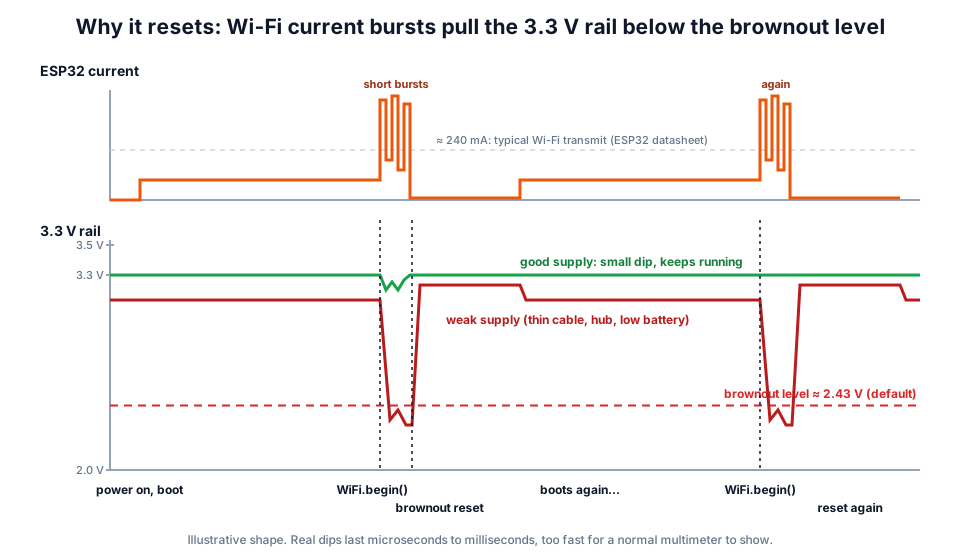 Each time WiFi.begin() runs, the current bursts pull a weak supply under the brownout level, and the cycle repeats.
The dips are short (microseconds to milliseconds), so a normal multimeter will usually show a healthy-looking 3.3 V even while the board is resetting. Judge by when the resets happen, not by a multimeter reading.
Find the cause: when does the brownout happen?
The moment the reset happens tells you which part of the supply is failing.
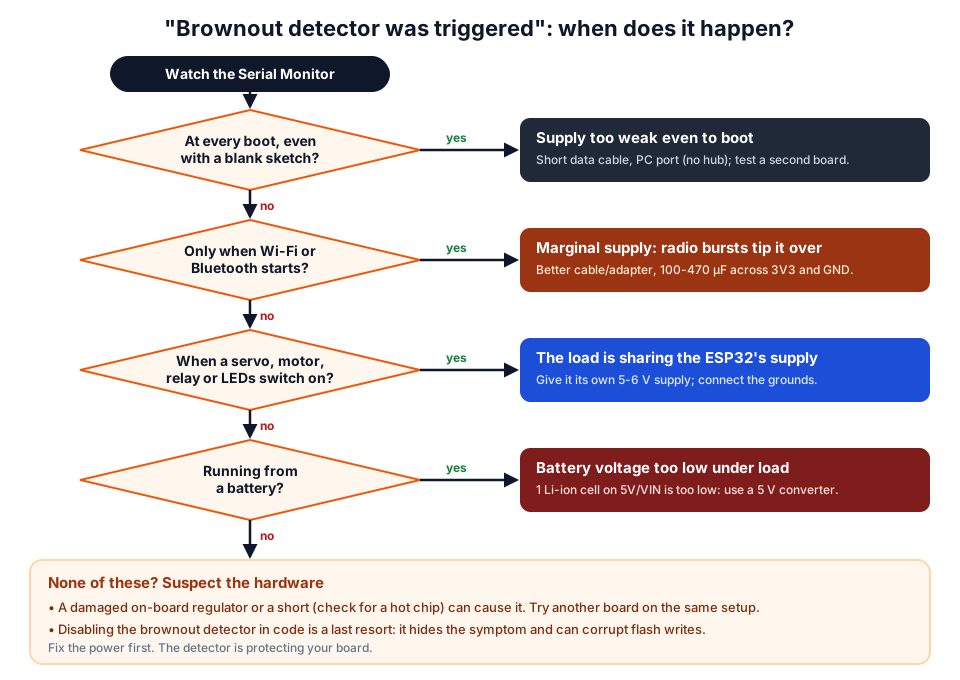 Match the moment of the reset to its cause.
| When it resets | Most likely cause | First thing to try |
|---|---|---|
| At every boot, even with an empty sketch | Very weak supply, bad cable, or damaged regulator | Different cable and PC port; try a second board |
When WiFi.begin() or Bluetooth starts | Supply only just good enough | Short cable, 5 V adapter, 470 µF on 3V3 |
| When a servo, motor or relay switches | Load shares the ESP32's supply | Separate supply with a common ground |
| After a few minutes on batteries | Battery sagging under load | Charge or replace; use a converter |
| ESP32-CAM when the camera or Wi-Fi starts | Camera plus radio need more current | 5 V supply into the 5V pin, not an adapter's 3.3 V pin |
Cause 1: weak USB port, hub or thin cable
Every USB cable has resistance, and thin, long cables lose a surprising amount of voltage when the ESP32's Wi-Fi bursts arrive. USB 2.0 ports only promise 4.75 V to 5.25 V and 500 mA, front-panel ports and unpowered hubs are often weaker, and the AMS1117 on the board then has too little headroom.
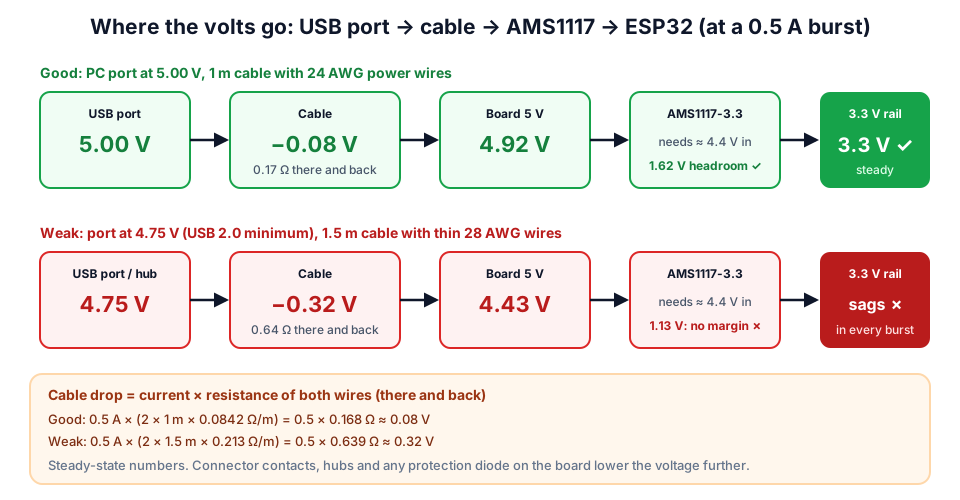 Same board, same code: only the port and cable changed.
Try your own numbers with our wire gauge and voltage drop calculator. Cable makers rarely print the wire gauge, so the practical test is simple: swap to a short, thick cable and a port on the PC itself, or a 5 V 1 A (or larger) phone charger. If the resets stop, you have found the cause. A short USB data cable is the cheapest fix in this whole guide.
Cause 2: Wi-Fi current bursts and the AMS1117 regulator
The ESP32 itself is not power-hungry on average, but its radio draws sharp bursts. The ESP32 datasheet lists about 240 mA typical while transmitting 802.11b at full power, and the ESP32-WROOM-32 datasheet asks for a power supply that can deliver at least 500 mA.
| Part | Key figure | Why it matters |
|---|---|---|
| ESP32 (module) | 3.0 V – 3.6 V operating range | Below this, behaviour is not guaranteed |
| Wi-Fi transmit | about 240 mA typical, in bursts | The bursts cause the dips |
| Recommended supply | 500 mA or more | A weak supply cannot follow the bursts |
| AMS1117-3.3 regulator | up to 1 A, about 1.1 V dropout | Needs about 4.4 V in for a clean 3.3 V out |
| USB 2.0 port | 4.75 V – 5.25 V, 500 mA | Little margin left after a thin cable |
Some low-cost boards also use small or poorly placed capacitors, or a protection diode that costs a few more tenths of a volt. That is why one board may work on a cable that makes another reset.
Cause 3: servos, motors, relays and LED strips on the same supply
A servo or motor draws a large current spike when it starts, and if it shares the ESP32's supply, that spike drags the 3.3 V rail down. This is the classic "it works until the servo moves" problem.
Power the load from its own 5 V – 6 V supply (a 4 × AA NiMH pack, a 5 V adapter, or a buck converter from a Li-ion pack), and connect its GND to the ESP32's GND so the control signal has a common reference. Never take servo or motor power from the ESP32's 3V3 or 5V pins. Our SG90 servo guide and Arduino resets when the motor starts show the right wiring step by step.
Cause 4: the battery cannot hold its voltage
A battery's voltage drops under load, and a single Li-ion cell is too low for the board's 5V/VIN pin in the first place. One 18650 cell runs from about 4.2 V (full) down to 3.0 V, but the AMS1117 needs about 4.4 V to output a steady 3.3 V.
| Battery setup | Works? | Better option |
|---|---|---|
| 1 × Li-ion (3.7 V) into 5V/VIN | No: below the regulator's needs | Boost converter to 5 V, or a low-dropout 3.3 V regulator into 3V3 |
| 3 × AA alkaline (4.5 V) into 5V/VIN | Marginal, worse as cells drain | 4 × AA into a 5 V converter, or a Li-ion pack |
| 2 × Li-ion (7.4 V) + 5 V buck into 5V/VIN | Yes | Choose a converter rated 1 A or more |
| 9 V PP3 battery into 5V/VIN | Poor: weak under load | 2S Li-ion pack with a buck converter |
For choosing and charging packs safely, read our robot battery guide (18650 vs LiPo vs AA).
How to power an ESP32 properly
Use exactly one power input: the USB connector, the 5V/VIN pin with a regulated 5 V supply, or the 3V3 pin with a regulated 3.3 V supply. Espressif's ESP32-DevKitC user guide warns that using more than one at the same time can damage the board or the power source.
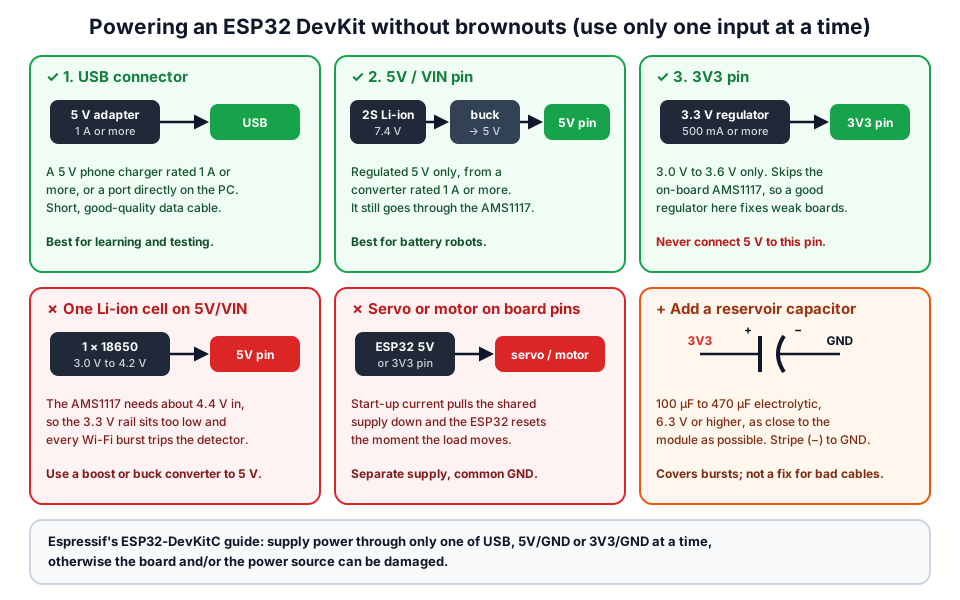 Pick one input, keep heavy loads on their own supply, and add a reservoir capacitor.
Add capacitors: an electrolytic capacitor of 100 µF to 470 µF (rated 6.3 V or more) across 3V3 and GND, as close to the module as you can, supplies the short bursts locally. Fit it with the stripe (−) to GND. If you design your own board, Espressif's hardware guidelines also recommend an RC delay on EN (10 kΩ and 1 µF) so the chip starts cleanly when power rises slowly; it helps with power-up glitches but does not fix a weak supply.
Hands-on: catch the brownout with the reset reason
This experiment proves whether your resets really are brownouts, and lets you test each fix. Upload the sketch, open the Serial Monitor at 115200 baud and watch the first line after each restart.
#include <WiFi.h>
#include "esp_system.h"

const char* ssid = "YOUR_WIFI";
const char* pass = "YOUR_PASSWORD";

void setup() {
  Serial.begin(115200);
  delay(500);
  esp_reset_reason_t r = esp_reset_reason();
  Serial.printf("Reset reason: %d %s\n", (int)r,
                r == ESP_RST_BROWNOUT ? "<-- BROWNOUT" : "");
  Serial.println("Starting Wi-Fi...");
  WiFi.mode(WIFI_STA);
  WiFi.begin(ssid, pass);
}

void loop() {
  static unsigned long last = 0;
  if (millis() - last > 2000) {
    last = millis();
    Serial.printf("Wi-Fi status: %d, uptime %lu s\n", (int)WiFi.status(), millis() / 1000);
  }
}
esp_reset_reason() is part of Espressif's system API; ESP_RST_BROWNOUT means the last reset was a brownout.
- Baseline: run it with the setup that fails (long cable, hub, servo connected). Note how often "BROWNOUT" appears.
- Change one thing: a short cable on a PC port, or a 5 V adapter. Does the uptime keep climbing now?
- Add a 470 µF capacitor across 3V3 and GND and repeat with the original cable.
- Diagnostic only: add
WiFi.setTxPower(WIFI_POWER_8_5dBm);afterWiFi.mode(WIFI_STA);. If lower transmit power stops the resets, your supply is marginal. Fix the supply, then remove this line, because lower power also means shorter Wi-Fi range.
| Result | Meaning |
|---|---|
| "BROWNOUT" stops with a better cable or port | Cause 1: cable or port |
| Stops only with lower transmit power | Supply is marginal: capacitor plus better supply |
| Stops only when the servo or motor is unplugged | Cause 3: give the load its own supply |
| Reset reason is not brownout (for example a panic or watchdog) | A code problem, not a power problem |
Should you disable the brownout detector?
No, not as a fix. Disabling it does not give the ESP32 more voltage; it only stops the chip protecting itself. The board may then crash randomly, drop Wi-Fi, or corrupt data while writing to flash (Preferences, LittleFS or an OTA update).
#include "soc/soc.h"
#include "soc/rtc_cntl_reg.h"

void setup() {
  WRITE_PERI_REG(RTC_CNTL_BROWN_OUT_REG, 0);  // LAST RESORT: turns off brownout reset
  Serial.begin(115200);
}

void loop() {}
If you use ESP-IDF directly, the same setting lives in menuconfig as the hardware brownout detect option, along with the trigger voltage level.
Where to go next
- ESP32 not even showing a COM port? See ESP32 not detected: COM port fixes.
- Picking a board for your next build? Read best ESP32 board for beginners in India, and find a project in ESP32 project ideas for students.
- Need parts? Browse ESP32 boards, capacitors and buck converters, or learn hands-on at our workshops.
Frequently asked questions
What causes "Brownout detector was triggered" on an ESP32?
A dip in the ESP32's supply voltage below the brownout level (about 2.43 V by default). The usual triggers are Wi-Fi current bursts on a weak USB cable or port, a servo or motor sharing the supply, or a battery that sags under load.
Will a capacitor fix the ESP32 brownout?
Often, if the supply is only slightly weak. A 100 µF to 470 µF electrolytic across 3V3 and GND, close to the module, covers short bursts. It will not fix a very thin cable, a single Li-ion cell on the 5V pin or a servo on the same supply.
Is it safe to disable the brownout detector?
Not as a fix. It hides the symptom while the ESP32 keeps running below its rated voltage, which can cause random crashes and corrupted flash data. Fix the power supply first; disable it only as a temporary test.
Why does my ESP32 reset only when Wi-Fi connects?
Wi-Fi transmission draws short current bursts (about 240 mA typical, per the ESP32 datasheet), much more than the chip uses while idle. A supply that copes with the idle current can still dip during those bursts.
Can I power an ESP32 from a 3.7 V Li-ion battery?
Not through the 5V/VIN pin of a typical DevKit, because its AMS1117 regulator needs about 4.4 V in. Use a boost converter to 5 V into the 5V pin, or a low-dropout 3.3 V regulator into the 3V3 pin, and never feed a battery straight into 3V3.
Thinking Robot Team
Thinking Robot is a team of engineers and educators in Pune who design electronics and robotics kits and run hands-on workshops for students and schools. Spotted a mistake or have a question? Get in touch.