🔋Arduino Resets When Motor Starts? Fix Random Resets from Motors and Servos (Wiring Guide)
Arduino or ESP32 resets or acts randomly when motors or servos start? Learn why start-up current, battery sag and motor noise cause it, and fix it with separate supplies, a common ground, capacitors, flyback diodes and proper wire.
In this article (17)
- Quick fix: Arduino resets when motor starts
- Why does an Arduino reset when a motor starts?
- Cause 1: motors or servos powered from the Arduino
- Cause 2: the battery sags at start-up
- Should the Arduino and the motor share a ground?
- Cause 3: electrical noise and spikes
- Cause 4: no flyback diode
- Cause 5: thin wires and breadboards
- Hands-on: prove whether the board is resetting
- ESP32 and servo notes
- Where to go next
- Frequently asked questions
- Why does my Arduino reset when the motor starts?
- Can I power a motor from the Arduino's 5V pin?
- Do the Arduino and motor battery need a common ground?
- What capacitor should I put across a DC motor?
- Why does my robot work on USB but reset on batteries?
Your robot car code works perfectly with the wheels off the ground, but the moment the motors start, the Arduino resets when the motor starts, the servo twitches, or the board starts behaving randomly. This is the most common power problem in student robotics, and it has a clear set of causes and fixes.
Direct answer: an Arduino (or ESP32) resets when a motor or servo starts because the motor's start-up current pulls the supply voltage down, or its electrical noise and spikes disturb the board. The fix is to power the motors from their own battery through a motor driver, connect only the grounds together (one wire), and add 100 nF capacitors across the motors plus a bulk capacitor at the driver. Never run motors or servos from the Arduino's 5V pin.
Quick fix: Arduino resets when motor starts
Ordered from the most common cause to the least.
| # | Likely cause | How to confirm | Fix |
|---|---|---|---|
| 1 | Motor or servo powered from the Arduino's 5V pin or USB | Driver or servo power wire goes to the Arduino | Separate battery for motors, common GND |
| 2 | One weak battery runs everything | Resets as motors start; worse as the battery drains | Stronger pack, or separate supplies |
| 3 | Motor noise | Resets even with separate supplies | 100 nF across each motor, twisted wires |
| 4 | Ground wiring | Motor current returns through the Arduino's GND | Star ground: one GND wire to the driver |
| 5 | No flyback diode | Motor or relay switched by one transistor | Diode across the motor or coil |
| 6 | Thin wires, breadboard | Motor current runs through jumpers | Short, thick wires straight to the driver |
| 7 | No bulk capacitor | Resets at direction changes or full-speed starts | 100 µF–470 µF across the driver's supply |
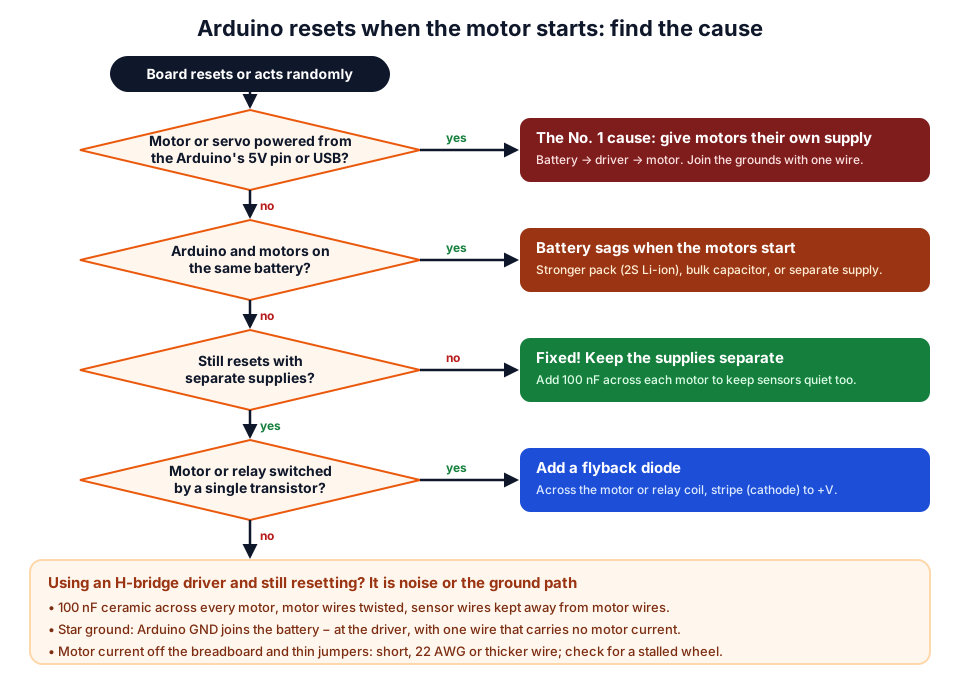 Answer the questions from the top; most robots are fixed by the first two boxes.
Why does an Arduino reset when a motor starts?
Because a stopped motor behaves almost like a short circuit for a moment. A spinning DC motor generates a back-voltage that limits its current, but at the instant it starts there is none, so the current is limited only by the winding resistance:
Start-up (stall) current ≈ supply voltage ÷ winding resistance
Example: winding measures 5 Ω on a multimeter, 6 V supply → 6 ÷ 5 = 1.2 A
That surge lasts only a fraction of a second, but it is enough to upset the board in three ways:
| What the motor does | What the Arduino sees | Result |
|---|---|---|
| Draws a big start-up current | Supply voltage dips (battery sag) | Brown-out reset or random crash |
| Returns that current through shared GND wires | The Arduino's "0 V" jumps around | Wrong readings, glitches, resets |
| Sparks inside its brushes; spikes when switched off | Electrical noise on power and signal wires | Random resets, frozen sketches |
On an Arduino Uno, the ATmega328P's brown-out detector is set to reset the chip if its supply falls below about 2.7 V. Between that and about 4.5 V, a 16 MHz ATmega328P is outside the speed range guaranteed in the ATmega328P documentation, so it may crash or freeze without a clean reset. That is why the symptom is sometimes "acts randomly" rather than "restarts". On an ESP32 the same dip prints Brownout detector was triggered (see our ESP32 brownout fix).
Cause 1: motors or servos powered from the Arduino
The Arduino's 5V pin is meant for sensors and small modules, not motors. When a motor driver or servo takes its power from the 5V pin, every start-up surge flows through the Arduino's own regulator or USB connection. An Uno's USB input is protected by a 500 mA resettable fuse, so a 1 A – 2 A motor surge collapses the 5 V rail and the board resets.
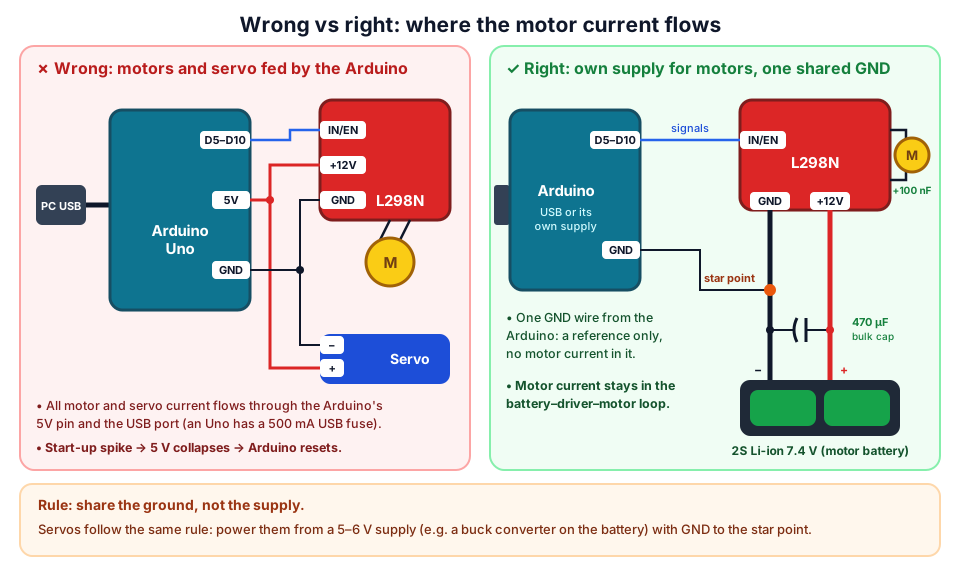 Motor current should flow only around the battery, driver and motor loop, never through the Arduino.
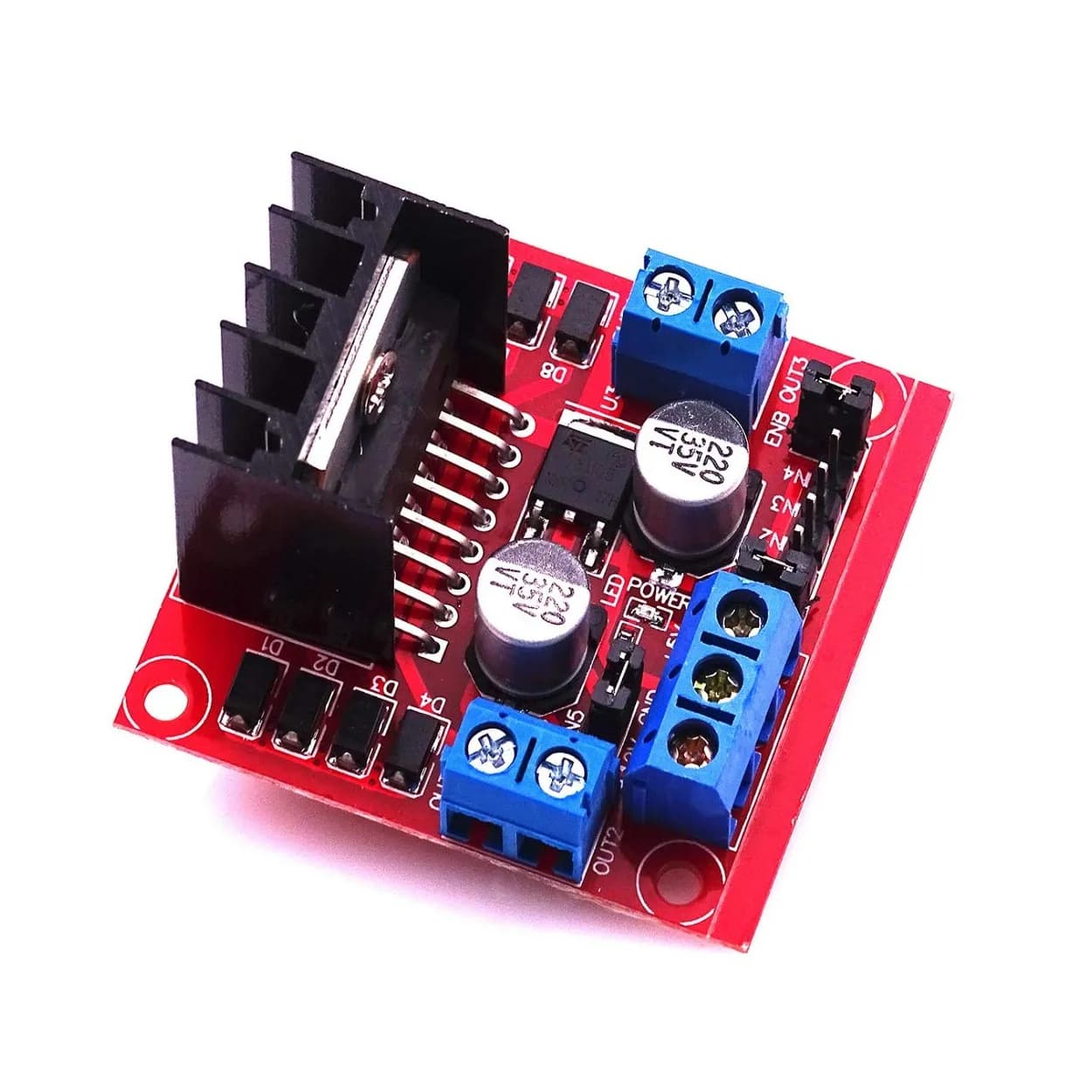
Fix: power the motor driver's VS (+12V) terminal from a battery, connect the battery negative to the driver's GND, and run one wire from the Arduino's GND to the driver's GND. The Arduino can stay on USB while you test. Our L298N robot car guide shows the full wiring, and the L298N vs TB6612FNG vs DRV8833 comparison helps you pick a driver. For servos, see the power section of our SG90 servo guide.
Cause 2: the battery sags at start-up
Every battery has internal resistance, so its voltage drops while it delivers a big current. If the Arduino runs from the same battery, its supply drops too.
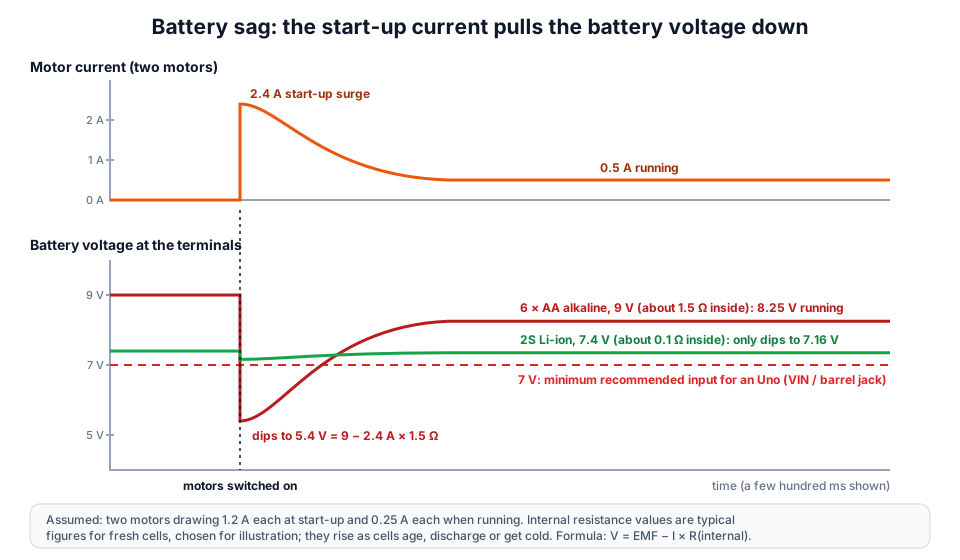 Same motors, two batteries. Internal resistance decides how far the voltage falls.
| Battery pack | Nominal voltage | Typical internal resistance (assumed) | Voltage during a 2.4 A surge |
|---|---|---|---|
| 9 V PP3 (alkaline) | 9 V | about 2 Ω | 9 − 4.8 = 4.2 V |
| 6 × AA alkaline | 9 V | about 1.5 Ω | 5.4 V |
| 2S Li-ion 18650 pack | 7.4 V | about 0.1 Ω | 7.4 − 0.24 = 7.16 V |
Internal resistance rises as cells age, drain or get cold, so a robot that worked on fresh cells often starts resetting as the battery runs down. A 2S Li-ion pack holds its voltage much better (our robot battery guide explains how to choose and charge one safely), but even it gets close to 7 V when nearly empty. The most robust fix is a separate supply for the Arduino, or a 5 V buck-boost converter that holds its output steady while the battery dips. Estimate run time with the battery life calculator.
Should the Arduino and the motor share a ground?
Yes: they must share a ground, but they should not share a supply. The control signals (IN1, ENA, servo signal) are measured relative to GND, so without a common ground the driver or servo cannot read them. But the motor's large current should never flow through the Arduino's GND pins or thin breadboard wires on its way back to the battery.
Use a star ground: battery negative, driver GND and the single Arduino GND wire all meet at one point, usually the driver's GND terminal. The Arduino GND wire then carries only tiny signal currents, so its "0 V" stays steady.
Cause 3: electrical noise and spikes
Brushed DC motors spark inside as they run, and every spark is a burst of electrical noise. That noise travels along the motor wires and can reset the Arduino or confuse sensors, even with separate supplies.
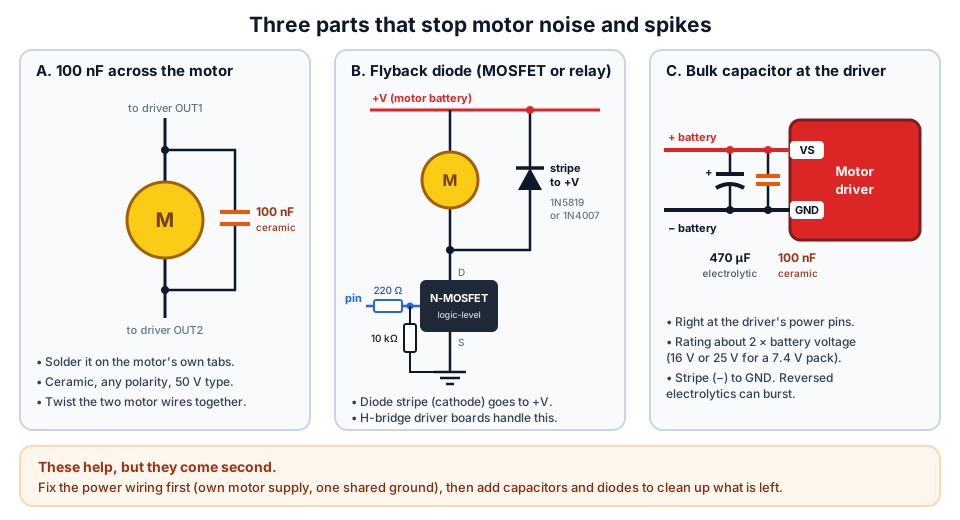 Capacitors and diodes come after the power wiring is right.
| Part | Value | Where it goes | What it does |
|---|---|---|---|
| Ceramic capacitor | 100 nF (code "104"), 50 V | Across each motor's terminals, soldered at the motor | Shorts out high-frequency brush noise |
| Electrolytic capacitor | 100 µF – 470 µF, 16 V or 25 V for a 7.4 V pack | Across the driver's VS and GND | Supplies start-up surges locally |
| Ceramic capacitor | 100 nF | Next to the electrolytic at the driver | Handles fast spikes the electrolytic is too slow for |
| Electrolytic for servos | 470 µF – 1000 µF, 10 V or more | Across the servo supply, near the servos | Stops servo jitter and dips |
Also twist each pair of motor wires together and keep sensor wires away from them. Read the "104" code with our capacitor code calculator if you are unsure.
Cause 4: no flyback diode
When you switch a motor or relay off, its coil produces a reverse voltage spike that can damage a transistor and reset the Arduino. If you drive a motor with a single MOSFET or transistor, or switch a relay coil, fit a diode across the motor or coil with its stripe (cathode) to the + supply. A Schottky diode such as the 1N5819 suits PWM; a 1N4007 works for simple on/off switching. H-bridge driver boards such as L298N modules, TB6612FNG and DRV8833 already handle this internally or on the board. Our PWM guide shows the full MOSFET circuit.
Cause 5: thin wires and breadboards
Jumper wires and breadboard contacts are made for signals, not amps. Their resistance turns start-up current into extra voltage drop and heat.
Connector contacts add more on top. Run motor power with short wires of 22 AWG or thicker, screw them into the driver's terminals, and keep motor current off the breadboard. Check your own runs with the wire gauge and voltage drop calculator.
Hands-on: prove whether the board is resetting
This sketch counts every restart in EEPROM, so you can tell a real reset from a code bug even when the robot is not connected to a PC. It uses one motor on an L298N wired as in our L298N guide (ENA on D5, IN1 on D7, IN2 on D8).
#include <EEPROM.h>

const int ENA = 5, IN1 = 7, IN2 = 8;   // one motor on an L298N

void setup() {
  Serial.begin(9600);
  byte boots = EEPROM.read(0);
  if (boots == 255) boots = 0;         // a fresh EEPROM reads 255
  boots++;
  EEPROM.write(0, boots);
  Serial.print(F("Boot number: "));
  Serial.println(boots);

  pinMode(LED_BUILTIN, OUTPUT);
  for (int i = 0; i < 3; i++) {        // three quick blinks = "I just restarted"
    digitalWrite(LED_BUILTIN, HIGH); delay(150);
    digitalWrite(LED_BUILTIN, LOW);  delay(150);
  }

  pinMode(ENA, OUTPUT); pinMode(IN1, OUTPUT); pinMode(IN2, OUTPUT);
  digitalWrite(IN1, HIGH); digitalWrite(IN2, LOW);
}

void loop() {
  analogWrite(ENA, 255);   // full-speed start: the hardest moment for the supply
  delay(1500);
  analogWrite(ENA, 0);
  delay(1500);
}
- Upload it, open the Serial Monitor and note the boot number (opening the monitor also resets the board once).
- Test A: power the Arduino and the motor from the same battery, the way that fails. Let it run for a minute with the wheels on the floor. Watch for the triple blink when a motor starts.
- Test B: give the Arduino its own supply (USB or a separate pack), keep one GND wire to the driver, and repeat.
- Test C: add the 100 nF and 470 µF capacitors and repeat Test A.
- Reconnect USB and read the boot number again.
| What you see | Meaning |
|---|---|
| Boot number jumps in Test A, not in Test B | Supply sag (Cause 2): separate supplies fixed it |
| Jumps in both tests | Noise or ground path (Causes 3–4) |
| Test C stops the jumps | Capacitors were enough for this battery |
| Number never jumps, but the robot still misbehaves | Not a reset: check your code and sensor wiring |
ESP32 and servo notes
The ESP32 is even more sensitive, because it runs at 3.3 V and its Wi-Fi adds its own current bursts. Apply the same rules: separate 5 V – 6 V supply for servos and motors, one common ground, and capacitors. Our ESP32 brownout guide covers the ESP32's power input options.
Where to go next
- Build it right first time: Arduino projects for beginners with parts lists and the Arduino starter kit buying guide.
- Get the parts: motor drivers, capacitors, 18650 battery holders and complete robot kits.
- Learn with a mentor in Pune at our workshops or robotics classes for kids.
Frequently asked questions
Why does my Arduino reset when the motor starts?
The motor's start-up current makes the supply voltage dip, or its electrical noise reaches the Arduino. Power the motors from their own battery through a motor driver, connect the grounds with one wire, and add a 100 nF capacitor across each motor.
Can I power a motor from the Arduino's 5V pin?
No. Even a small DC motor can draw over 1 A for a moment when it starts, while an Uno's USB input has a 500 mA fuse. Use a motor driver powered from a separate battery. Only tiny loads such as one unloaded SG90 servo for a quick test are acceptable.
Do the Arduino and motor battery need a common ground?
Yes. Without a common ground the driver cannot read the Arduino's control signals. Connect one wire from the Arduino's GND to the driver's GND, where the battery negative also connects, so the motor current does not flow through the Arduino.
What capacitor should I put across a DC motor?
A 100 nF (marked "104") ceramic capacitor soldered across the motor's terminals. For extra protection add a 100 µF to 470 µF electrolytic across the motor driver's supply, rated well above the battery voltage.
Why does my robot work on USB but reset on batteries?
The battery probably sags when the motors start, especially AA cells or a 9 V PP3 battery, which have high internal resistance. Use a 2S Li-ion pack for the motors and keep the Arduino's supply separate, or feed it through a 5 V buck-boost converter that holds steady through the dips.
Thinking Robot Team
Thinking Robot is a team of engineers and educators in Pune who design electronics and robotics kits and run hands-on workshops for students and schools. Spotted a mistake or have a question? Get in touch.