⚙️L298N vs TB6612FNG vs DRV8833: Which Motor Driver Should You Use?
Voltage and current ratings, the 2 V the L298N wastes, logic levels, standby, heat, and which driver suits BO, N20 and bigger motors, with wiring diagrams and code.
In this article (14)
- L298N vs TB6612FNG vs DRV8833: specs side by side
- Why the L298N loses about 2 V: bipolar vs MOSFET
- Logic levels, standby and the pins you must not forget
- Which motor driver for BO motors, N20 motors and bigger motors?
- Wiring the TB6612FNG to an Arduino Uno
- Wiring the DRV8833 to an ESP32
- Experiment: measure what reaches your motor
- Common mistakes
- Frequently asked questions
- Is the TB6612FNG better than the L298N?
- Can the DRV8833 drive BO motors?
- Do these motor drivers work with an ESP32's 3.3 V logic?
- Why does my L298N get hot?
- Can I use one DRV8833 for a single bigger motor?
L298N vs TB6612FNG vs DRV8833: which motor driver should you use for your robot? All three are dual H-bridge drivers that let an Arduino or ESP32 run two DC motors forwards, backwards and at any speed. On paper they look interchangeable. On a battery-powered robot car they are not, because one of them quietly throws away about 2 V of your battery as heat.
This comparison uses numbers from the ST, Toshiba and Texas Instruments datasheets to cover ratings, voltage drop, logic levels, standby and heat, then shows which to pick for BO, N20 and bigger motors, with wiring diagrams, code and a multimeter experiment.
Short answer: for small battery robots with BO or N20 motors, use a TB6612FNG, or a DRV8833 if your battery stays under 10.8 V. Both use MOSFETs and lose only a fraction of a volt. Keep the L298N for learning, for motor supplies above about 13 V, and for motors drawing up to about 2 A continuously, and expect it to run warm and give your motors roughly 2 V less.
L298N vs TB6612FNG vs DRV8833: specs side by side
| L298N module (ST L298) | TB6612FNG | DRV8833 | |
|---|---|---|---|
| Switch type | Bipolar (BJT) | MOSFET | MOSFET |
| Motor supply | Up to 46 V (chip); at least 2.5 V above the logic HIGH level | 4.5–13.5 V (15 V absolute max) | 2.7–10.8 V |
| Continuous current per channel | 2 A | 1.2 A average | 1.5 A RMS (with good PCB cooling) |
| Peak current per channel | 3 A (non-repetitive, 100 µs) | 3.2 A (single 10 ms pulse) | 2 A |
| Voltage lost inside | 1.8–3.2 V total at 1 A | I × 0.5 Ω (typical) | I × 0.36 Ω (typical) |
| Logic supply | 5 V (module regulator or Arduino) | VCC 2.7–5.5 V | None needed (internal) |
| Sleep / standby | No standby pin | STBY pin | nSLEEP pin |
| Built-in protection | Over-temperature | Thermal shutdown, low-voltage detection | Over-current, thermal, under-voltage, nFAULT output |
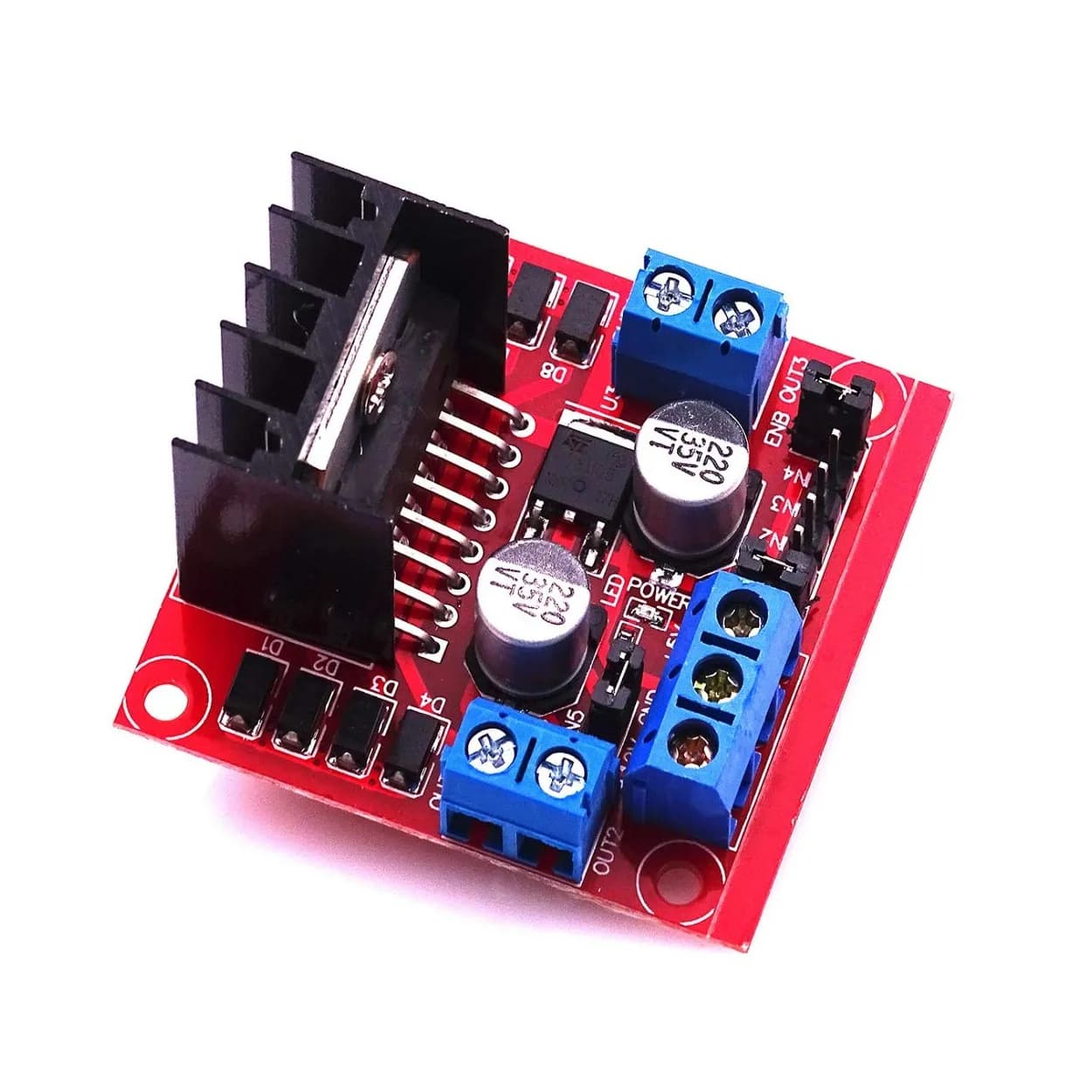
| Typical board | Large red module, heatsink, screw terminals | Small breakout, pin headers | Small breakout, pin headers |
Sources: ST L298 datasheet, Toshiba TB6612FNG datasheet and TI DRV8833 datasheet. Module boards add their own regulators, capacitors and diodes, so check the listing too.
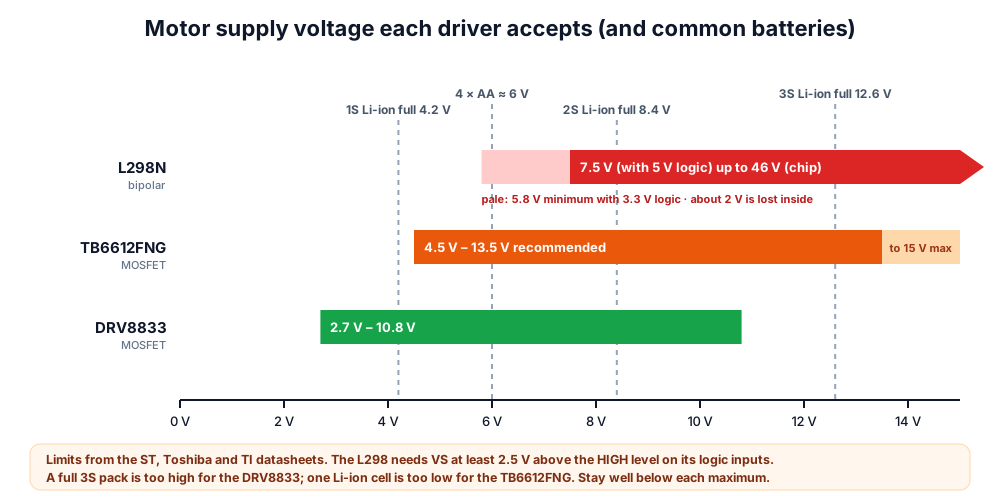 Which battery suits which driver. A full 3S pack (12.6 V) is too high for the DRV8833; one Li-ion cell is too low for the TB6612FNG.
Why the L298N loses about 2 V: bipolar vs MOSFET
The L298N's switches are bipolar transistors. Motor current flows through two of them (high-side and low-side), and each has a saturation voltage of around a volt that barely shrinks at low current. The TB6612FNG and DRV8833 use MOSFETs, which act like small resistors when on, so their loss scales with current.
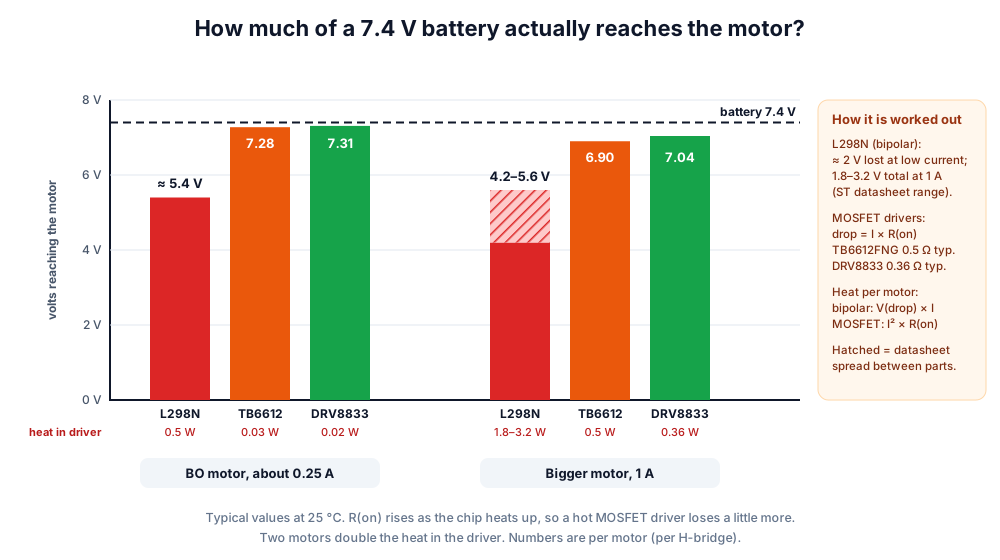 Same battery, same motor: the MOSFET drivers pass almost all of the battery voltage to the motor.
| Driver, 7.4 V battery, 0.25 A motor | Voltage at motor | Share of battery voltage reaching the motor | Heat for two motors |
|---|---|---|---|
| L298N | ≈ 5.4 V | ≈ 73 % | ≈ 1 W |
| TB6612FNG | ≈ 7.28 V | ≈ 98 % | ≈ 0.06 W |
| DRV8833 | ≈ 7.31 V | ≈ 99 % | ≈ 0.05 W |
That missing 2 V is why the same robot feels faster on a TB6612FNG and why a 4 × AA pack (6 V) feels weak through an L298N. On-resistance rises as a chip warms, but the gap stays large. Battery choices are compared in our robot battery guide.
Logic levels, standby and the pins you must not forget
All three drivers work with 5 V Arduino signals and with 3.3 V ESP32 signals, with one catch on the TB6612FNG.
| L298N | TB6612FNG | DRV8833 | |
|---|---|---|---|
| Pins per motor | ENx (PWM) + IN1, IN2 | PWMx + xIN1, xIN2 | xIN1, xIN2 (PWM goes on these) |
| Pins for two motors | 6 | 7 (6 + STBY) | 4 (+ nSLEEP if not pulled up) |
| 3.3 V logic (ESP32) | Works: input HIGH is 2.3 V minimum | Works when VCC = 3.3 V | Works |
| Must not forget | Remove ENA/ENB jumpers to use PWM | STBY HIGH, or nothing moves | nSLEEP HIGH, or nothing moves |
| Idle current with motors stopped | Tens of mA (chip, regulator, LED) | About 1 µA in standby | Microamps in sleep |
| Stop modes | Brake or coast | Short brake or stop (coast) | Brake (slow decay) or coast (fast decay) |
The TB6612FNG's inputs need at least 0.7 × VCC to read HIGH. If VCC is 5 V, that is 3.5 V, which an ESP32's 3.3 V output does not reach. Tie VCC to 3.3 V on an ESP32 robot and the problem disappears.
Which motor driver for BO motors, N20 motors and bigger motors?
Match the driver to your battery voltage first, then to the motor's stall current. A driver's peak rating should be above the motor's stall current, and its continuous rating above the running current.
| Your robot | Best pick | Also OK | Avoid |
|---|---|---|---|
| 2 × BO motors on 4 × AA or 2S Li-ion, Arduino car | TB6612FNG | DRV8833 (2S stays under 8.4 V); L298N on 2S only | — |
| N20 6 V micro gear motors, small robot | DRV8833 | TB6612FNG | L298N (bulky, wastes voltage) |
| N20 12 V motors on a 3S pack | TB6612FNG (12.6 V full is close to its 13.5 V limit) | L298N | DRV8833 (above 10.8 V) |
| Tiny robot on one Li-ion cell (3.7 V) | DRV8833 | — | TB6612FNG (needs 4.5 V), L298N |
| 12 V gear motors: about 1 A running, stall under 3 A | L298N with heatsink | — | TB6612FNG and DRV8833 (current) |
| Motors whose stall current is above about 3 A | A high-current MOSFET driver | — | All three |
| Classroom kit that gets rough handling | L298N (screw terminals) | TB6612FNG | — |
To find your motor's stall current, put a multimeter on its 10 A range in series with the motor and hold the wheel still for no more than a second or two. For voltage and current in long wires, try the wire gauge voltage drop calculator.
Wiring the TB6612FNG to an Arduino Uno
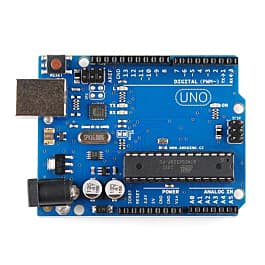
The TB6612FNG drops into the same pins as our L298N robot car, plus one extra pin for STBY.
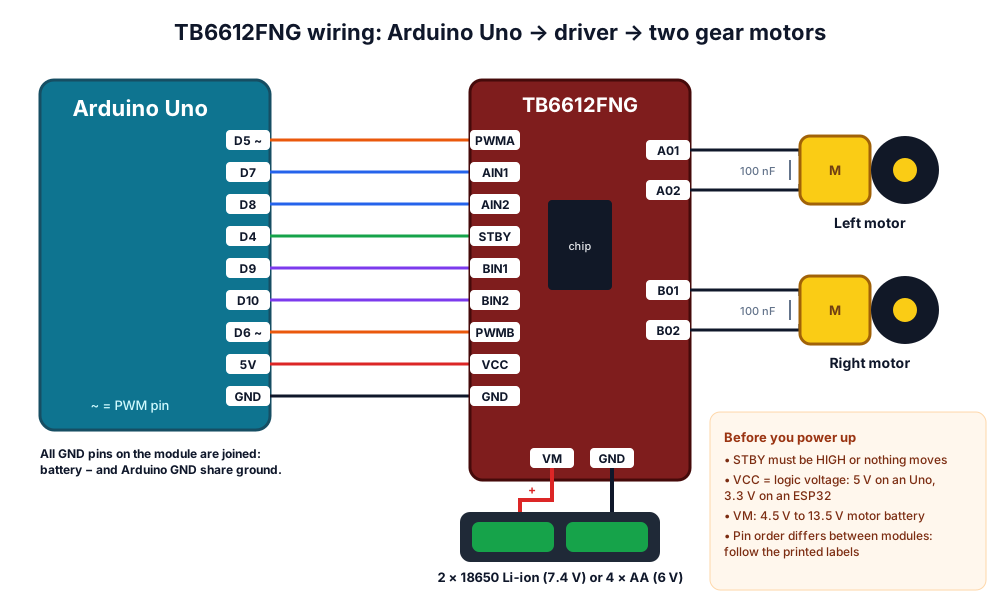 TB6612FNG with an Arduino Uno. Pin order differs between breakout boards, so follow the printed labels.
| Arduino Uno | TB6612FNG | Purpose |
|---|---|---|
| D5 (PWM) | PWMA | Left motor speed |
| D7, D8 | AIN1, AIN2 | Left motor direction |
| D6 (PWM) | PWMB | Right motor speed |
| D9, D10 | BIN1, BIN2 | Right motor direction |
| D4 | STBY | HIGH = run, LOW = standby |
| 5V | VCC | Logic supply |
| GND | GND | Common ground with the battery |
// TB6612FNG + Arduino Uno: two motors, speed -255 ... 255
const int PWMA = 5, AIN1 = 7, AIN2 = 8;    // left motor
const int PWMB = 6, BIN1 = 9, BIN2 = 10;   // right motor
const int STBY = 4;                        // HIGH = driver on

void setMotor(int pwmPin, int in1, int in2, int speed) {
  speed = constrain(speed, -255, 255);
  if (speed > 0) {
    digitalWrite(in1, HIGH); digitalWrite(in2, LOW);   // forwards
  } else if (speed < 0) {
    digitalWrite(in1, LOW);  digitalWrite(in2, HIGH);  // backwards
  } else {
    digitalWrite(in1, HIGH); digitalWrite(in2, HIGH);  // short brake
  }
  analogWrite(pwmPin, abs(speed));
}

void drive(int left, int right) {
  setMotor(PWMA, AIN1, AIN2, left);
  setMotor(PWMB, BIN1, BIN2, right);
}

void setup() {
  const int pins[] = {PWMA, AIN1, AIN2, PWMB, BIN1, BIN2, STBY};
  for (int i = 0; i < 7; i++) pinMode(pins[i], OUTPUT);
  digitalWrite(STBY, HIGH);
}

void loop() {
  drive(180, 180);   delay(2000);   // forwards
  drive(0, 0);       delay(800);    // brake
  drive(-150, 150);  delay(600);    // spin left
  drive(0, 0);       delay(800);
  digitalWrite(STBY, LOW);  delay(2000);  // standby: outputs off
  digitalWrite(STBY, HIGH);
}
Wiring the DRV8833 to an ESP32
The DRV8833 has no separate speed pin. You send PWM to the two input pins of each motor, which saves pins on small boards.
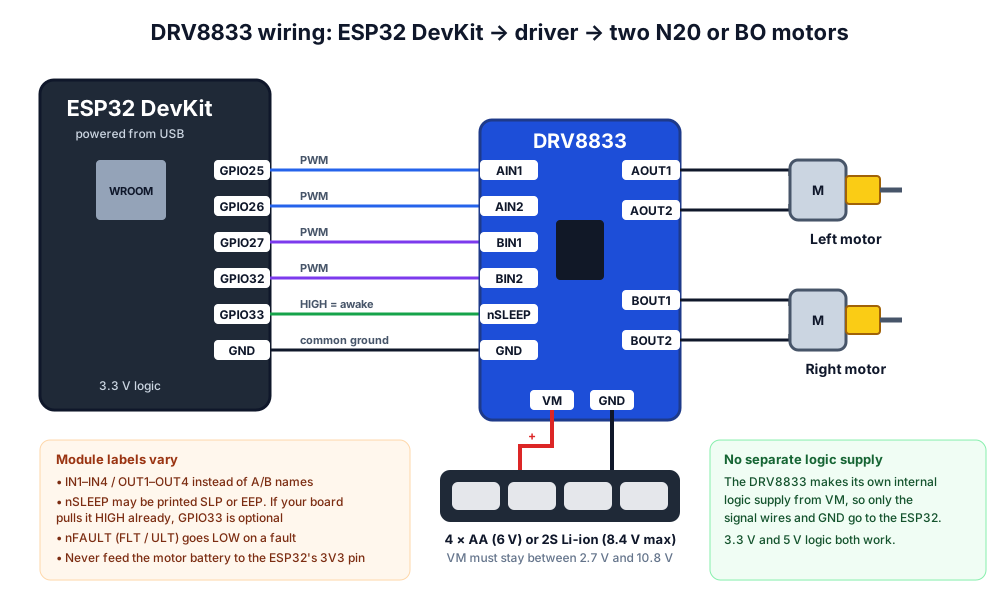 DRV8833 with an ESP32. Only signal wires and ground go to the ESP32; the driver makes its own logic supply from VM.
| xIN1 | xIN2 | Motor |
|---|---|---|
| 0 | 0 | Coast (outputs off) |
| 1 | 0 | Forwards |
| 0 | 1 | Backwards |
| 1 | 1 | Brake |
| 1 | PWM | Forwards, speed set by the time IN2 is LOW (slow decay) |
| PWM | 1 | Backwards, speed set by the time IN1 is LOW (slow decay) |
// DRV8833 + ESP32 (Arduino-ESP32 core): PWM on the IN pins, slow decay
const int AIN1 = 25, AIN2 = 26;   // left motor
const int BIN1 = 27, BIN2 = 32;   // right motor
const int SLEEP_PIN = 33;         // nSLEEP: HIGH = awake

// speed: -255 ... 255. 0 = brake.
void setMotor(int in1, int in2, int speed) {
  speed = constrain(speed, -255, 255);
  if (speed >= 0) {
    analogWrite(in1, 255);           // IN1 held HIGH
    analogWrite(in2, 255 - speed);   // forwards while IN2 is LOW
  } else {
    analogWrite(in1, 255 + speed);   // backwards while IN1 is LOW
    analogWrite(in2, 255);           // IN2 held HIGH
  }
}

void setup() {
  pinMode(SLEEP_PIN, OUTPUT);
  digitalWrite(SLEEP_PIN, HIGH);
}

void loop() {
  setMotor(AIN1, AIN2, 200);  setMotor(BIN1, BIN2, 200);   delay(2000);
  setMotor(AIN1, AIN2, 0);    setMotor(BIN1, BIN2, 0);     delay(800);
  setMotor(AIN1, AIN2, -160); setMotor(BIN1, BIN2, 160);   delay(600);
  setMotor(AIN1, AIN2, 0);    setMotor(BIN1, BIN2, 0);     delay(800);
}
analogWrite() works on ESP32 pins in current versions of the Arduino-ESP32 core. If the ESP32 resets every time the motors start, see why an Arduino or ESP32 resets when a motor starts and the ESP32 brownout fix.
Experiment: measure what reaches your motor
You need a multimeter, a fully charged 2S pack (or fresh 4 × AA), one motor and whichever drivers you have.
- Lift the robot so the wheels spin freely and note the battery voltage with the motor stopped.
- Run one motor at full speed (
drive(255, 0)on the TB6612FNG or L298N;setMotor(AIN1, AIN2, 255)on the DRV8833). At 255 the PWM output is fully on, so a DC voltmeter reads correctly. - Measure the DC voltage across the motor's two terminals.
- Subtract: battery voltage − motor voltage = driver loss.
- Repeat with each driver; after a minute, check whether the driver is warm.
| Driver | Battery (V) | Motor (V) | Loss (V) | Warm? |
|---|---|---|---|---|
| L298N | ||||
| TB6612FNG | ||||
| DRV8833 |
What you learn: the L298N's loss should be roughly 1.5–2.5 V; the MOSFET drivers' loss should be a small fraction of a volt. Measure wheel speed with the wheel RPM and speed calculator to see what that loss costs you, and fine-tune speeds with the PWM duty cycle calculator.
Common mistakes
| Mistake | What happens | Fix |
|---|---|---|
| TB6612FNG STBY left unconnected | Motors never move | Tie STBY to VCC or a HIGH pin |
| DRV8833 nSLEEP left floating on a bare breakout | Motors never move | Drive it HIGH (it has an internal pull-down) |
| 3S Li-ion (12.6 V) on a DRV8833 | Above the 10.8 V maximum; driver can fail | Use 2S, or a TB6612FNG |
| TB6612FNG VCC at 5 V with an ESP32 | Inputs may not read HIGH reliably | Power VCC from 3.3 V |
| L298N on 4 × AA | Motors get about 4 V and crawl | Use 2S Li-ion, or a MOSFET driver |
Find drivers, BO and N20 motors and battery holders on our motor driver products page, or start with a complete robot kit.
Frequently asked questions
Is the TB6612FNG better than the L298N?
For small battery robots, yes. It loses about 0.125 V at 0.25 A instead of roughly 2 V, runs cool and is much smaller. The L298N is better only when you need more than 13.5 V or close to 2 A per motor, or rugged screw terminals for a classroom.
Can the DRV8833 drive BO motors?
Yes. BO motors run on 3–6 V and typically draw a few hundred milliamps, well within the DRV8833's 1.5 A RMS rating. Keep the battery at 10.8 V or less; 4 × AA or a 2S Li-ion pack is ideal.
Do these motor drivers work with an ESP32's 3.3 V logic?
Yes. The L298N reads 2.3 V and above as HIGH, the DRV8833 accepts 3.3 V signals, and the TB6612FNG works when its VCC pin is powered from 3.3 V.
Why does my L298N get hot?
It turns its 1.8–3.2 V internal drop (at 1 A) into heat: about 2–3 W per motor at 1 A. That is normal for a bipolar driver. Keep the heatsink, check for stalled wheels, or switch to a MOSFET driver.
Can I use one DRV8833 for a single bigger motor?
Yes. TI's datasheet allows the two H-bridges to be paralleled for up to 3 A RMS on one motor. Join AIN1 with BIN1, AIN2 with BIN2, AOUT1 with BOUT1, and AOUT2 with BOUT2, as the datasheet shows.
Thinking Robot Team
Thinking Robot is a team of engineers and educators in Pune who design electronics and robotics kits and run hands-on workshops for students and schools. Spotted a mistake or have a question? Get in touch.