🦾SG90 Servo Motor with Arduino: How Servos Work, Wiring, Code and a Pan-Tilt Project
What is inside a hobby servo, how a 50 Hz pulse sets its angle, SG90 vs MG996R, how to power servos without resetting your Arduino, and three experiments ending in a joystick pan-tilt head.
In this article (16)
- What is inside a hobby servo
- How the signal works: 50 Hz pulses
- SG90 vs MG90S vs MG996R
- Powering servos safely
- Experiment 1: the sweep
- Experiment 2: control the angle with a knob
- Experiment 3: find your servo's real limits
- Project: a joystick-controlled pan-tilt head
- Troubleshooting
- Where to go next
- Frequently asked questions
- Why does my Arduino reset when the servo moves?
- Can I connect an SG90 to a 9 V battery?
- How many servos can an Arduino Uno control?
- What is a continuous rotation servo?
- Can I use a servo with an ESP32?
A DC motor spins. A stepper motor steps. A servo motor goes to an angle you choose and stays there, even if something pushes against it. That is why servos move robot arms, steer RC cars, aim cameras and flap the wings of science-fair models.
The tiny blue SG90 is most students' first servo. This guide explains what is inside it, how a single Arduino pin tells it where to go, how to power it without resetting your board, and three experiments that end with a two-servo pan-tilt head you control with a joystick.
What is inside a hobby servo
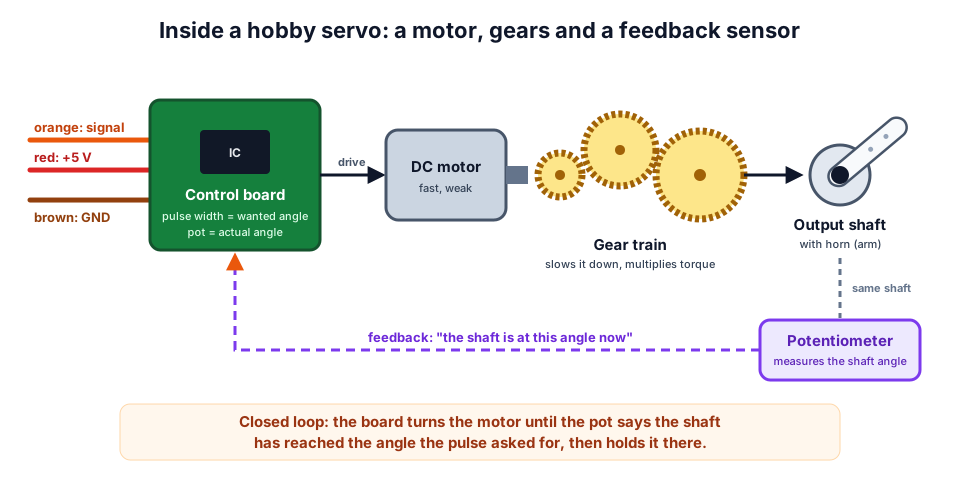 A servo is a small closed-loop system: motor, gears, and a potentiometer that reports the shaft angle.
Open up an SG90 and you will find four parts:
| Part | What it does |
|---|---|
| Small DC motor | Spins fast but has very little twisting force |
| Gear train | Slows the motor down a lot and multiplies its torque |
| Potentiometer | Turns with the output shaft, so its resistance tells the board the shaft angle |
| Control board | Compares the angle you asked for with the angle the pot reports, and drives the motor until they match |
This is closed-loop control: push the horn away from its position and the pot reports the error, so the board pushes back. A plain DC motor has no idea where it is; a servo always does.
How the signal works: 50 Hz pulses
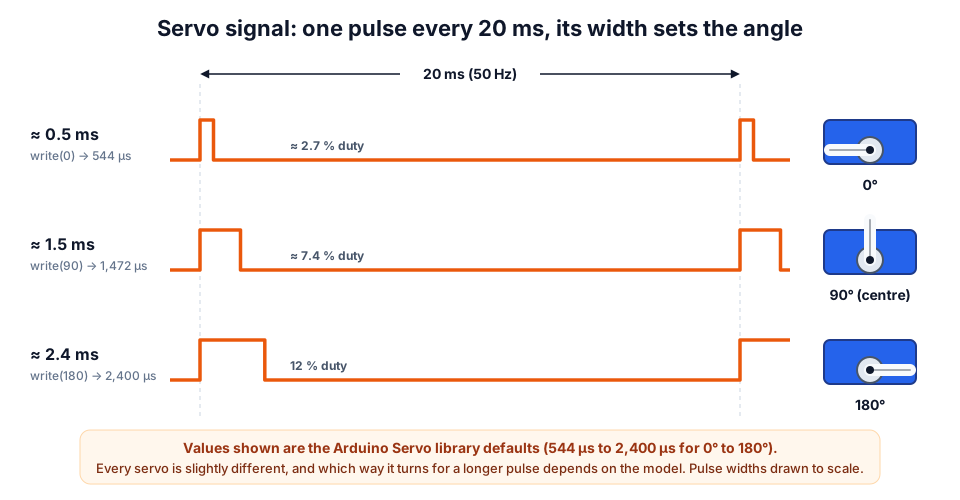 The pulse repeats every 20 ms. Only the width of the pulse matters.
A servo has three wires. On the SG90 they are brown (GND), red (+5 V) and orange (signal). The signal is a pulse that repeats every 20 ms, which is 50 times a second (50 Hz). The width of each pulse is the instruction:
| Servo library call | Pulse width | Duty cycle at 50 Hz | Typical position |
|---|---|---|---|
write(0) | 544 µs | 2.7 % | One end |
write(45) | 1,008 µs | 5.0 % | |
write(90) | 1,472 µs | 7.4 % | Centre |
write(135) | 1,936 µs | 9.7 % | |
write(180) | 2,400 µs | 12.0 % | Other end |
The Arduino Servo library maps 0°–180° onto 544 µs – 2,400 µs by default:
You will often read that servos use "1 ms to 2 ms, with 1.5 ms at the centre". That is the classic RC standard. Many hobby servos, including most SG90s, only move about 90° on 1–2 ms and need roughly 0.5–2.4 ms for their full travel. Every servo is slightly different, which is why Experiment 3 below finds the real limits of yours. Our servo pulse width calculator converts between angle, pulse width and duty cycle for any range.
SG90 vs MG90S vs MG996R
| SG90 | MG90S | MG996R | |
|---|---|---|---|
| Gears | Plastic | Metal | Metal |
| Weight | ≈ 9 g | ≈ 13 g | ≈ 55 g |
| Operating voltage | 4.8 V – 6 V | 4.8 V – 6 V | 4.8 V – 7.2 V |
| Stall torque (datasheet) | ≈ 1.8 kg·cm at 4.8 V | ≈ 1.8 kg·cm at 4.8 V, ≈ 2.2 at 6 V | ≈ 9.4 kg·cm at 4.8 V, ≈ 11 at 6 V |
| Speed (no load) | ≈ 0.1 s per 60° | ≈ 0.1 s per 60° | ≈ 0.17 s per 60° at 4.8 V |
| Current | Small idle current; a few hundred mA when moving or stalled | Similar to SG90 | Can exceed 2 A when stalled |
| Best for | Pan-tilt heads, flaps, light arm joints | Small arms that get knocked about | Shoulder and base joints, larger robots |
Figures are typical datasheet values and vary between manufacturers.
Stall torque is the most the servo can hold before it stops moving. "1.8 kg·cm" means it can hold 1.8 kg at 1 cm from the shaft, or 0.18 kg at 10 cm. Running near stall makes servos hot and noisy, so keep your load well below it.
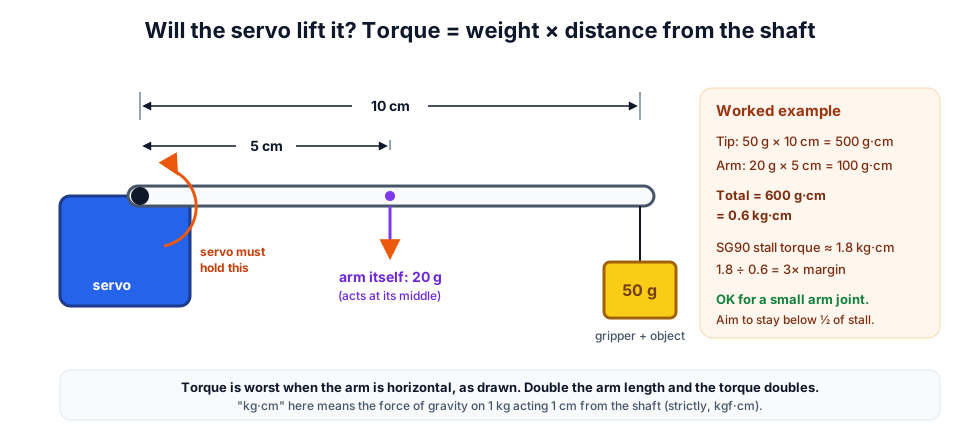 Add up weight × distance for everything the servo has to hold, with the arm horizontal.
Powering servos safely
This is where most servo projects go wrong. When a servo starts moving, it draws a sudden burst of current. One small SG90 doing light work is usually fine from the Arduino's 5V pin while testing. Two or more servos, or any servo under load, are not. The 5V supply sags, the Arduino resets or behaves strangely, and the USB port can shut down.
| Servo supply | Voltage | Good for | Notes |
|---|---|---|---|
| 4 × AA NiMH rechargeable | 4.8 V | 2–4 small servos | Ideal voltage for SG90s |
| 5 V, 2 A (or bigger) adapter | 5 V | Bench projects, pan-tilt | Simple and steady |
| 2 × 18650 (7.4 V) + 5 V–6 V buck converter or UBEC | 5 V – 6 V | Mobile robots | Check the converter's current rating |
| Uno 5V pin | 5 V | One unloaded SG90 for testing only | Adding a 470 µF capacitor helps |
Add a 470 µF – 1000 µF electrolytic capacitor (10 V or higher) across the servo supply, close to the servos, with the stripe (−) to GND. It supplies the short current bursts and stops jitter. For help choosing a battery pack, see our robot battery guide.
Experiment 1: the sweep
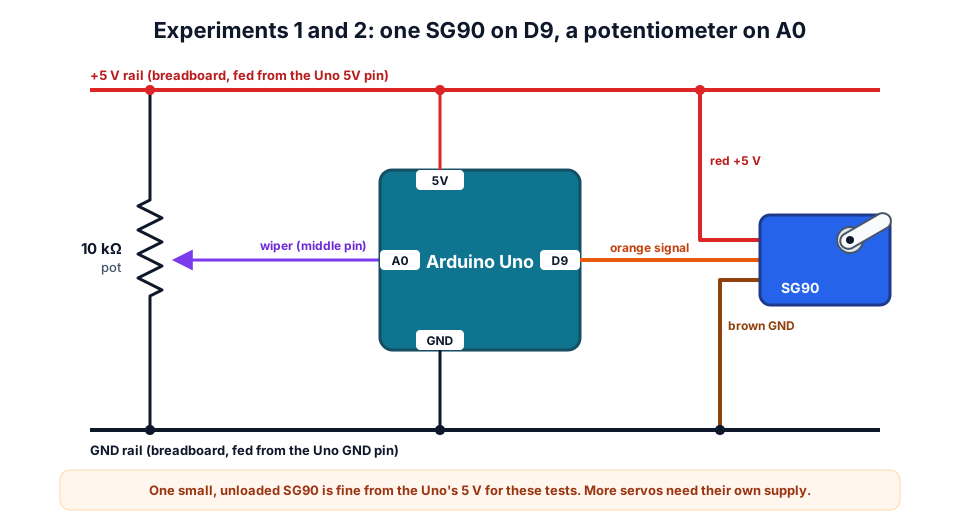 One SG90 on D9 and a 10 kΩ potentiometer on A0. Use the same wiring for Experiments 1, 2 and 3.
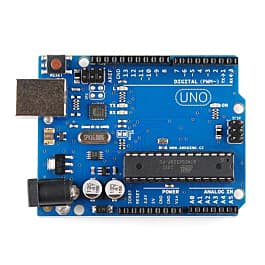
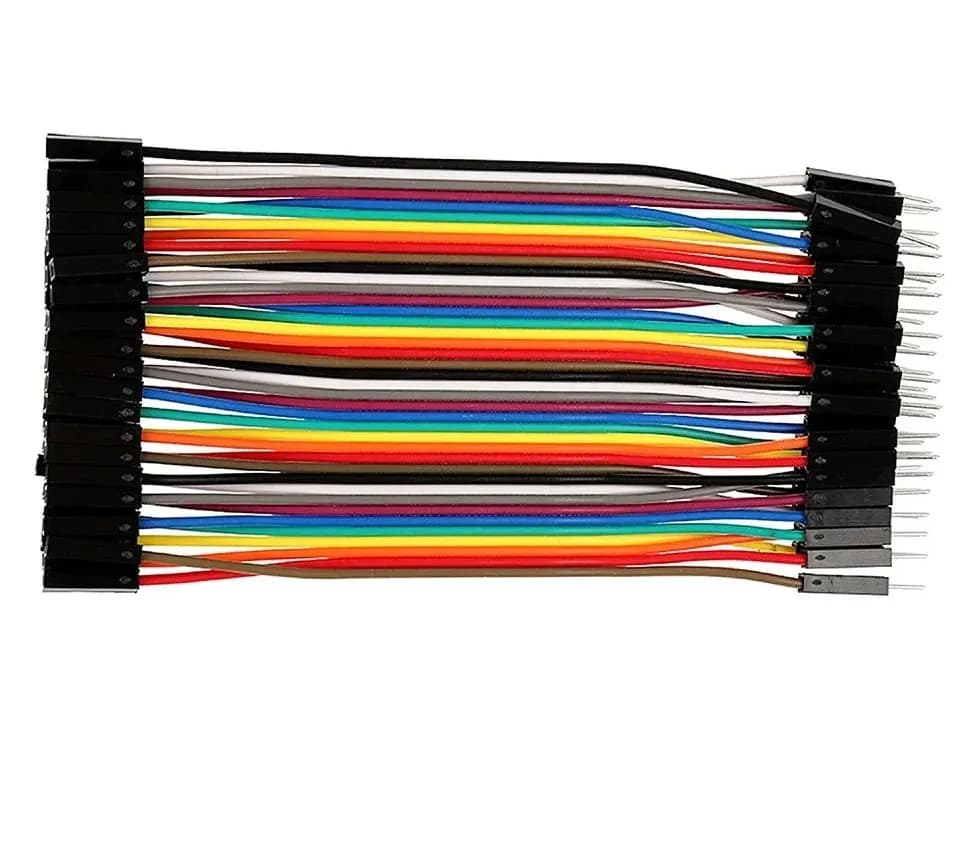
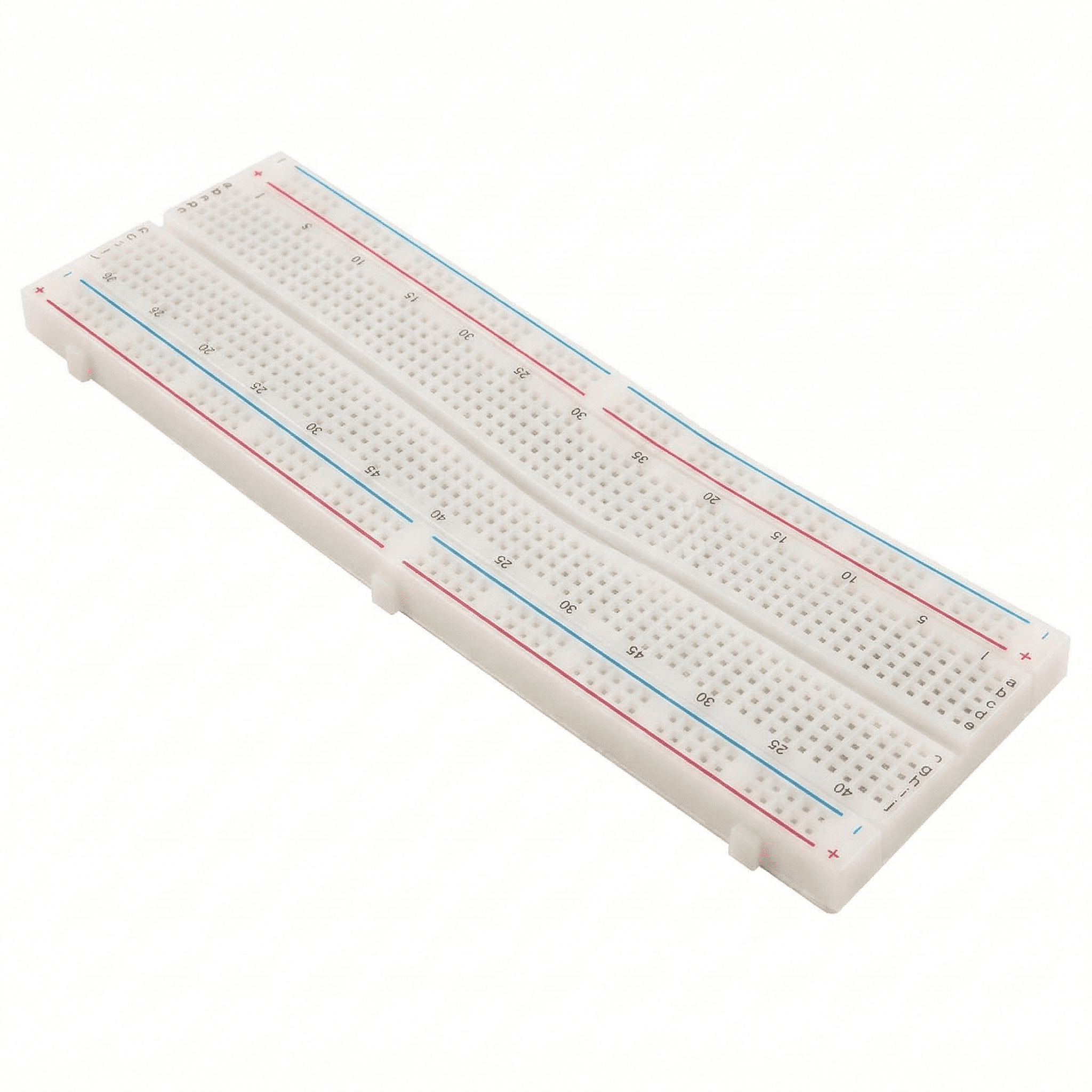
You need: Arduino Uno, one SG90 with a horn fitted, a 10 kΩ potentiometer, breadboard and jumper wires.
- Connect the servo: brown → GND, red → 5V, orange → D9.
- Upload the sketch. The
Servolibrary comes with the Arduino IDE. - Watch the horn sweep slowly from one end to the other and back.
#include <Servo.h>

Servo myServo;

void setup() {
  myServo.attach(9);            // signal wire on D9
}

void loop() {
  for (int angle = 0; angle <= 180; angle++) {
    myServo.write(angle);
    delay(15);                  // time for the servo to follow
  }
  for (int angle = 180; angle >= 0; angle--) {
    myServo.write(angle);
    delay(15);
  }
}
Try this: change delay(15) to delay(1). The code now asks for 180° in under 0.2 s, but an SG90 needs about 0.1 s for every 60°, so at least 0.3 s for 180°. It cannot keep up and turns back before reaching the ends.
Experiment 2: control the angle with a knob
Connect the potentiometer's outer pins to 5V and GND and its middle pin (wiper) to A0, as in the diagram.
#include <Servo.h>

Servo myServo;
const int POT = A0;

void setup() {
  myServo.attach(9);
  Serial.begin(9600);
}

void loop() {
  int raw = analogRead(POT);               // 0 ... 1023
  int angle = map(raw, 0, 1023, 0, 180);   // 0 ... 180 degrees
  myServo.write(angle);
  Serial.println(angle);
  delay(20);
}
Turn the knob and the servo follows (the Serial Monitor shows the angle). You have built a position-control system: the knob sets the target, the servo's internal feedback does the rest.
Experiment 3: find your servo's real limits
- Upload this sketch and open the Serial Monitor at 9600 baud.
- Type
1500and press Enter. The servo should go to its centre. - Try
1000, then800,700,600... until the horn stops moving further. Do the same upwards from2000. - As soon as you hear the servo buzz without moving, it is pushing against its end stop. Back off by 50 µs and note that value.
#include <Servo.h>

Servo s;

void setup() {
  Serial.begin(9600);
  s.attach(9, 500, 2500);       // allow a wider range for testing
  s.writeMicroseconds(1500);
  Serial.println("Type a pulse width (500-2500) and press Enter");
}

void loop() {
  if (Serial.available()) {
    int us = Serial.parseInt();
    if (us >= 500 && us <= 2500) {
      s.writeMicroseconds(us);
      Serial.print("Pulse: ");
      Serial.print(us);
      Serial.println(" us");
    }
  }
}
Once you know your servo's limits, use them in your own projects with attach(pin, minUs, maxUs). Then write(0) and write(180) reach the true ends without straining the gears.
Project: a joystick-controlled pan-tilt head
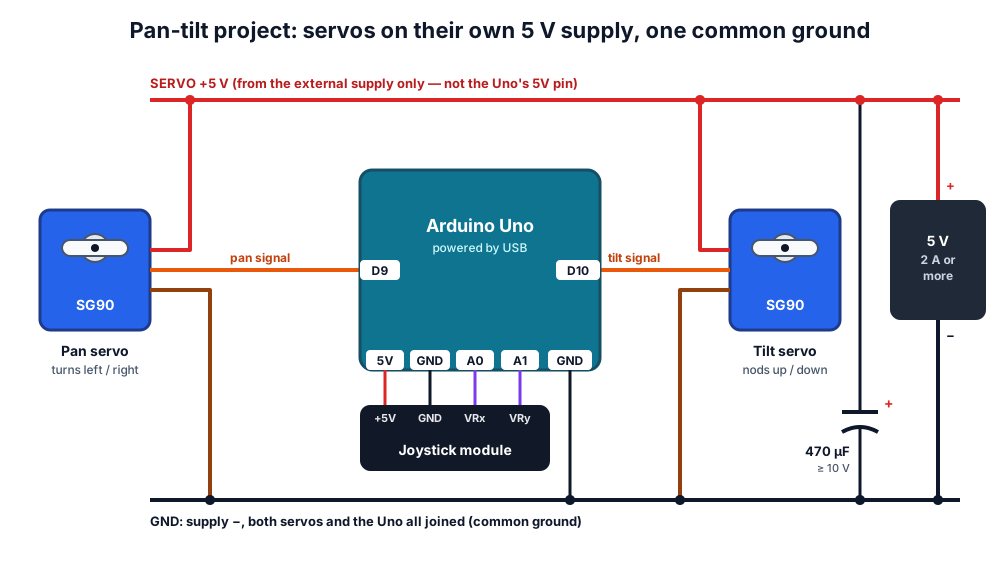 Servos get power from the external 5 V supply. The Arduino only sends signals, and all grounds are joined.
A pan-tilt bracket holds two servos: the bottom one turns left and right (pan), the top one tilts up and down. Mount an HC-SR04 on it and your robot can look around without turning its body.
| Part | Connects to |
|---|---|
| Pan servo signal (orange) | D9 |
| Tilt servo signal (orange) | D10 |
| Both servo red wires | External 5 V supply + |
| Both servo brown wires | External supply − and Arduino GND |
| Joystick +5V / GND | Arduino 5V / GND |
| Joystick VRx / VRy | A0 / A1 |
#include <Servo.h>

Servo pan, tilt;
const int JOY_X = A0, JOY_Y = A1;
int panAngle = 90, tiltAngle = 90;

// Joystick reading (0-1023, about 512 at rest) -> step of -2 ... +2 degrees
int joyStep(int raw) {
  int offset = raw - 512;
  if (abs(offset) < 60) return 0;           // dead zone around the centre
  if (offset > 300) return 2;
  if (offset > 0) return 1;
  if (offset < -300) return -2;
  return -1;
}

void setup() {
  pan.attach(9);
  tilt.attach(10);
  pan.write(panAngle);
  tilt.write(tiltAngle);
}

void loop() {
  int dx = joyStep(analogRead(JOY_X));
  int dy = joyStep(analogRead(JOY_Y));
  panAngle = constrain(panAngle + dx, 0, 180);
  tiltAngle = constrain(tiltAngle + dy, 30, 150);  // keep clear of the bracket
  pan.write(panAngle);
  tilt.write(tiltAngle);
  delay(15);
}
Push the stick and the head moves; let go and it stays where it is. That is because the joystick changes the angle a little each loop instead of setting it directly. The tilt range is limited to 30°–150° so the top servo cannot crash into the bracket; adjust these numbers for your own mount. If an axis moves the wrong way, change + dx to - dx (or + dy to - dy).
Troubleshooting
| Problem | Likely cause | Fix |
|---|---|---|
| Arduino resets when the servo moves | Servo powered from the Uno's 5V | Separate 5 V supply, common ground, 470 µF capacitor |
| Servo jitters or twitches at rest | Weak supply, noise, or loose GND | Shorter wires, capacitor, solid ground connection |
| Servo does nothing | No common ground, or wrong pin | Join all grounds; check the signal pin number in attach() |
| Only moves about 90° | Pulse range too narrow for this servo | Find the limits (Experiment 3) and use attach(pin, min, max) |
| Motors on D9/D10 stop changing speed | Servo library uses Timer1 on the Uno | Move motor PWM to pins 3, 5, 6 or 11 |
Where to go next
- Give your robot car a scanning "head" with our HC-SR04 obstacle-avoiding robot guide.
- Need precise, repeatable rotation over many turns? Read about stepper motors.
- Driving wheels instead of joints? See our L298N DC motor driver guide.
- Get SG90 servos, pan-tilt brackets and joysticks in our robotics kits, browse individual parts in our products, or build with a mentor at our workshops.
Frequently asked questions
Why does my Arduino reset when the servo moves?
The servo's starting current pulls the 5 V supply down, and the Arduino's microcontroller resets when its supply drops too low. Power the servos from a separate 5 V – 6 V supply, join the grounds, and add a 470 µF capacitor across the servo supply.
Can I connect an SG90 to a 9 V battery?
No. The SG90 is rated for about 4.8 V – 6 V, and a 9 V battery can damage it. A 9 V PP3 battery also cannot supply much current. Use 4 × AA NiMH cells, a 5 V adapter, or a Li-ion pack with a 5 V – 6 V regulator.
How many servos can an Arduino Uno control?
The Servo library can drive up to 12 servos on an Uno. In practice, power is the limit, not pins. For larger projects, such as a hexapod with 18 servos, use a 16-channel PCA9685 servo driver board and a supply rated for several amps.
What is a continuous rotation servo?
It is a servo without position feedback, so it spins like a geared motor. write(90) (roughly) stops it, while values towards 0 or 180 spin it faster in either direction. It is useful for small wheeled robots but cannot go to an angle.
Can I use a servo with an ESP32?
Yes. Use the ESP32Servo library, which works like the Arduino Servo library (see our Arduino vs ESP32 vs Pico comparison for other differences). The ESP32's 3.3 V signal is normally enough for an SG90, but the servo still needs its own 5 V supply and a common ground.
Try the calculators
Servo Pulse Width Calculator
Convert servo angle to pulse width (µs) and back for SG90 and standard servos, with duty cycle, writeMicroseconds and ESP32 LEDC values.
Gear Ratio Calculator
Calculate gear ratio, output RPM and output torque for one or two gear stages from tooth counts, with efficiency and an animated drawing.
Thinking Robot Team
Thinking Robot is a team of engineers and educators in Pune who design electronics and robotics kits and run hands-on workshops for students and schools. Spotted a mistake or have a question? Get in touch.