🦇HC-SR04 Ultrasonic Sensor with Arduino: How It Works + Obstacle-Avoiding Robot
How the HC-SR04 turns an echo into a distance, how to wire it to an Arduino Uno or a 3.3 V ESP32, working code, what fools it, and a step-by-step obstacle-avoiding robot car.
In this article (15)
- How the HC-SR04 measures distance
- Key specifications
- The trigger and echo timing
- Wiring: Arduino Uno and ESP32
- Experiment 1: read distances on the Serial Monitor
- Accuracy: what fools an ultrasonic sensor
- Experiment 2: build an obstacle-avoiding robot car
- Troubleshooting
- Where to go next
- Frequently asked questions
- Why do we divide by 2 when calculating distance?
- Can I use the HC-SR04 with an ESP32 or Raspberry Pi Pico?
- What is the real range of the HC-SR04?
- Why does my sensor give random readings?
- Is the HC-SR04 waterproof?
Bats find their way in the dark by shouting and listening for the echo. The HC-SR04 ultrasonic sensor does exactly the same thing, using a sound too high for us to hear, and it is the sensor that gives most first robots their "eyes". It is cheap, easy to wire and accurate to within about a centimetre when you use it well.
This guide explains how the HC-SR04 really works, how to wire it to an Arduino Uno (and safely to a 3.3 V ESP32), gives you working code, shows where it gets fooled, and finishes with a hands-on build: an obstacle-avoiding robot car.
How the HC-SR04 measures distance
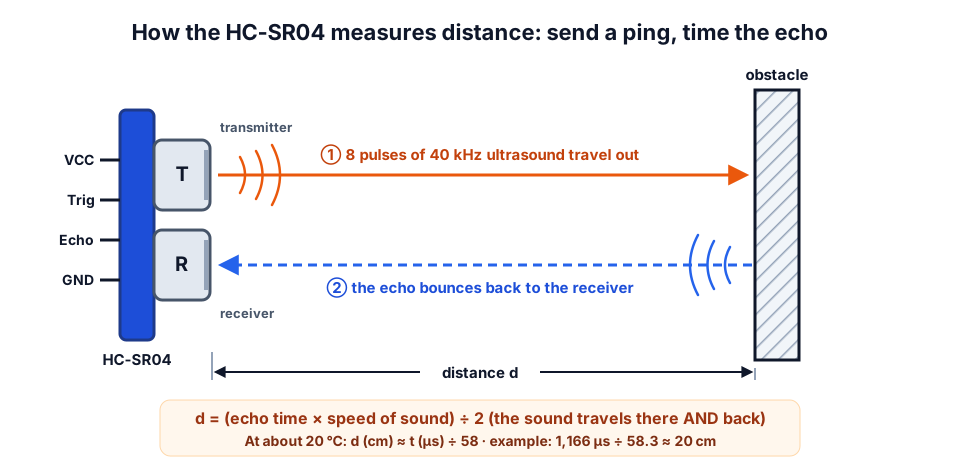 The sound goes to the obstacle and back, so the distance is half of what the sound travelled.
The two silver "eyes" on the module are not eyes at all. One (T) is a tiny speaker that sends out a short burst of 40 kHz ultrasound. The other (R) is a microphone that listens for the echo. A small chip on the back measures how long the echo took to come back.
Sound in air at about 20 °C travels at roughly 343 metres per second, which is 0.0343 cm per microsecond. The sound has to travel to the obstacle and back, so:
The "÷ 58" you see in many sketches is just 2 ÷ 0.0343 ≈ 58.3, rounded. The datasheet uses the same shortcut.
You can try other values with our ultrasonic distance calculator, which also corrects for air temperature.
Key specifications
| Specification | HC-SR04 (typical datasheet values) |
|---|---|
| Supply voltage | 5 V DC |
| Working current | About 15 mA |
| Ultrasound frequency | 40 kHz |
| Range | 2 cm – 400 cm (reliable range on a robot is usually shorter) |
| Resolution | About 0.3 cm |
| Measuring angle | About 15° |
| Trigger input | 10 µs HIGH pulse |
| Echo output | HIGH pulse, width proportional to distance (5 V level) |
The trigger and echo timing
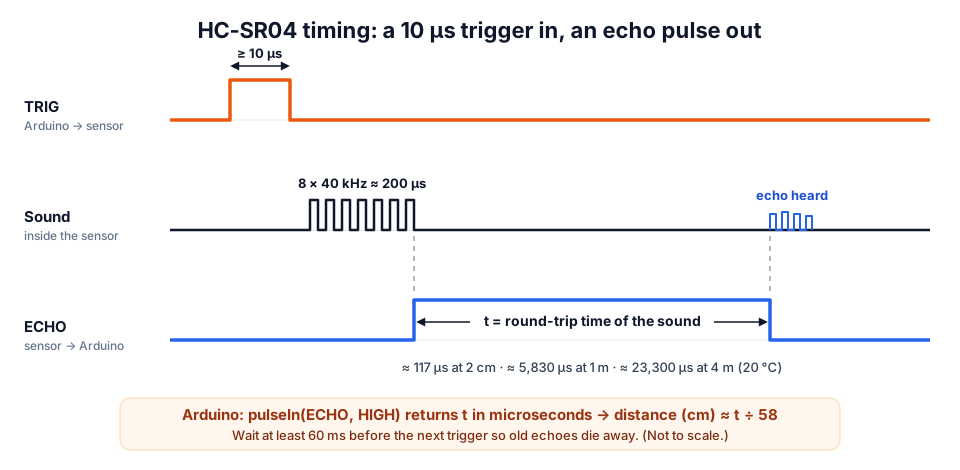 Your code only handles TRIG and ECHO. The 40 kHz burst happens inside the module.
A measurement always follows the same four steps:
- Your Arduino pulls TRIG HIGH for at least 10 µs, then LOW again.
- The module sends 8 cycles of 40 kHz sound (8 ÷ 40,000 = 200 µs of sound).
- It sets ECHO HIGH and starts listening.
- When the echo arrives, ECHO goes LOW. The width of that HIGH pulse is the round-trip time.
On the Arduino, pulseIn(ECHO, HIGH) measures that width in microseconds for you. Leave at least 60 ms between measurements so the echo of the previous ping has died away; otherwise you can measure an old echo by mistake.
| Distance | Echo pulse at 20 °C | Notes |
|---|---|---|
| 2 cm | ≈ 117 µs | Minimum range |
| 10 cm | ≈ 583 µs | |
| 50 cm | ≈ 2,915 µs | |
| 1 m | ≈ 5,831 µs | |
| 4 m | ≈ 23,324 µs | Maximum rated range |
Wiring: Arduino Uno and ESP32
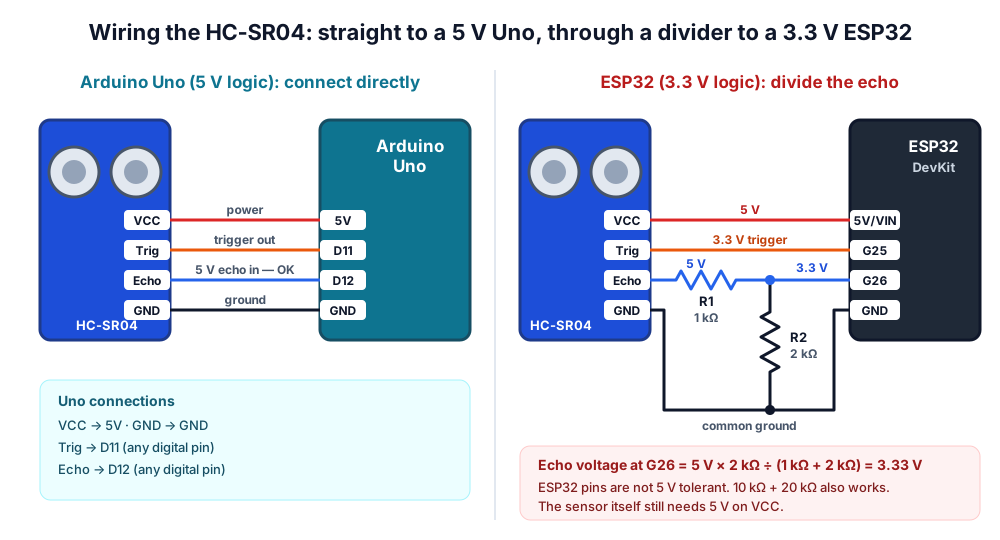 On a 5 V Uno, wire it directly. On a 3.3 V board, divide the 5 V echo down to 3.3 V.
| HC-SR04 pin | Arduino Uno | ESP32 DevKit |
|---|---|---|
| VCC | 5V | 5V / VIN (from USB) |
| Trig | D11 | GPIO 25 (3.3 V is usually enough to trigger it) |
| Echo | D12 | GPIO 26 through a 1 kΩ / 2 kΩ divider |
| GND | GND | GND |
The Arduino Uno runs at 5 V, so the sensor connects directly. The ESP32 (and the Raspberry Pi Pico) run at 3.3 V and their pins are not 5 V tolerant. The HC-SR04's Echo pin outputs a full 5 V pulse, so put a voltage divider in the Echo line: 1 kΩ in series from Echo, and 2 kΩ from the ESP32 pin to GND. That gives 5 × 2 ÷ (1 + 2) = 3.33 V. Check other resistor pairs with our voltage divider calculator.
Not sure which board to use? Our Arduino vs ESP32 vs Raspberry Pi Pico comparison explains the 3.3 V versus 5 V difference in detail.
Experiment 1: read distances on the Serial Monitor
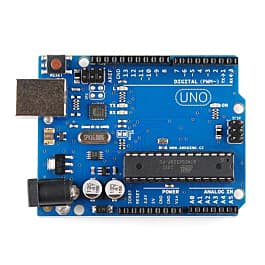
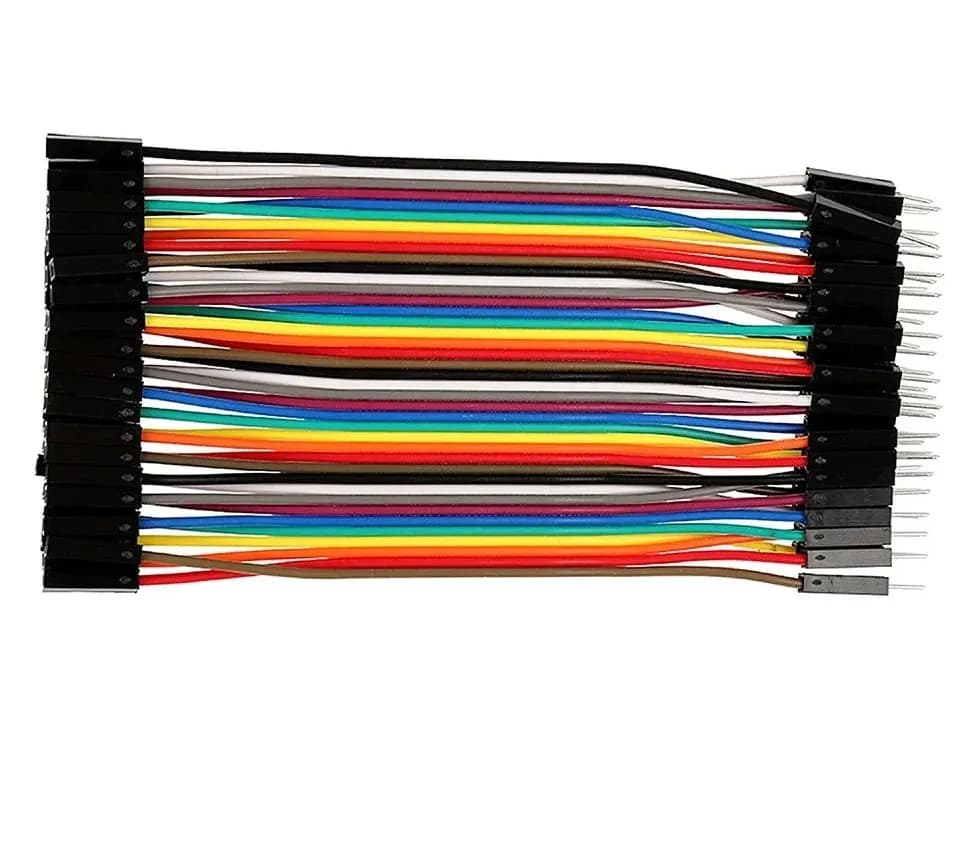
You need: Arduino Uno, HC-SR04, four jumper wires, a ruler or measuring tape, and a flat box or book as a target.
- Wire the sensor as in the table above (Trig to D11, Echo to D12).
- Upload the sketch below and open the Serial Monitor at 9600 baud.
- Hold a book flat in front of the sensor at 10, 30, 50 and 100 cm. Write down what you see.
const int TRIG = 11;
const int ECHO = 12;

void setup() {
  Serial.begin(9600);
  pinMode(TRIG, OUTPUT);
  pinMode(ECHO, INPUT);
  digitalWrite(TRIG, LOW);
}

void loop() {
  // 1. Send a 10 microsecond trigger pulse
  digitalWrite(TRIG, LOW);
  delayMicroseconds(2);
  digitalWrite(TRIG, HIGH);
  delayMicroseconds(10);
  digitalWrite(TRIG, LOW);

  // 2. Measure how long ECHO stays HIGH (give up after 30 ms)
  unsigned long t = pulseIn(ECHO, HIGH, 30000UL);

  // 3. Convert the time to a distance
  if (t == 0) {
    Serial.println("No echo (nothing in range)");
  } else {
    float cm = t * 0.0343 / 2.0;   // speed of sound ~343 m/s at 20 C
    Serial.print(t);
    Serial.print(" us  =  ");
    Serial.print(cm, 1);
    Serial.println(" cm");
  }
  delay(100);   // more than 60 ms between pings
}
The 30,000 µs timeout matters. Without it, pulseIn() waits up to a full second when nothing comes back, and your robot would freeze. 30 ms of round trip is about 5 m, which is beyond the sensor's range anyway.
Use a table like this for your results:
| Real distance | Expected echo (20 °C) | Your reading | Error |
|---|---|---|---|
| 10 cm | ≈ 583 µs | ||
| 30 cm | ≈ 1,749 µs | ||
| 50 cm | ≈ 2,915 µs | ||
| 100 cm | ≈ 5,831 µs |
What you learn: with a flat target held square to the sensor, readings are usually within a centimetre or so. Now tilt the book by about 45° and watch what happens.
Accuracy: what fools an ultrasonic sensor
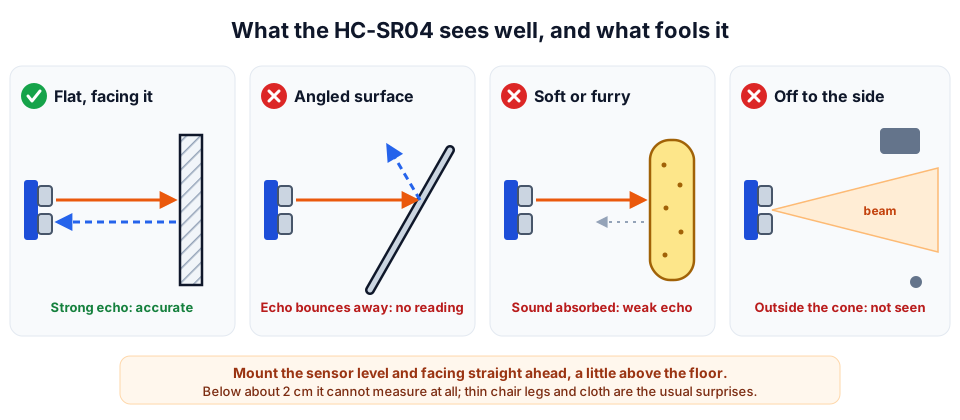 Flat, hard surfaces facing the sensor are easy. Angles, soft materials and narrow objects are not.
- Angled surfaces. Sound reflects like light off a mirror. A wall at a steep angle sends the echo away, so you get no reading or a reading from something further away.
- Soft materials. Curtains, sofas, soft toys and clothing absorb ultrasound. The echo may be too weak to detect.
- Narrow objects. Chair legs and thin poles return very little sound, and objects to the side of the roughly 15° beam are not seen at all.
- Too close. Below about 2 cm the sensor cannot measure.
- Two sensors at once. If two HC-SR04s ping at the same time, one can hear the other's echo. Trigger them one after another.
- Temperature. Sound travels faster in warm air. The table shows the error if your code always assumes 343 m/s:
| Air temperature | Speed of sound | A real 100 cm reads as |
|---|---|---|
| 10 °C | ≈ 337 m/s | ≈ 101.7 cm |
| 20 °C | ≈ 343 m/s | ≈ 100 cm |
| 30 °C | ≈ 349 m/s | ≈ 98.1 cm |
| 40 °C | ≈ 355 m/s | ≈ 96.5 cm |
The speed of sound is about 331.3 + 0.606 × T m/s, where T is the temperature in °C. On a hot Indian summer afternoon the error is only a few centimetres per metre, which does not matter for obstacle avoidance. For a science-fair "digital tape measure", add a temperature sensor and use the corrected speed: cm = t * (331.3 + 0.606 * tempC) / 20000.0;
Experiment 2: build an obstacle-avoiding robot car
This project starts from the two-motor car in our L298N motor driver guide. If you have not built it yet, do that first. The motor wiring and the drive() function are the same.
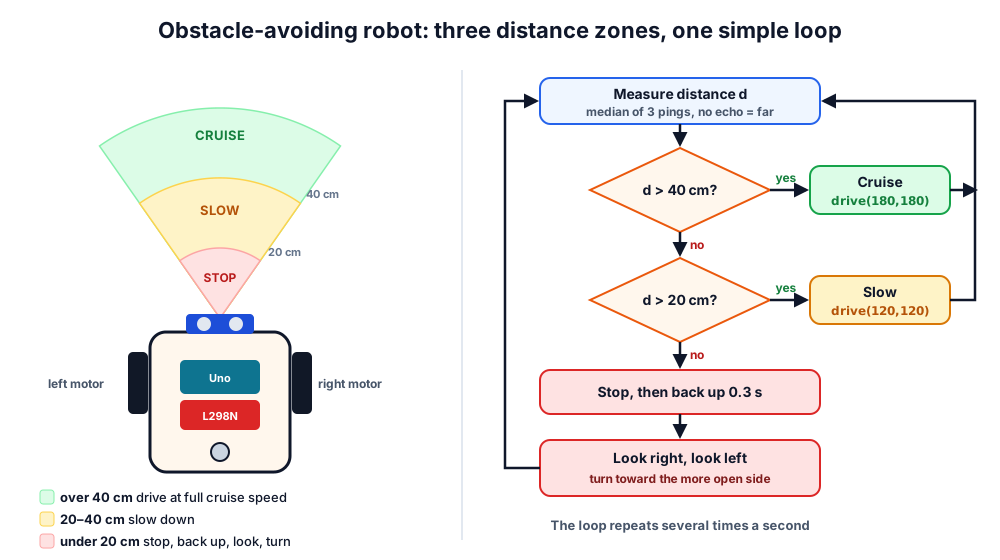 Under 20 cm: stop and look around. 20 to 40 cm: slow down. Over 40 cm: cruise.
Add the sensor:
- Mount the HC-SR04 at the front of the chassis, facing straight ahead, a few centimetres above the floor. Tilting it down makes it see the floor.
- Connect VCC to the Uno's 5V, GND to GND, Trig to D11 and Echo to D12. The L298N already uses D5–D10.
- Lift the car so the wheels spin freely, upload the code, and wave your hand in front of the sensor to test each zone.
- Put it on the floor and tune
TURN_MSuntil a "look right" is roughly a 45° turn.
// Obstacle-avoiding robot: Arduino Uno + L298N + HC-SR04
const int ENA = 5, IN1 = 7, IN2 = 8;     // left motor
const int ENB = 6, IN3 = 9, IN4 = 10;    // right motor
const int TRIG = 11, ECHO = 12;          // ultrasonic sensor

const int STOP_CM = 20;    // closer than this: stop and turn
const int SLOW_CM = 40;    // closer than this: slow down
const int TURN_MS = 300;   // spin time for about 45 degrees (tune this)

void setMotor(int en, int inA, int inB, int speed) {
  digitalWrite(inA, speed > 0 ? HIGH : LOW);
  digitalWrite(inB, speed < 0 ? HIGH : LOW);
  analogWrite(en, abs(speed));
}

void drive(int left, int right) {
  setMotor(ENA, IN1, IN2, left);
  setMotor(ENB, IN3, IN4, right);
}

// One ping. No echo counts as "far away" (400 cm).
int readCm() {
  digitalWrite(TRIG, LOW);
  delayMicroseconds(2);
  digitalWrite(TRIG, HIGH);
  delayMicroseconds(10);
  digitalWrite(TRIG, LOW);
  unsigned long t = pulseIn(ECHO, HIGH, 30000UL);
  if (t == 0) return 400;
  return t / 58;
}

// Median of three pings rejects a single bad reading.
int distanceCm() {
  int a = readCm(); delay(60);
  int b = readCm(); delay(60);
  int c = readCm();
  int lo = min(a, b);
  int hi = max(a, b);
  return max(lo, min(hi, c));
}

void avoid() {
  drive(0, 0);        delay(150);       // stop
  drive(-150, -150);  delay(300);       // back away
  drive(160, -160);   delay(TURN_MS);   // look right
  drive(0, 0);        delay(150);
  int right = distanceCm();
  drive(-160, 160);   delay(2 * TURN_MS);  // look left
  drive(0, 0);        delay(150);
  int left = distanceCm();
  if (right > left) {                   // right was clearer: turn back
    drive(160, -160); delay(2 * TURN_MS);
    drive(0, 0);      delay(100);
  }
}

void setup() {
  const int outs[] = {ENA, IN1, IN2, ENB, IN3, IN4, TRIG};
  for (int i = 0; i < 7; i++) pinMode(outs[i], OUTPUT);
  pinMode(ECHO, INPUT);
}

void loop() {
  int d = distanceCm();
  if (d > SLOW_CM)      drive(180, 180);   // clear: cruise
  else if (d > STOP_CM) drive(120, 120);   // something ahead: slow
  else                  avoid();           // too close: look and turn
}
The robot stays in its current state while it measures, so it keeps moving smoothly. When something gets within 20 cm it stops, backs off, "looks" both ways by turning, and heads toward the side with more space.
Troubleshooting
| Problem | Likely cause | Fix |
|---|---|---|
| Always "No echo" | Trig and Echo swapped, or no 5 V on VCC | Check the four wires; measure VCC with a multimeter |
| Reads 0 or jumps wildly | Loose jumper wires or a weak supply | Use short wires; power the Uno properly; add median filtering |
| Robot crashes into chair legs | Thin objects return little sound | Add a second sensor angled slightly outward, or IR sensors at the corners |
| Robot freezes for a second | pulseIn() without a timeout | Always pass a timeout such as 30000UL |
| Readings change when motors run | Motor noise or battery sag | 100 nF capacitors across motors; a good battery (see our robot battery guide) |
Where to go next
- Mount the sensor on a servo so the robot can "look" without turning its whole body. Our SG90 servo guide shows how.
- Combine it with line sensors from our line-following robot guide.
- Get the sensor, chassis, motors and driver together in our robotics kits, or pick up individual parts from our products.
- Prefer to learn with a mentor? Join one of our hands-on robotics workshops.
Frequently asked questions
Why do we divide by 2 when calculating distance?
The echo time includes the trip to the obstacle and the trip back. The sensor-to-obstacle distance is only half of the total path, so you multiply the time by the speed of sound and then divide by 2.
Can I use the HC-SR04 with an ESP32 or Raspberry Pi Pico?
Yes. Power the sensor from 5 V, connect Trig directly (3.3 V is normally enough to trigger it), and put a voltage divider such as 1 kΩ and 2 kΩ on the Echo line so the board only sees about 3.3 V.
What is the real range of the HC-SR04?
The datasheet says 2 cm to 400 cm. In practice you get the most reliable readings from large, flat, hard objects within a couple of metres. Soft, small or angled objects may only be detected much closer, or not at all.
Why does my sensor give random readings?
The usual causes are loose wires, measuring too often (leave at least 60 ms between pings), an angled or soft target, or electrical noise from motors. Use a median of three readings and short, firm connections.
Is the HC-SR04 waterproof?
No. Keep it away from rain and splashes, and store robots in a dry place during the monsoon. For outdoor or wet use, look for a waterproof ultrasonic sensor with a sealed transducer instead.
Try the calculators
Ultrasonic Distance Calculator (HC-SR04)
Convert HC-SR04 echo time to distance (cm, m, inch) and back, corrected for air temperature, with the Arduino pulseIn() constant and timeout.
Wheel RPM & Speed Calculator
Convert motor RPM and wheel diameter to robot speed in m/s, km/h and cm/s, or find the RPM you need for a target speed.
Thinking Robot Team
Thinking Robot is a team of engineers and educators in Pune who design electronics and robotics kits and run hands-on workshops for students and schools. Spotted a mistake or have a question? Get in touch.