🧠Arduino vs ESP32 vs Raspberry Pi Pico: Which Board Should You Start With?
An honest comparison for students and makers: specifications, programming options, which board suits which project, a beginner path, and the 3.3 V vs 5 V mistakes that damage boards.
In this article (13)
- The three boards at a glance
- How you program each board
- Which board for which project?
- The big pitfall: 3.3 V vs 5 V
- Other common mistakes
- Experiment: same knob, three boards
- A sensible beginner path
- Frequently asked questions
- Is the ESP32 better than the Arduino Uno?
- Can I use Arduino code on the ESP32 or Raspberry Pi Pico?
- Is the Raspberry Pi Pico the same as a Raspberry Pi?
- Which board is best for a school science project?
- Can I connect 5 V sensors to an ESP32 or Pico?
"Which board should I buy first: Arduino, ESP32 or Raspberry Pi Pico?" It is one of the most common questions we hear from students, parents and teachers. All three are small, affordable microcontroller boards that read sensors and control LEDs, motors and displays. But they are built for different jobs, and picking the wrong one can make your first project harder than it needs to be.
This is an honest, side-by-side comparison for Indian students and makers: real specifications, how you program each one, which board suits which project, and the beginner mistakes that damage boards (most of them involve 3.3 V vs 5 V). We will not quote prices; they change often and vary by seller, but all three are within reach of a school project budget.
The three boards at a glance
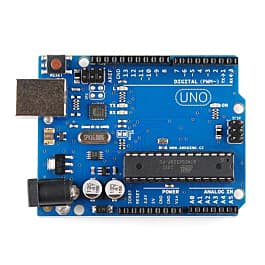
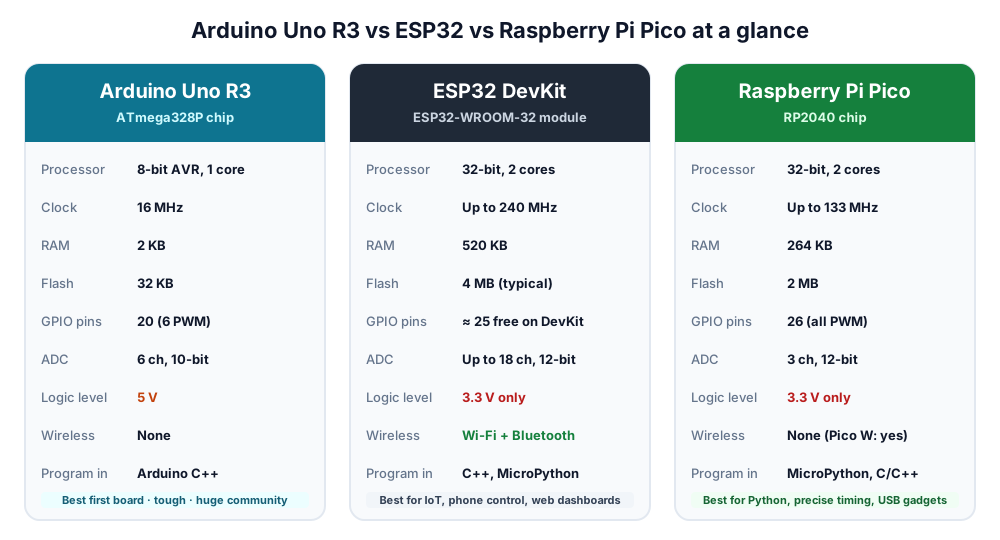 Uno R3, ESP32 and Pico side by side. Figures are for the standard boards described below.
| Feature | Arduino Uno R3 | ESP32 DevKit (ESP32-WROOM-32) | Raspberry Pi Pico (RP2040) |
|---|---|---|---|
| Processor | ATmega328P, 8-bit, 1 core | Xtensa LX6, 32-bit, 2 cores | Arm Cortex-M0+, 32-bit, 2 cores |
| Clock speed | 16 MHz | Up to 240 MHz | Up to 133 MHz |
| RAM | 2 KB | 520 KB | 264 KB |
| Program flash | 32 KB | 4 MB on most modules | 2 MB |
| GPIO pins | 20 (14 digital + 6 analog) | About 25 usable on a typical DevKit | 26 |
| Analog inputs (ADC) | 6 × 10-bit | Up to 18 × 12-bit | 3 × 12-bit |
| PWM outputs | 6 | Most output pins (16 channels) | 16 channels, any pin |
| Logic voltage | 5 V | 3.3 V (not 5 V tolerant) | 3.3 V (not 5 V tolerant) |
| Wi-Fi / Bluetooth | No | Wi-Fi 2.4 GHz + Bluetooth (Classic and BLE) | No (Pico W adds Wi-Fi and Bluetooth) |
| Built-in LED | Pin 13 | GPIO 2 on many DevKits | GP25 (on Pico W: "LED") |
| USB | Via a USB-serial chip | Via a USB-serial chip (CP2102 or CH340) | Native USB on the RP2040 |
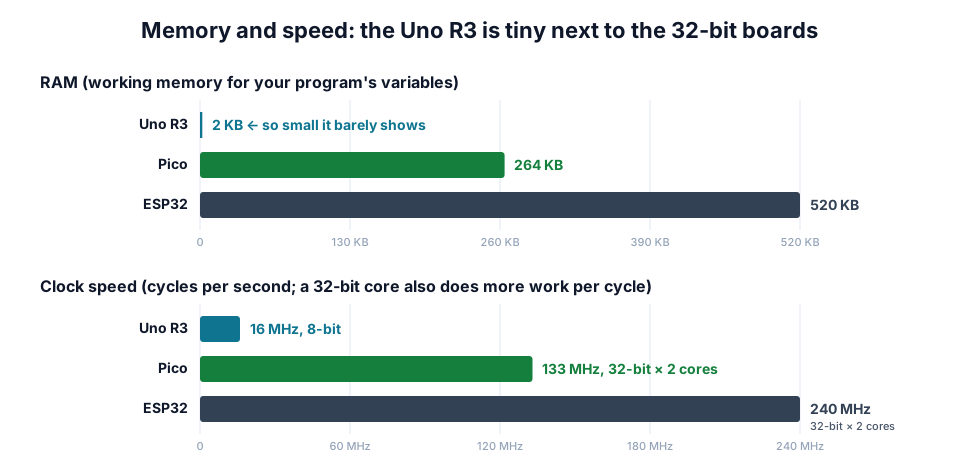 The ESP32 has 260 times the RAM of an Uno R3. That is why it can run Wi-Fi and MicroPython and the Uno cannot.
Do the numbers matter for a beginner? Less than you might think. An Uno blinks an LED, reads an ultrasonic sensor and drives a robot car perfectly well. The difference shows up in bigger projects: a colour display, a web server, a long data log or MicroPython all need far more than 2 KB of RAM.
How you program each board
| Option | Arduino Uno | ESP32 | Raspberry Pi Pico |
|---|---|---|---|
| Arduino IDE (C++) | Built in | Add the "esp32" boards package | Add an RP2040 boards package |
| MicroPython | Not practical (too little RAM) | Yes | Yes (official, and the easiest way to start) |
| Manufacturer's own toolkit | — | ESP-IDF (C) | Pico C/C++ SDK |
| How code is uploaded | USB, one click | USB; some boards need the BOOT button held | USB; or hold BOOTSEL and drag a .uf2 file onto the "drive" |
The good news: the Arduino IDE works with all three. Learn pinMode(), digitalWrite() and analogRead() on an Uno and the same code style runs on an ESP32 or Pico. If you prefer Python, the Pico is the friendliest MicroPython board: copy one file onto it, open the free Thonny editor, and type commands that run instantly.
Which board for which project?
| Project | Best pick | Why |
|---|---|---|
| First LED, buzzer and sensor experiments | Uno | 5 V parts plug straight in; endless tutorials |
| School science model, traffic light, rain alarm | Uno | Simple, forgiving, easy for teachers to check |
| Line follower or obstacle-avoiding robot car | Uno (or any) | 5 V sensors such as the HC-SR04 wire in directly |
| Phone-controlled robot over Wi-Fi or Bluetooth | ESP32 | Radio built in, no extra module |
| IoT weather station, smart-home switch, web dashboard | ESP32 | Wi-Fi, plenty of memory, deep sleep |
| Battery-powered sensor that wakes up occasionally | ESP32 | Very low deep-sleep current |
| Learning Python with real hardware | Pico | MicroPython is official and simple |
| USB keyboard, macro pad or game controller | Pico | Native USB |
| Precise timing: LED strips, many servos, custom signals | Pico | 16 PWM channels and the programmable I/O (PIO) blocks |
For a robot car, our L298N motor driver guide and HC-SR04 obstacle-avoiding robot use the Uno, and both work on an ESP32 with the small changes described there. Planning a battery-powered IoT sensor? Estimate how long it will last with our IoT deep-sleep battery life estimator.
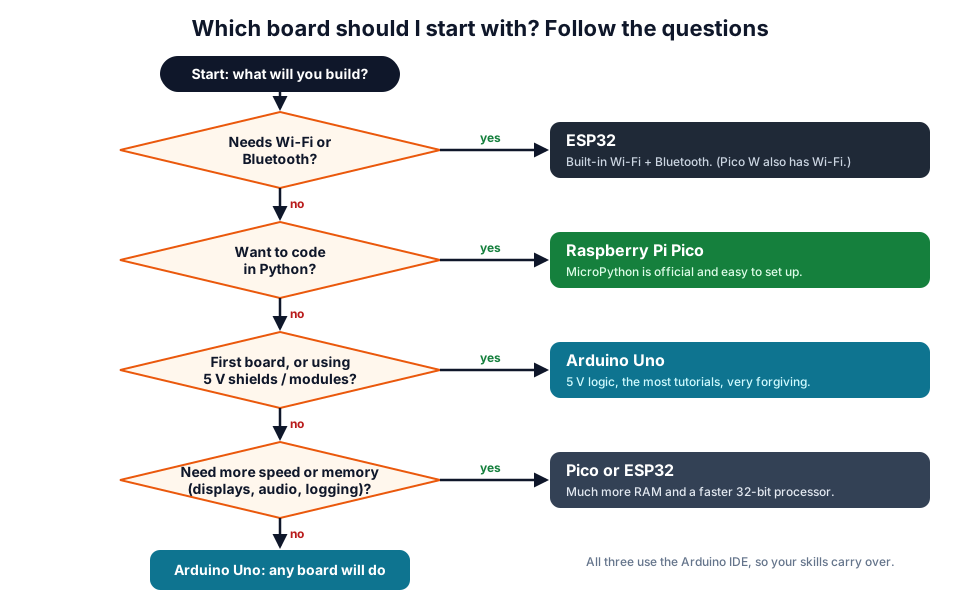 Answer the questions from the top. The first 'yes' is your board.
The big pitfall: 3.3 V vs 5 V
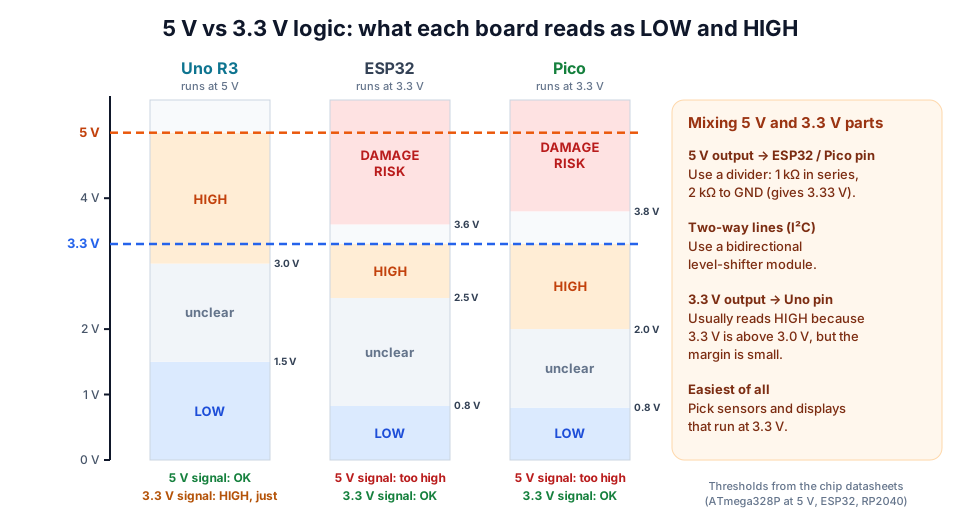 A 5 V signal is a normal HIGH for the Uno, but above the safe limit for the ESP32 and Pico.
The Uno's pins work at 5 V. The ESP32's and Pico's pins work at 3.3 V, and their absolute maximum input is only a few tenths of a volt above that. Many popular modules (HC-SR04, some relay boards, older LCDs) output 5 V signals.
| Situation | Result | What to do |
|---|---|---|
| 5 V module output → ESP32 or Pico input | Can damage the pin | Voltage divider (1 kΩ + 2 kΩ gives 3.33 V) or a level shifter |
| 3.3 V board output → 5 V module input | Often works (an ATmega328P at 5 V reads 3.0 V and above as HIGH), but some 5 V chips need 3.5 V | Test it; use a level shifter if unreliable |
| Two-way bus such as I²C between 3.3 V and 5 V | Risky | Bidirectional level-shifter module |
| Connecting the 5 V rail to a 3.3 V board's GPIO pin | Damage | Never do this, even briefly |
Work out divider values with our voltage divider calculator, and see the HC-SR04 guide for a worked divider on a real sensor.
Other common mistakes
- Charge-only USB cables. Many phone cables carry power but no data. If your computer does not detect the board, try another cable first.
- USB driver missing. Many Uno-compatible and ESP32 boards use a CH340 or CP2102 USB chip that needs a driver on some Windows PCs.
- ESP32 and 5 GHz Wi-Fi. The ESP32 only connects to 2.4 GHz networks. If your home router or phone hotspot is set to 5 GHz only, it will not appear.
- ESP32 ADC2 pins with Wi-Fi. The analog pins on ADC2 cannot be read while Wi-Fi is on. Use ADC1 pins (GPIO 32–39) for sensors.
- ESP32 boot pins. GPIO 0, 2, 5, 12 and 15 affect how the chip starts up, GPIO 6–11 are used by the flash memory, and GPIO 34–39 are input-only. Avoid them for your first projects.
- Weak power. When Wi-Fi switches on, the ESP32 draws current in bursts and a weak USB port or long cable can cause "brownout" resets.
- Driving motors from pins. No microcontroller pin can run a motor. Use a driver such as the L298N, and give servos their own supply (see our SG90 servo guide).
Experiment: same knob, three boards
This experiment shows the real difference in analog inputs. You need a 10 kΩ potentiometer and whichever boards you have.
- Connect the pot's outer pins to the board's supply and GND: 5V on the Uno, 3.3V on the ESP32 and Pico. Never 5 V on a 3.3 V board.
- Connect the middle pin (wiper) to A0 on the Uno, GPIO 34 on the ESP32, or GP26 on the Pico.
- Upload the matching code, open the serial monitor (or Thonny's shell for the Pico) and turn the knob slowly from end to end.
Arduino Uno (Arduino IDE):
void setup() {
  Serial.begin(9600);
}

void loop() {
  int raw = analogRead(A0);              // 0 ... 1023 (10-bit)
  float volts = raw * 5.0 / 1023.0;
  Serial.print(raw);
  Serial.print("  ");
  Serial.println(volts, 2);
  delay(200);
}
ESP32 (Arduino IDE with the esp32 boards package):
const int POT = 34;                      // an ADC1 pin (input only)

void setup() {
  Serial.begin(115200);
}

void loop() {
  int raw = analogRead(POT);             // 0 ... 4095 (12-bit)
  int mv = analogReadMilliVolts(POT);    // calibrated millivolts
  Serial.print(raw);
  Serial.print("  ");
  Serial.println(mv);
  delay(200);
}
Raspberry Pi Pico (MicroPython in Thonny):
from machine import ADC
import time

pot = ADC(26)                  # GP26 is ADC0
while True:
    raw = pot.read_u16()       # 0 ... 65535 (12-bit reading, scaled up)
    print(raw, round(raw * 3.3 / 65535, 2))
    time.sleep(0.2)
| Uno | ESP32 | Pico | |
|---|---|---|---|
| Raw range | 0 – 1023 | 0 – 4095 | 0 – 65535 (scaled from 12-bit) |
| Full-scale voltage | 5 V | About 3.3 V | 3.3 V |
| Smallest step | 5 ÷ 1024 ≈ 4.9 mV | 3.3 ÷ 4096 ≈ 0.8 mV (nominal) | 3.3 ÷ 4096 ≈ 0.8 mV |
| What you will notice | Steady and linear | Squashed near 0 V and near the top | Steady; only 3 analog pins |
What you learn: the 12-bit boards resolve finer steps, but the ESP32's ADC is not very linear near the ends of its range, which is why analogReadMilliVolts() exists. For predictable measurements, the Uno and Pico are easier to work with.
A sensible beginner path
- Start with an Uno (or an Uno-based kit) to learn circuits,
digitalWrite(),analogRead()and Ohm's law. Our Ohm's law guide is a good companion. - Move to an ESP32 when you want your project on Wi-Fi or controlled from a phone.
- Try a Pico when you want to learn Python, or need precise timing.
You do not have to choose only one. The skills carry over, and most makers end up owning all three. Get started with our Arduino and ESP32 kits, browse boards and sensors in our products, or learn hands-on at our workshops.
Frequently asked questions
Is the ESP32 better than the Arduino Uno?
It is more powerful, with far more memory, a faster processor and built-in Wi-Fi and Bluetooth. But "better" depends on the job. The Uno's 5 V pins, simple hardware and huge number of tutorials make it easier for a complete beginner, and it is harder to damage.
Can I use Arduino code on the ESP32 or Raspberry Pi Pico?
Yes. Install the ESP32 or RP2040 boards package in the Arduino IDE and most simple sketches run with only pin-number changes. Libraries that talk directly to Uno hardware (such as some timer libraries) may need an alternative.
Is the Raspberry Pi Pico the same as a Raspberry Pi?
No. A Raspberry Pi (such as the Pi 4 or Pi 5) is a full computer that runs Linux, with HDMI, USB ports and an SD card. The Pico is a microcontroller board, like an Arduino, that runs one program directly.
Which board is best for a school science project?
For most projects, the Arduino Uno. It works with common 5 V sensors and modules, and teachers and examiners are usually familiar with it. Choose an ESP32 if the project needs to send data over Wi-Fi or to a phone.
Can I connect 5 V sensors to an ESP32 or Pico?
You can power many 5 V sensors from the board's 5V (VBUS/VIN) pin, but any signal coming back to a GPIO pin must be 3.3 V or less. Use a voltage divider for one-way outputs, or a level-shifter module for two-way connections such as I²C.
Try the calculators
Ultrasonic Distance Calculator (HC-SR04)
Convert HC-SR04 echo time to distance (cm, m, inch) and back, corrected for air temperature, with the Arduino pulseIn() constant and timeout.
NTC Thermistor Calculator (Beta Equation)
Convert NTC thermistor resistance to temperature and back with the Beta equation, or turn an Arduino ADC reading from a divider into °C.
PWM Duty Cycle Calculator
Convert duty cycle % to Arduino analogWrite and ESP32 LEDC values, and get period, on-time, off-time and average voltage with a live waveform.
Seven-Segment Display Encoder
Design any 7-segment character by tapping segments and get its byte in hex and binary for common cathode or anode, plus a ready Arduino array.
Thinking Robot Team
Thinking Robot is a team of engineers and educators in Pune who design electronics and robotics kits and run hands-on workshops for students and schools. Spotted a mistake or have a question? Get in touch.