📶Best ESP32 Board for Beginners in India: Which ESP32 Should You Buy?
ESP32 DevKit V1, ESP32-CAM, ESP32-S3, ESP32-C3 or an ESP8266 NodeMCU? Specs, USB chips, what to buy for which project, what else you need and a buyer checklist.
In this article (18)
- The five boards at a glance
- Which is the best ESP32 board for beginners, by project?
- Board by board: what beginners should know
- ESP32 DevKit V1 (ESP32-WROOM-32)
- ESP32-CAM
- ESP32-S3
- ESP32-C3
- When an ESP8266 NodeMCU is enough
- USB-serial chips: CP2102 vs CH340 vs native USB
- What else you need with an ESP32 board
- Experiment: your first-hour test for a new ESP32 board
- ESP32 buyer checklist
- Frequently asked questions
- Which ESP32 board is best for beginners in India?
- Is the ESP32-CAM good for a first ESP32 board?
- What is the difference between CP2102 and CH340 ESP32 boards?
- Should I buy an ESP32-S3 or a classic ESP32?
- Can an ESP32 board run on 5 V?
The best ESP32 board for beginners is not always the newest or the most powerful one. Search for "ESP32" in India and you will see a DevKit V1, an ESP32-CAM, ESP32-S3 and ESP32-C3 boards, and the older ESP8266 NodeMCU, often side by side and at similar prices. They all run Arduino code and join Wi-Fi, but they suit different jobs, and the wrong pick means a week of driver and wiring trouble.
This buyer's guide compares the five boards students and makers in India actually find in shops and kits, explains their USB chips and ends with a checklist to use before you pay.
Short answer: for most beginners, the best ESP32 board to buy is a 30-pin ESP32 DevKit V1 with the ESP32-WROOM-32 module and a CP2102 or CH340 USB chip. Choose an ESP32-CAM only for camera projects, an ESP32-S3 for native USB, AI or large displays, an ESP32-C3 for tiny low-cost Bluetooth LE nodes, and an ESP8266 NodeMCU when a single Wi-Fi relay or sensor is all you need.
The five boards at a glance
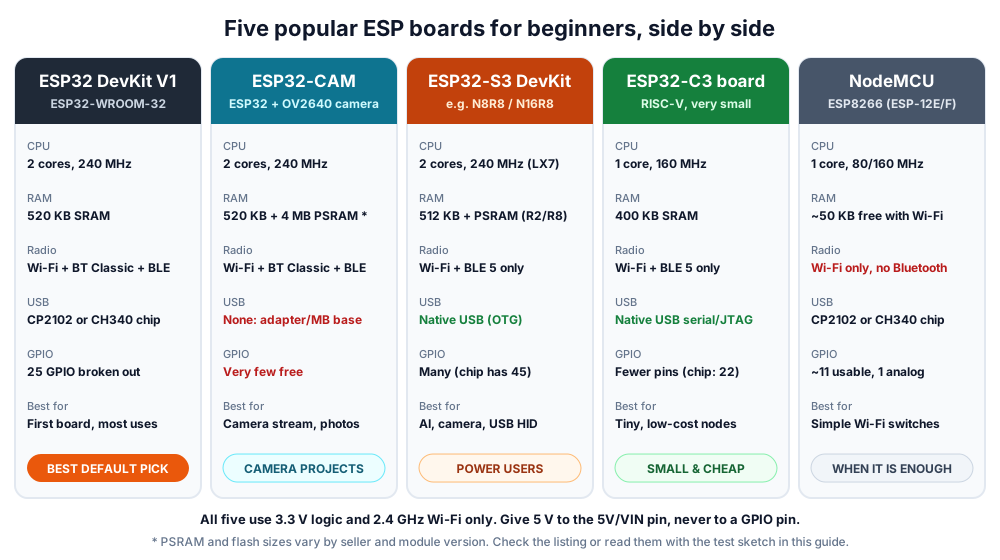 The five boards beginners in India most often choose between. Chip figures are from Espressif's datasheets.
| ESP32 DevKit V1 | ESP32-CAM | ESP32-S3 DevKit | ESP32-C3 board | NodeMCU (ESP8266) | |
|---|---|---|---|---|---|
| Chip / module | ESP32 (ESP32-WROOM-32) | ESP32 + OV2640 camera | ESP32-S3 | ESP32-C3 | ESP8266EX (ESP-12E/F) |
| CPU | 2 × Xtensa LX6, up to 240 MHz | 2 × Xtensa LX6, up to 240 MHz | 2 × Xtensa LX7, up to 240 MHz | 1 × RISC-V, up to 160 MHz | 1 × Tensilica L106, 80/160 MHz |
| On-chip SRAM | 520 KB | 520 KB | 512 KB | 400 KB | About 50 KB free for your code with Wi-Fi on |
| PSRAM | None on WROOM-32 | Typically 4 MB | 2 MB or 8 MB on "R2"/"R8" modules | Not supported | None |
| Bluetooth | 4.2 Classic + BLE | 4.2 Classic + BLE | BLE 5 only | BLE 5 only | None |
| USB | CP2102 or CH340 chip | None on the board | Native USB OTG (many boards add a second, USB-serial port) | Native USB Serial/JTAG | CP2102 or CH340 chip |
| GPIO | 25 broken out on a 30-pin board | Very few free (camera and SD card use most) | Plenty (the chip has 45) | Fewer (the chip has 22) | About 11 usable |
| ADC | 12-bit, up to 18 channels | Few free pins | 12-bit, 20 channels | 12-bit, 6 channels | One 10-bit channel |
| Price tier (typical) | Budget to mid | Mid (camera included) | Mid to higher | Budget | Budget |
Chip figures come from Espressif's ESP32 datasheet, ESP32-S3 datasheet and ESP32-C3 datasheet. Pin count, flash size and USB chip vary between sellers, so check the listing.
Which is the best ESP32 board for beginners, by project?
The ESP32 DevKit V1 is the best default; pick another board only when your project needs its special feature, such as a camera or native USB.
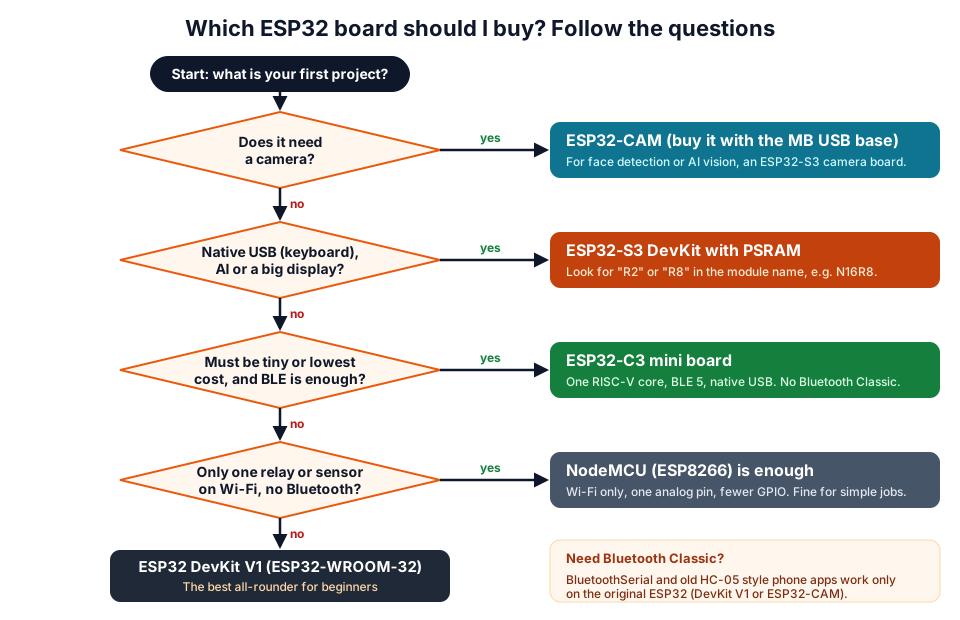 Answer from the top. The first 'yes' is your board; if every answer is 'no', buy the DevKit V1.
| Your project | Best board | Why |
|---|---|---|
| Learning ESP32, sensors, LEDs, web dashboard | ESP32 DevKit V1 | Most tutorials, many pins, Classic + BLE |
| Phone-controlled robot car over Bluetooth | ESP32 DevKit V1 | BluetoothSerial needs Bluetooth Classic |
| Wi-Fi security camera, photo on motion | ESP32-CAM | Camera, PSRAM and microSD slot built in |
| Face detection, voice or TinyML experiments | ESP32-S3 with PSRAM | Faster LX7 cores with vector instructions, more memory |
| USB keyboard, macro pad, game controller | ESP32-S3 | Native USB OTG can act as a USB device |
| Tiny BLE beacon or battery sensor node | ESP32-C3 | Small, low cost, BLE 5 |
| One relay or temperature sensor on Wi-Fi | NodeMCU (ESP8266) | Enough for simple jobs; huge code base |
For more ideas sorted by difficulty, see our ESP32 project ideas for students.
Board by board: what beginners should know
ESP32 DevKit V1 (ESP32-WROOM-32)
This is the board most Indian kits and tutorials use. A 30-pin DevKit V1 breaks out 25 GPIO pins, has BOOT and EN (reset) buttons, an on-board 3.3 V regulator and a USB-serial chip. In the Arduino IDE, select "DOIT ESP32 DEVKIT V1" or "ESP32 Dev Module".
Know these pin rules from day one: GPIO 34–39 are input-only, GPIO 6–11 are used by the flash memory, and GPIO 0, 2, 5, 12 and 15 are strapping pins that affect boot. With Wi-Fi on, read analog sensors on ADC1 pins (GPIO 32–36 and 39), because ADC2 is shared with the Wi-Fi radio.
ESP32-CAM
The common AI-Thinker style ESP32-CAM pairs a classic ESP32 with an OV2640 camera, a microSD slot, a bright flash LED on GPIO 4 and, typically, 4 MB of PSRAM. The catch: there is no USB port, and the camera and SD card use most of the pins. You upload code through a USB-serial adapter or, much more easily, an ESP32-CAM-MB base board.
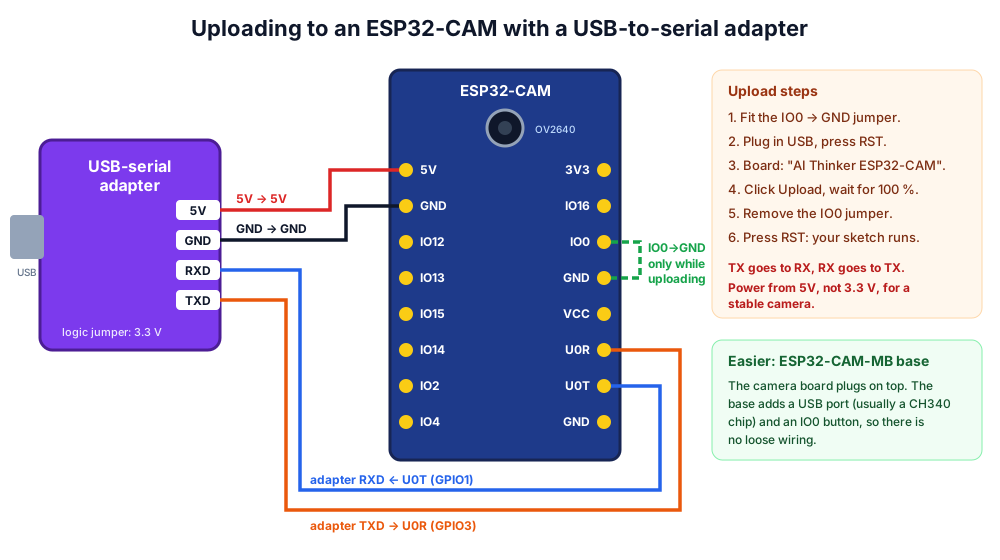 Uploading to an ESP32-CAM without the MB base: cross TX and RX, and hold IO0 low only while uploading.
The ESP32-CAM is also hungry for current when the camera and Wi-Fi run together. Power it from a solid 5 V supply; a weak one is the most common cause of the error covered in our ESP32 brownout detector fix.
ESP32-S3
The S3 has two faster Xtensa LX7 cores, 512 KB SRAM, 45 GPIOs, 20 ADC channels and native USB OTG, so it can act as a USB keyboard or mouse. Many S3 boards carry PSRAM, shown in the module name: in N16R8, "N16" means 16 MB flash and "R8" means 8 MB PSRAM. Buy an R2 or R8 version if you plan camera, display or AI work, and enable PSRAM in the Arduino IDE's Tools menu (OPI PSRAM for R8 modules).
It has Bluetooth LE only. Code written for BluetoothSerial on a classic ESP32 will not work on an S3; you would rewrite it for BLE.
ESP32-C3
The C3 swaps the Xtensa cores for one RISC-V core at up to 160 MHz, with 400 KB SRAM, 22 GPIOs on the chip and BLE 5. Most mini C3 boards use the chip's built-in USB Serial/JTAG, so there is no driver to install. It cannot use PSRAM and has no Bluetooth Classic, but for a small, low-cost sensor that reports over Wi-Fi or BLE, it is excellent.
When an ESP8266 NodeMCU is enough
If your project is "switch one relay from my phone" or "send one temperature reading to a dashboard", the older ESP8266 still does the job. It has Wi-Fi only, one analog input and about 11 usable pins, and roughly 50 KB of RAM is left for your program once Wi-Fi connects (per Espressif's ESP8266EX datasheet). For anything bigger, the ESP32 is the better long-term buy. Our ESP32 vs ESP8266 comparison covers the differences in detail.
USB-serial chips: CP2102 vs CH340 vs native USB
The USB chip decides how your computer sees the board, and it is the number one cause of "board not detected". All three options work well once set up.
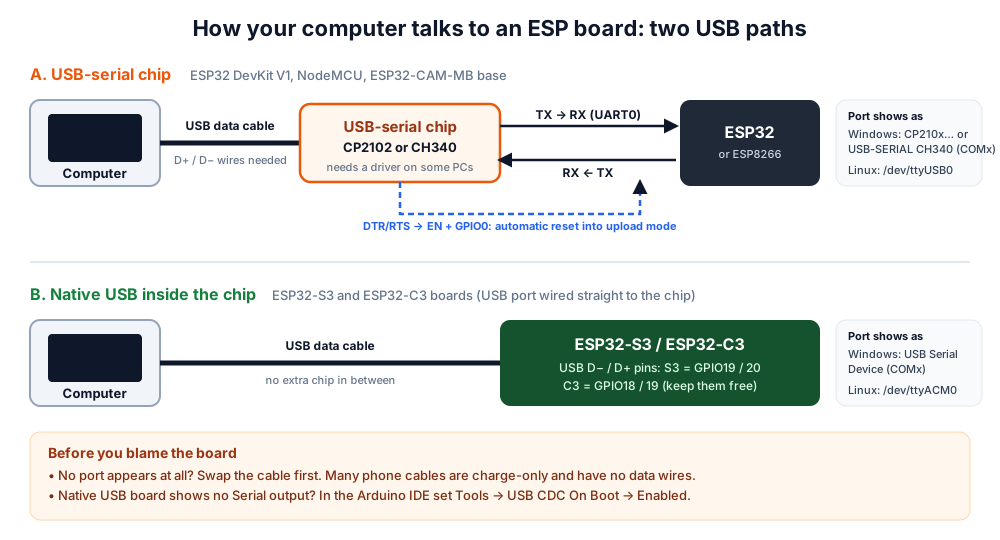 DevKit V1 and NodeMCU boards use a USB-serial chip; S3 and C3 boards can talk USB directly.
| USB type | Found on | Driver | Port name | Notes |
|---|---|---|---|---|
| CP2102 / CP2102N (Silicon Labs) | Many DevKit V1 and NodeMCU v2 boards | Often installed automatically; else the Silicon Labs CP210x VCP driver | "Silicon Labs CP210x USB to UART Bridge (COMx)" | Very reliable |
| CH340 / CH9102 (WCH) | Many DevKit V1, NodeMCU v3 and ESP32-CAM-MB boards | Some PCs need the WCH driver | "USB-SERIAL CH340 (COMx)" | Works the same once installed |
| Native USB | ESP32-S3, ESP32-C3 | Usually none | "USB Serial Device (COMx)", /dev/ttyACM0 on Linux | Set USB CDC On Boot to Enabled for Serial output |
If no COM port appears at all, follow our step-by-step ESP32 not detected / COM port fix.
What else you need with an ESP32 board
| Item | Why | Tip |
|---|---|---|
| USB cable that carries data | Charge-only cables power the board but show no port | Match the board: micro-USB or USB-C |
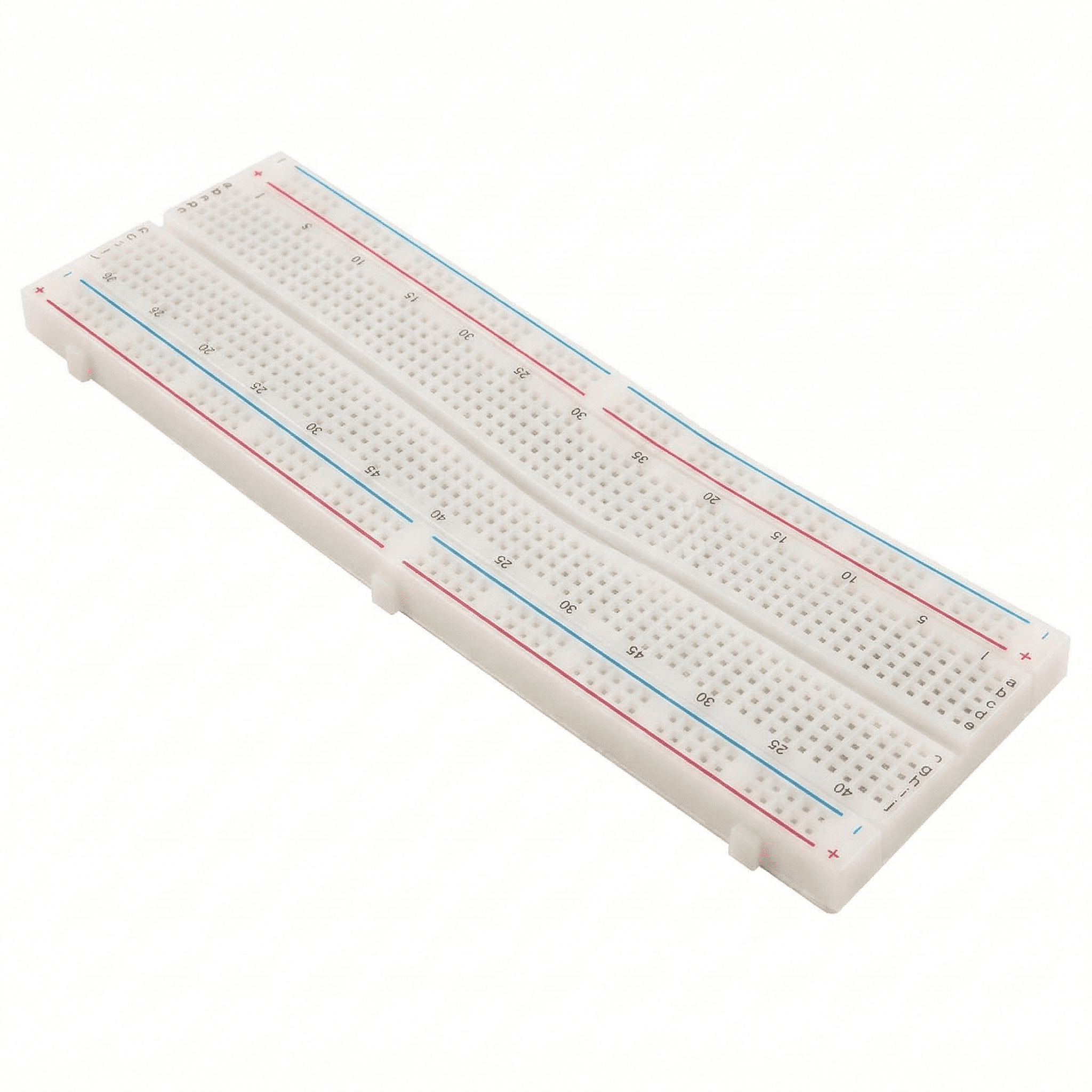
| Breadboard (830-point) or two | A DevKit V1 is wide and covers most of one breadboard | Two breadboards side by side leave holes on both sides |
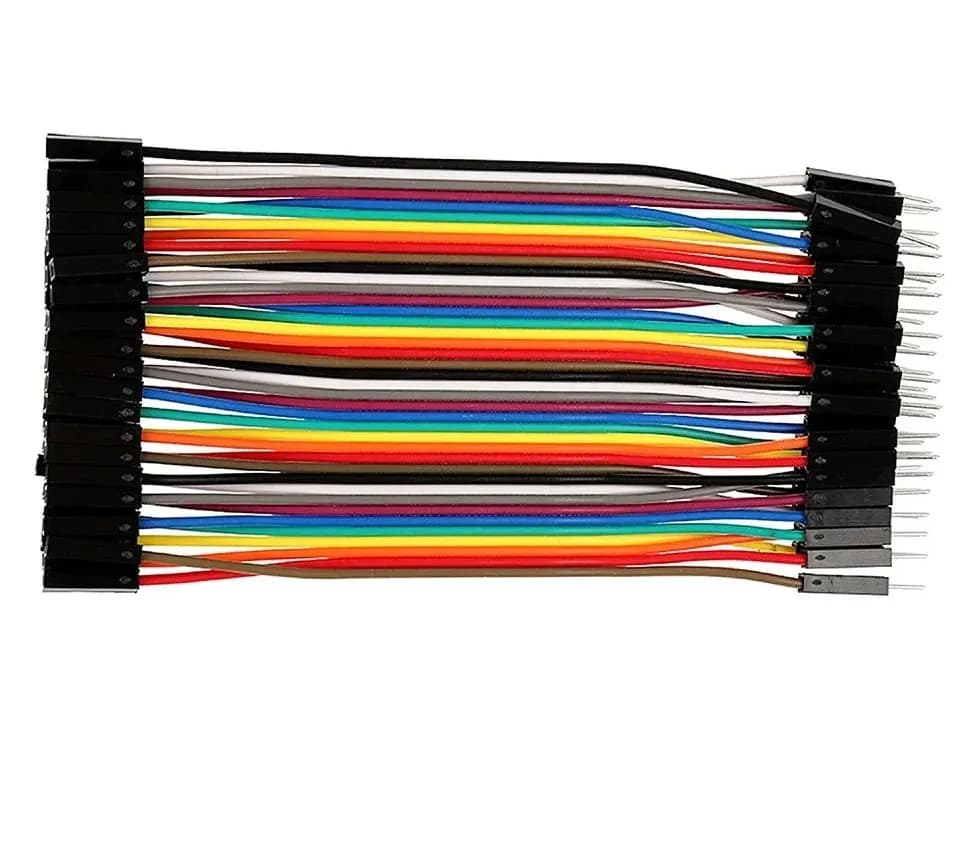
| Male-to-male and male-to-female jumpers | Connecting sensors and modules | Keep wires short near Wi-Fi antennas |
| Correct power | Board runs at 3.3 V; USB or the 5V/VIN pin feeds the regulator | Never put 5 V on a GPIO or the 3V3 pin |
| Level shifting for 5 V modules | ESP32 pins are not 5 V tolerant | A divider works for one-way signals: see the voltage divider calculator |
| 2.4 GHz Wi-Fi | ESP boards cannot join 5 GHz networks | Turn on 2.4 GHz on your router or phone hotspot |
New to breadboards? Read our breadboard basics guide. Planning a battery-powered sensor? Estimate run time with the battery life calculator, and convert raw sensor readings with the ADC voltage calculator.
Experiment: your first-hour test for a new ESP32 board
Run this the day your board arrives, so you know exactly what you received.
- Install the esp32 by Espressif Systems package in the Arduino IDE (Espressif's Arduino-ESP32 installation guide has the steps).
- Plug the board in with a data cable and check that a new COM port appears.
- Select your board (for example "DOIT ESP32 DEVKIT V1", "ESP32S3 Dev Module" or "ESP32C3 Dev Module") and the port.
- Upload the sketch below and open the Serial Monitor at 115200 baud. If the upload stalls at "Connecting…", hold BOOT until it starts writing.
- Compare the printed chip, flash and PSRAM with what the listing promised.
// First-hour test: prints what is on your board and blinks an LED.
#ifndef LED_BUILTIN
#define LED_BUILTIN 2   // GPIO 2 on most DevKit V1 boards; change for your board
#endif

void setup() {
  Serial.begin(115200);
  delay(1000);
  pinMode(LED_BUILTIN, OUTPUT);

  Serial.println();
  Serial.print("Chip model:   ");
  Serial.println(ESP.getChipModel());
  Serial.print("Revision:     ");
  Serial.println(ESP.getChipRevision());
  Serial.print("CPU cores:    ");
  Serial.println(ESP.getChipCores());
  Serial.print("CPU MHz:      ");
  Serial.println(ESP.getCpuFreqMHz());
  Serial.print("Flash (MB):   ");
  Serial.println(ESP.getFlashChipSize() / (1024 * 1024));
  Serial.print("PSRAM (KB):   ");
  Serial.println(ESP.getPsramSize() / 1024);
  Serial.print("Free heap KB: ");
  Serial.println(ESP.getFreeHeap() / 1024);
}

void loop() {
  digitalWrite(LED_BUILTIN, HIGH);
  delay(500);
  digitalWrite(LED_BUILTIN, LOW);
  delay(500);
}
| What you see | What it means |
|---|---|
| Chip model "ESP32-D0WD-V3" (or similar), 2 cores | Classic ESP32, as on a DevKit V1 |
| Chip model "ESP32-S3", PSRAM 0 KB on an "R8" board | PSRAM not enabled in Tools, or not the board you paid for |
| PSRAM about 4,000 KB on an ESP32-CAM | Normal 4 MB PSRAM |
| Garbled text | Serial Monitor baud rate is not 115200 |
What you learn: the board, not the label, tells the truth. Keep this sketch as a quick health check.
ESP32 buyer checklist
Use this before you order online or pick up from a store.
| Check | Good sign | Red flag |
|---|---|---|
| Exact chip/module named | "ESP32-WROOM-32", "ESP32-S3 N16R8", "ESP32-C3" | Just "ESP32 Wi-Fi board" |
| USB chip named | CP2102, CH340 or "native USB" | Not mentioned |
| Pin count and pinout image | 30-pin or 38-pin with a clear pinout | No pinout |
| PSRAM (S3, CAM) | Size stated, for example 8 MB | "High memory" with no number |
| Connector | Micro-USB or USB-C stated | Unknown |
| Headers | Soldered, or clearly "unsoldered" | Unclear |
| Support | Tutorials, sample code, local help | None |
Browse ESP32 boards and modules on our ESP32 products page, compare ready-made kits that include sensors and a cable, or collect from our Pune store. Prefer learning with a mentor? Join one of our workshops.
Frequently asked questions
Which ESP32 board is best for beginners in India?
The 30-pin ESP32 DevKit V1 with an ESP32-WROOM-32 module: the most tutorials, enough pins, Wi-Fi plus Bluetooth Classic and BLE, and a USB-serial chip that works with the Arduino IDE straight away. Our Arduino vs ESP32 vs Raspberry Pi Pico guide helps if you are still deciding between platforms.
Is the ESP32-CAM good for a first ESP32 board?
Usually not. It has no USB port, very few free pins and needs a stable 5 V supply. Buy it as a second board for camera projects, preferably with the ESP32-CAM-MB USB base.
What is the difference between CP2102 and CH340 ESP32 boards?
Only the USB-serial chip. Both convert USB to the serial signals the ESP32 uses for uploading and Serial.print(). Some computers need the WCH driver for CH340 or the Silicon Labs driver for CP2102; after that, they behave the same.
Should I buy an ESP32-S3 or a classic ESP32?
Buy the classic ESP32 DevKit V1 for general learning and Bluetooth Classic projects. Buy an ESP32-S3 with PSRAM when you need native USB, camera or AI work, or more memory for displays.
Can an ESP32 board run on 5 V?
The board can be powered with 5 V through USB or the 5V/VIN pin, because an on-board regulator makes 3.3 V. The GPIO pins themselves are 3.3 V only, so 5 V sensor outputs need a voltage divider or level shifter.
Thinking Robot Team
Thinking Robot is a team of engineers and educators in Pune who design electronics and robotics kits and run hands-on workshops for students and schools. Spotted a mistake or have a question? Get in touch.