🏗Can Kids Learn Robotics Without a Laptop? What a Phone or Tablet Can and Cannot Do
What children can learn with only a phone or tablet, when a computer is needed, whether a phone can program a board, and how to share one laptop.
In this article (10)
- What works without a computer
- Three months with no laptop
- Can I program a board from a phone?
- When you really need a computer
- No laptop at home? Four ways round it
- Frequently asked questions
- Can my child code a robot from a phone?
- Is a tablet enough?
- Does it need to be a fast laptop?
- What should I buy if we have no computer?
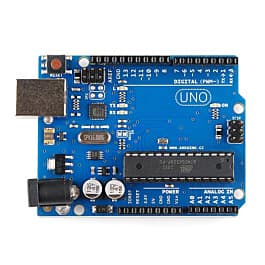
Yes, to begin with. Building, circuits and step-by-step thinking need no computer, and block coding works on many tablets. To load a program onto an Arduino or ESP32 board, a laptop or desktop is the reliable route. Some Android phones can do it, but plan on needing a computer.
What works without a computer
| Activity | No screen | Phone | Tablet | Laptop |
|---|---|---|---|---|
| Light an LED, switch, small fan | Yes | Not needed | Not needed | Not needed |
| Planning steps on paper | Yes | Not needed | Not needed | Not needed |
| Scratch block coding | Plan only | View only | Usually | Yes |
| Driving a finished robot | No | Yes, if it has an app | Sometimes | Sometimes |
| Loading code on Arduino or ESP32 | No | Limited, test first | Limited, test first | Yes |
Scratch says projects cannot be made or edited on phones. It runs in most modern tablet browsers, but "key pressed" blocks and right-click menus do not work there.
Three months with no laptop
Month 1: make things light up and move.
| Week | Build |
|---|---|
| 1 | A torch |
| 2 | A switch made from card and foil |
| 3 | A buzzer door alarm |
| 4 | A small card fan |
Use new, ordinary AA cells in a holder with an adult nearby. Do not use rechargeable cells, never let the two battery leads touch, and disconnect anything that feels warm. Pick by age from our electronics experiments, and keep coin cells locked away from small children.
Month 2: think in steps. Write a routine as instructions: "if the door opens, sound the buzzer". One child writes and another acts it out exactly as written. They will find the missing steps fast. No one to act? A parent can be the robot. If anyone is blindfolded, an adult watches and the floor is cleared first.
Month 3: blocks. Make a small game in Scratch on a tablet or borrowed computer. Only a phone at home? Repeat month 2 with a longer routine, such as a lift or a traffic signal.

Can I program a board from a phone?
Sometimes. Android apps exist that can load code over a USB OTG cable, and a few boards accept updates over Wi-Fi after a first upload by cable. It depends on the phone, the cable and the board, and it is hard to fix when it fails. Treat it as a backup, not a reason to buy a kit.
When you really need a computer
Once your child wants to change what a board does.
- PICO BOT: you need a laptop or desktop with Chrome or Edge to set it up and program it. After that, it can be driven from an Android phone.
- Mini IoT Kit: needs a computer and a USB-C data cable, which is not in the box.
Some cables only charge. If the computer does not notice the board, try another cable first, then our ESP32 port guide.

No laptop at home? Four ways round it
- Ask whether the school computer room or tinkering lab can be used once a week.
- Borrow a relative's laptop for two hours on Sunday.
- Share one: one child codes while the other wires, then swap.
- Choose a class that provides computers. Our guide to classes lists what to ask.

Frequently asked questions
Can my child code a robot from a phone?
Usually not. Many robots can be driven from a phone, which is different from writing their program.
Is a tablet enough?
For blocks and building, often. For Arduino or ESP32, use a computer.
Does it need to be a fast laptop?
Usually not. Check the kit's browser, operating system and USB needs.
What should I buy if we have no computer?
A simple circuits or building kit whose listing says no computer is needed. Our programmable kits, including PICO BOT, are not the right buy yet. For ages and interests, see Which kit suits my child, then check the listing for a computer requirement.
Thinking Robot Team
Thinking Robot is a team of engineers and educators in Pune who design electronics and robotics kits and run hands-on workshops for students and schools. Spotted a mistake or have a question? Get in touch.